Archive for the ‘Security’ Category

Dropbox exposed? Not a problem for eWallet GO!

Tuesday, June 21st, 2011

eWallet GO!As you may have heard, Dropbox accidentally left the barn door open over the weekend. Thanks to a glitch in their system, Dropbox made it possible to access some of their secure user vaults without a password. The good news is that if you are an eWallet GO!™ customer that syncs to Dropbox, your eWallet GO! data is safe.

The file eWallet GO! saves on Dropbox is fully encrypted using 256-bit AES encryption. This means that an eWallet GO! data file using a strong password would take thousands of years to hack! Even if someone did get into your Dropbox account over the weekend, your data is safe if you stored your important information in eWallet GO!

And if you aren’t using eWallet GO! you should get it today! That way, if the other guy drops the ball, you can relax and know that your most important information will remain secure!

eWallet GO! LastPass Converter Available

Tuesday, May 10th, 2011

eWallet GO!

By popular request, we just released an update to the eWallet GO!™ Conversion Utility* that lets you easily move data exported from LastPass into eWallet GO!

It’s easy to do! Just export the LastPass data and save it into a text file, then run through the Conversion Utility wizard. That’s it! The utility does all the rest!

We hope this helps those of you who were looking for a solution like this!

For more information about eWallet GO! click here.
To access the eWallet GO! Conversion Utility click here.
To learn more about converting to eWallet GO! from LastPass, click here.

* Previously known as the Wallet Transfer Utility

eWallet GO! Makes Cloud Storage Safer

Friday, May 6th, 2011

eWallet GO!With recent news about a possible security breach for a cloud-based secure information manager and discussions like this one at various sites around the web, we wanted to say a few things about eWallet GO!TM With eWallet GO! we’ve developed a solution that gives you the convenience of cloud based storage and sharing while significantly reducing the risk!

When you backup your information to Dropbox or Google Docs from eWallet GO! you’re backing up a fully encrypted file. This file features the power of 256-bit AES encryption. Even if someone managed to get this backup file, as long as you’ve chosen a strong password, it is effectively impossible for them to access your personal information stored in eWallet GO! And when we decrypt your data so you can view it, it all happens locally – we never, EVER send your password over the internet.

But how safe is safe?

But what does this “256-bit” stuff mean? In a great article on Wikipedia about what it would take to hack a file using 256-bit AES encryption, they offer the following:

A device that could check a billion billion (1018) AES keys per second (if such a device could ever be made) would in theory require about 3×1051 years to exhaust the 256-bit key space.

In other words, a really good password using 256-bit AES encryption is effectively unhackable by anything outside of science fiction. Humans will have constructed a Dyson Sphere around the sun and shed our mortal forms by the time someone can get to your data.

Good Passwords Required!

There is a caveat – the security is only as good as the password. First, we all know choosing a password another person could guess is a bad idea. We also know that we should never leave the password where someone else could find it, and we know that we should never pick a word that appears in the dictionary. We hear this advice time and again from security experts, and it’s true!

But what about a “brute force” attack, where a hacker uses a computer to guess the password by trying different combinations of letters, numbers, and symbols? In this case, the longer the password, the harder it becomes to crack. How hard? Let me give you a couple of examples:

An 8-digit password using all lowercase letters would take, in theory, around 3-6 years to hack with brute force.

An 8-digit password using a combination of lowercase, uppercase, numbers, and symbols would take, in theory, around 4000-8000 years to hack with brute force.

That’s right – if your password is f8#$mGQ! it could take 4-8 THOUSAND years to figure it out using an off-the shelf computer and the appropriate software.

And here’s the best part – length benefits are exponential! Add one more character – and now it might take 250-500 THOUSAND YEARS to hack your password.

At the end of the day, you don’t have to sacrifice convenience for security. With eWallet GO! you get all the benefits of cloud based storage and sharing while significantly reducing the risk.

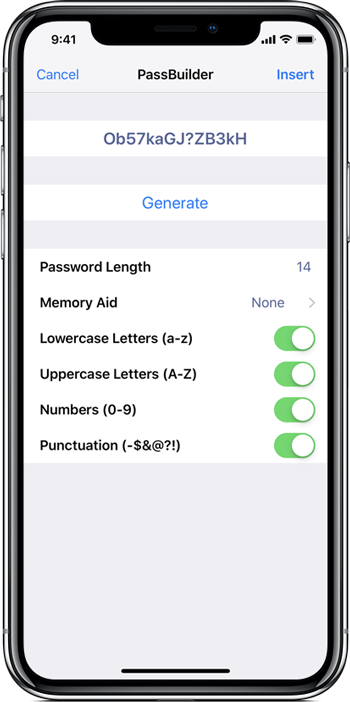
Need help building a strong password? Visit www.passbuilder.com to generate super-strong passwords!

eWallet 7.0 – Updates and Answers

Monday, November 30th, 2009

eWallet2I’m in the middle of a major software release right now so I’ll make this quick. I apologize that I can’t respond to all your comments individually, but considering how many of them there are, that simply isn’t possible. So – let’s get started…
Thanks!
First let me say thanks to everyone who posted their support. We really appreciate it and we are working very hard to live up to your expectations. The new release is a pretty big deal and I think you’ll all like it. In fact I think you’ll REALLY like it. So thanks for your kind words and we hope you like eWallet 7.0!

eWallet 7.0 Will Be Out Tuesday
eWallet 7.0 will be out tomorrow morning. This was the planned release date all along and we’re sticking to it.

More after the jump!

(more…)

No, Bob. “Password” Isn’t a Good One.

Thursday, July 16th, 2009

oopsHi Twitter Management,

Correction: This post was originally meant to be tongue-in-cheek, where we would offer Twitter employees a free copy of eWallet to keep track of their passwords. It’s not an offer for the general public.

It looks like you’re having a little problem with your passwords. I know you know that using “password” isn’t a good idea, but I imagine you’ve all probably been pretty busy lately.

We’ve got this program called eWallet – you may have heard of it. It not only lets you store passwords safely so that you don’t have to pick the ones anyone can remember – and hack – but it also has a built-in password generator so you don’t even have to think of one. It’s network compatible, so your trusted employees (though you might want to rethink them as well, from what I’ve been reading) can all use it, and it’s compatible with iPhone, iPod Touch, Blackberry and Windows Mobile phones.

I’d be happy to give you a copy! No charge – consider it thanks for giving us all yet another way to feed our internet addictions. Just get in touch with our Customer Service guys, and we’ll get you your copy.

Most People Wouldn’t Call These Mothers’ Day Videos

Friday, May 9th, 2008

Even the FTC is getting into the video act. They’ve released videos about phishing, identity theft, and protecting personal information on YouTube. I’ll admit I only watched the short ones, but they were pretty good.

I’m guessing that everyone who reads this blog knows all this already, but I’m also guessing that everyone who reads this blog knows someone who could use a reminder. I’m very careful what I click on, but I know too many people who forget, or just don’t realize, that what looks like a very, very legitimate email might not be.

Most people wouldn’t call these Mothers’ Day videos, but if watching and remembering one of these videos makes someone’s mother stop and think before she clicks a link in an email, it will be worth a lot more than flowers.

Monday* Morning Mobile Miscellany

Tuesday, February 5th, 2008

cal.gif*(I wrote this Monday. I’m publishing it Tuesday because we updated our blog software yesterday, and couldn’t publish new articles.)

A few related posts and articles I found interesting this morning:

(more…)

Aplogies to Our Loyal Readers

Tuesday, February 5th, 2008

If you subscribe to the comments feed on this blog, or read them online, and have been seeing a lot of spam among them recently, we apologize! Somehow, our filter plug-in got disabled. We’ve fixed it now, and are in the process of upgrading our WordPress installation to get the very latest in security. Thanks to everyone who wrote us about the problem, and I hope it won’t happen again.

You Can’t Be Too Rich, Too Thin, or Too Careful

Monday, December 3rd, 2007

More and more, I realize you really can’t be too careful.

I got an email this morning, looking like it was from PayPal, telling me to login to my account and update my information. I have enough experience to know what to look for before hitting any link, and also to know what kinds of emails to be suspicious of in general, but I also know that a lot of people don’t. I used to think things like the personal images and extra security questions were overkill, but I’ve changed my mind. I’m taking security a lot more seriously now, because some of the tricks the bad guys are pulling are pretty impressive.

I’d bet that people who read this blog (and thanks for reading it; I really like being able to just “think out loud” on my PC and call it working) are pretty careful and knowledgeable too, but I’d also bet that everyone has at least one friend or relative who’d read an email like the one I got today and click that link that looks legitimate. So if you know someone like that, this would be a great time to remind them that emails aren’t necessarily from who they say they’re from. And that links don’t necessarily go to the site in their text.

And now back to figuring out how to get rich and thin.

Information Security

Wednesday, November 7th, 2007

police.jpgI’m thinking a lot about information security lately. Not because we develop and sell eWallet, but because of two things that have happened recently:

Our office was broken into. Nothing but one laptop was taken (and it was just used for testing, so had no valuable info on it, plus was password-protected). We think that our alarm scared the person or people away, and they just took the nearest good-looking piece of equipment. While we’re all feeling a little rattled by the thought that someone was in our office, we’re also very aware it could have been much worse.

We stopped keeping the credit card numbers we get for sales several years ago, and are very careful to protect any confidential info – whether users’ email addresses or our own credit card numbers and passwords – on any of our PCs, so I know that anyone getting any of our equipment wouldn’t be able to get any useful information. And I know we’re good about keeping offsite backups of all the corporate and customer info. I hope we’re also good about keeping offsite backups of our own PCs, but I know at least I don’t do that every day. But we’d lose weeks of work if we all had to get new PCs and set them up. I’m not sure that 5-year-old PCs (mine’s at least that old) are even worth taking, but I hope I never find out.

The other thing that’s happened is that as part of two banks I use being acquired, I’m kicking off a long-postponed personal financial reorganization. Wow – there’s a lot of info to enter and keep with new bank accounts. Online security is a lot better than it used to be, which I’m very glad about. But it’s clear that no matter how excellent my memory is, there’s no way I could be without a good wallet program. And being able to enter free-form info – like my third boyfriend’s pet’s name, or the street my high school was on – is a lot more critical than it was when we first added the Notes fields to eWallet cards.

Anyway, I’m glad the banks are looking out for me, and I’m glad there’s good enough software that I can manage everything I need to. And I’m really glad we got an alarm when we moved into this office (we’d always planned to with the previous one, but never got around to it). It’s too bad we need all that, but since we do, it’s good that it’s there.

And, yes, I’m thinking a lot about mobile technology too, especially with all the new announcements lately. I just don’t have anything to say about it – yet – that hasn’t been said by many other people.