July 2006

Common sense is neither common nor sensical. Discuss!

by Kevin

One of my little Google Homepage widgets is for a blog by one James Bach, who knows more about testing than me. A lot more. He recently blogged about his dislike for the words ‘intuition’ and ‘common sense’ being used as explanations in arguments.

Bach has a very good point when it comes to using those two concepts as ways to explain away a problem.

The article also made me think about how often I run into issues of common sense or intuition while providing tech support. Keep reading for some examples, and a little discussion on how I think the common sense and intuition pitfalls can be avoided.

Common Sense

Dictionary.com says: “Sound judgment not based on specialized knowledge; native good judgment.” [ link] This is a good definition, since the idea of common sense is that it’s common, or rather not uncommon. Take crossing the road. You look both ways, right? That’s common sense - if you don’t look, you get hit by a car. This is common because most people are taught it when they’re a child.

The problem is when you, me, or anyone else thinks that something is common sense, but isn’t. “ It’s common sense that to make a new file, you go to File -> New File, right?” No. One key part of tech support is instructing users on how to accomplish tasks. If the user doesn’t know how to do something, then thinking, “But that’s common sense!” is pointless. It’s only common to you.

 A related problem concept is ‘obviousness’. I think the only way something can be truly obvious is if it is simply in plain sight and clearly delineated. If you say something is obvious and it’s not staring you in the face saying, “I’m obvious!”, it’s not.

My favorite example is the picture below:
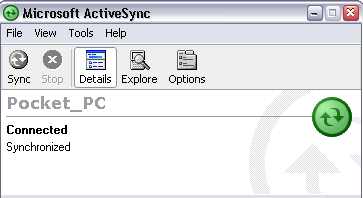
Microsoft ActiveSync: Spot the Device Name!

This is the Microsoft ActiveSync connection window, with a Pocket PC 2002 PDA connected. I’m not trying to pick on ActiveSync, but this happens to be a very common scenario that I have to deal with, and it’s a subtle one.

If you are familiar with Pocket PCs, forget that you’ve ever used one before. If you aren’t familiar with them, stay that way for the next 30 seconds.

Now, pretend that you’re on the phone with me getting help:

Me: “Okay, now I need to know the partnership name of your Pocket PC.”

You: “How do I find that?”

Me: “Open your ActiveSync window on your PC and you’ll see the name listed.”

You (more often than not): “Uh, where’s the name?”

Where is the name?  Something is connected, and probably synchronized. Do you know where the name is?

The name is “Pocket_PC” - that’s the name assigned to your Pocket PC by ActiveSync, for use in identifying it in other software. That’s the piece of information I needed. Do I blame you for not knowing how to get it? Not at all. That piece of information is not obvious.

My solution for this obvious problem would be to place the following in front of the actual name text, so it reads Device Name: Pocket_PC . That way, if I ask you for the name of your Pocket PC, there’s a much higher chance you could look at the ActiveSync window and say, “Oh, it’s Pocket underscore PC.”

Obvious things are a kind of discoverable common sense. To learn not to walk blindly into the street, your parents had to tell you not to do it - you can’t really discover ’look both ways’ unless you want to get hit by a car. To learn how to save an article as a draft and keep writing it in WordPress, you hopefully just look down below where you’re typing and see the large button labeled “Save and Continue Editing” - in other words, you discover the obvious button.

From a tech support perspective, everything should be obvious - this helps maximize a user’s happiness with software and minimizes tech support for things that aren’t actually broken. Obviousness helps people develop their own common sense and helps them explore the software on their own.

Intuition

If common sense is something everyone is supposed to know, intuition is something no one knows. “The act or faculty of knowing or sensing without the use of rational processes; immediate cognition.” [ link] James Bach argues that intuition is really, “I don’t know how I did it,” and I agree with that definition.

Sometimes it’s easiest to throw out a counter example - here’s the file menu I see when I’m right-clicking a file in my FTP client to rename it to a backup copy:
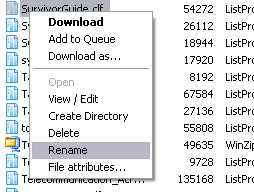
Two Options You Don’t Want Next To Each Other

What’s wrong with this picture? Let’s say that wasn’t SurvivorGuide.clf, but instead ThisFileIsSoImportantYouWillDieIfYouDeleteIt.ext . Let’s say you sneeze right before clicking ‘Rename’. What other option might you click? DELETE.

You could argue that this is not an intuitive thing to do - it’s counter-intuitive. But what’s the reason? Well, because. Maybe it’s a bad idea to put delete next to a very innocuous thing such as Rename. It just feels funny, at least to me.

Part of tech support involves fielding feature requests. A user decides that it’d be easier to use OurProduct if the Widgets are configurable by right-clicking on them, and so they send something along which gets to me. But why is it any better to have right-click on Widgets? Sometimes the user gives a really good explanation, but other times, it’s just, “I like it better that way.” It’s like explaining why you like pistachio ice cream - you just do. I could implement my GTD organizational system using Microsoft Outlook, but I don’t like the way Outlook works, and for the most part I don’t know why. Other options just feel better.

When users can’t use our software, I want to know why. It’s in my best interest to figure out what the problem is, since I’ll be helping people with it when it becomes a problem.  Are we assuming users know something that they really don’t know (“it’s common sense!”)? Are we ignoring an easy way to make things ‘feel’ right for users (“it’s not intuitive unless the category tree’s on the right!”)?

It’s all very linked together. Users come to technical support with problems, technical support goes to the developers with common problems, developers fix the problems and refine the software, users take the refined software and find more problems.

Share this article:


What is RSS? Here's a short answer.

by Kevin

One thing I’ve noticed in terms of support is that people usually come to us wanting to make lists (ListPro), keep track of passwords and such (eWallet), keep track of financial transactions (Keep Track), but when it comes to NewsBreak, it’s a bit up in the air. It lets you… read news! Specifically, it’s an RSS feed aggregator, and if you know what RSS is, you understand the concept immediately.

If you don’t know what RSS is, wrapping your head around just what NewsBreak is good for, can do, can’t do, etc. can be a little tricky. If you don’t know what RSS is, this article will probably help: A non-technical explanation of RSS.

Share this article:


A Good Name is Hard to Find!

by Marc

With the recent announcement of the Microsoft Zune I just felt a need to talk about naming products. I’ll give Microsoft a little credit. It’s really hard to name a product these days. Most of the good names are already taken by something. That leaves new products stuck with either made up names or names that squish two words together and pretend that it is one word (yes…we’ve done this too…I know).

Now, some of the made up names end up being quirky cool, like WOOT! and Google. Unfortunately, it seems that this has led big corporations to think that a wacky new word for their product name is the smart way to go.

Take the now infamous decision by Nintendo to rename their REVOLUTION! game system “wii”. (“wheeeee!”) I mean, seriously. Revolution was something I could get excited about. “Join the Nintendo Revolution!” “Become part of the gaming Revolution!”

But wii? I’m almost embarrassed to walk into a store and ask about this system.

“Hi, do you know when you’ll be getting the wee’s?”

It would be so much cooler to walk in and ask:

“Can you tell me when you’ll have THE REVOLUTION!?”

Back to the Zune. apparently Microsoft hired the same ad agency to name their Argo media device. The name “Argo” had power. It filled my head with images of going on adventures, of legendary journeys, and excitement. But Zune? I guess it’s a little like “Zoom” and that’s sort of cool. I don’t know. All I can think is that the big corps have a room full of suits trying to figure this stuff out:

Suit 1: “OK…what’s happening on the web and how can we tap it!” Suit 2: “Crazy product names!” Suit 1: “Good one Bob…now think crazy…what’ve you got?” Suit 3: “Um…zerbert?” Suit 1: “No no…crazier!” Suit 4: “Zuh…zuh…zune?” Suit 1: “YES Johnson! Now that’s crazy!”

And of coure there is the Origami. While the name “UMPC” isn’t a terrible name, it doesn’t evoke the same cool image of flexibility and zen comfort as Origami does.

I guess what I’d really like to know is what they are thinking. Is it really the scenario I described above? Or maybe some market research company in India calling thousands of people in the U.S. and asking them how the word Zune makes them feel? As I said, I know that it is hard to pick names for new products. Still, these guys seem to pick great names and then toss them out at the last minute.

Well, enough of the naming rant. I’ll close with what I thought was a pretty funny quote about the Zune from James Kendrick’s Blog, JKOnTheRun . It’s the very quote that got us on the subject of product names over here at Ilium Software.

" I don’t know if I like the name Zune or not, but I thought Microsoft would come up with something like Ultra Mobile Audio Media Adapter (UMAMA)."

Share this article:


You got "Getting Things Done" in my ListPro!

by Kevin

Ten points to whoever recognizes the advertising throwback in the title. “Getting Things Done” is a methodology developed by one David Allen to help create a ’trusted system’ for tracking what you need to.. get done.

GTD focuses on helping you dump your brain into this trusted system, so you don’t leave obligations looming in the black uncertainty raincloud over your head. If you don’t have time to read his book, you can probably get a good sense of how the core of GTD works by looking at this flowchart [PDF file, 30KB].

GTD is pretty popular with geeks, probably because it takes quite a bit of fiddling to get it done (geeks love to fiddle with things, in my experience), and because it’s a “Life Hack”, a way of optimizing your life to make things work better.

GTD is also something that is basically a bunch of lists. We make a product called ListPro that is very good at making bunches of lists. So inevitably, the two will collide. For the collision, keep reading after the cut thingy below.

Disclaimer: I am not the master of GTD. I am still ’trying it out’, so to speak, figuring out what the best way to implement it is. That’s one of the downsides of GTD - there’s no 100% right answer for how to make it work. The important parts of GTD are:

  • Making a trusted system, that you can rely on 100% without thinking
  • Making a trusted system, that you can rely on 100% without thinking (is there an echo?)

If you can’t rely on your GTD system, then you’re no better off than before you tried implementing it. This is one on of the downsides of a lot of organization tips and tricks - you have to do it, and you have to stick to it. One way to help you stay stuck is to find a system that’s comfortable for you. I’m still looking - so far, I’ve tried LifeBalance, the eerily-similar MyLife Organized, our very own ListPro, and am about to tack a program called Ultra Recall. If you want a good smattering of GTD aids in one spot, check out this blog post on 52Reviews.com .

Disclaimer 2: I don’t think I’m going to use ListPro for GTD. This doesn’t mean you should stop reading. If you like ListPro, and want to do GTD, give it a shot. You can certainly do it, and it may work perfect for you. I just feel like I need to say this so I’m not purely saying ListPro is the best thing since sliced bread. It’s like how I drive a Toyota - I don’t hate other car companies, I’m just familiar with them and found my car to suit my needs. ListPro works great for testing checklists, daily process lists, call logging, my groceries… just not my GTD.

Anyway, enough yap. I present to you the ListPro GTD template. [Warning: 122KB .CLF download, requires ListPro!]

Just download that file, stick it wherever you want, and peruse it. You’ll find helpful hints written by me.

Is this the only way to use ListPro for GTD? Probably not. Is it the best GTD implementation there is? Probably not. Is there a best GTD implementation? For you, yes. For everyone, no.

So go get some things done. [Kevin now checks off the ‘push publish button in Wordpress’ Next Action…]

Here are some tips:

  • On a Pocket PC, to sync your GTD list, make sure you have Files turned on in your ActiveSync settings, then just drop the GTD template into your Pocket PC’s synchronized My Documents folder.
  • On a Palm, you’ll want to open your regular ListPro list file on your desktop and go to Tools -> Import Lists…, then point to the GTD file.
  • Get familiar with the shortcuts for copy and paste (Ctrl-C or Ctrl-X if you want to cut, Ctrl-V for paste), since you can’t drag items between lists.
  • If you want to change your columns, you may need to re-build the entire template. This just is a limitation to how ListPro works - each List has its own format, and you may not be able to copy items between lists of different formats.
  • If you really want to stick with ListPro for GTD, make a shortcut for your actual GTD file and place it in your Start Menu’s Startup folder. This will launch the file whenever you boot up or log into Windows. Then, right-click on the shortcut and pick Properties, and assign a keyboard shortcut. Whenever you want to add something to your list, just press that shortcut and ListPro will open right up - it should open up to displaying your Inbox, but it may change to whatever list you had been working in last.

If you make modifications to the template or have any feedback, feel free to either send a message to Ilium Software or leave a comment below! I’ll be glad to post different templates or update it based on user requests.

If you have any problems getting this to work in your ListPro, or have any other problems with our software, just contact Ilium Software directly and someone will help you. I’d like to put my email here, but I haven’t figured out how to effectively spam-proof it in Wordpress yet.

Share this article:


Who's Going to Denver?

by Ellen

By “who” here, I mean which electronics - I’ve picked up the developer habit of at least sometimes calling them “he” or “this guy” (yes, of course they’re male. Here’s the official joke).

Any trip of any kind gets at least a cellphone, 1 PDA (just in case I need a quick game while I’m stuck waiting for something) and my mp3 player. More and more, the pedometer comes along - not only do I like to “get credit” for how much I’m walking, it also has a built-in clock, and since I don’t wear a watch (or always carry the cellphone if I’m just walking around for exercise) that’s very handy. And of course if I’m on a business trip, I also bring a laptop for taking notes and checking email, and usually at least 2 PDAs, just because my business trips are PDA related.

But now that we have this UMPC, I’m seriously considering how many other devices it could replace. Certainly I don’t need the UMPC and the laptop, and the UMPC is a lot lighter. It’s not as easy to use, but it’s enough more portable that it would definitely be worth considering. But then Marc mentioned getting a portable DVD drive for it and then it suddenly got much more attractive.

I’d like to be able to watch movies on planes - I can’t read comfortably, and don’t handle just sitting very well at all. We have a portable media player, but between trying to see that small a screen and the hassle of setting it up with anything I’d want to see, I never bothered with it. But if I can plug a DVD drive into the UMPC and just bring some DVDs to watch on the plane, then plug a keyboard into it to take notes in the conference, it becomes a very attractive option.

Then I don’t need a PDA, because I can just as easily whip out the UMPC (screen part only) to play games when I want to. And I don’t need the MP3 player if I can watch DVDs on the plane instead of listening to books.

While a UMPC plus keyboard plus DVD drive probably isn’t quite as light as some - less geeky - people travel, it’s a definite improvement over a laptop plus mp3 player plus PDA. And while right now, I have the luxury of choosing from all the devices we have available for any given trip, I could easily see that if I didn’t, and had to make a choice of what to buy, a UMPC would have a lot going for it. Particularly in a year or so when the battery life is better.

I’m seeing a lot of potential in the UMPCs. I don’t think I’ll take it to Denver this week, but I bet it goes with me on the next trip.

Share this article:


Meet (yet another one of) the staff!

by Lee

I’m Lee, part of the support team, and if you call or email for tech support you will probably get Kevin before you get me, unless you are a bulk-purchaser or one of a select bunch of resellers.

I have been doing tech support of one variety or another for about 15 years, nearly five of those here at Ilium Software.  It truly is a great place to work; it’s nice to be around people who are caring and honest, and really believe in what they are doing.

I, too, am a big fan of our software, especially ListPro and eWallet.  I use them every day, both at work and home, and wonder how I ever managed without them.  Both travel everywhere with me on my Treo 650; it’s so nice to have my information at my fingertips!  I save a ton of time by filtering my grocery list to only show the items I need, and then sort it by aisle.  Then I print it out and check it off in the store (I really don’t have enough hands to wrangle two active kids, a grocery cart, *and* my Palm – and besides my kids will ask endlessly “Mom, can I play a game on your Palm now?”  Out of sight, out of mind).  One trip through the store and I’m done.  No backtracking to a missed item (this is a really good thing – see previous statement about two active kids…).

Also, since I am calendar-challenged (write it on the calendar and promptly forget it), I use a running list of appointments, events, reminders, etc. in ListPro.  Since I am constantly referring to it for one reason or another, I don’t miss appointments anymore.  When an event is past, I check it off to make it hidden, but I can easily look back and say “When was that?”.

Did someone encourage me to write about our software?  No.  Do I recommend it to friends, and even people I don’t know?  Yup.  It’s good stuff, and it just works.

Share this article: