Just a quick note! We’ve released a minor update to Keep Track. It doesn’t include the pile of updates we’d like to release right now, but it does fix a couple of minor things that we don’t want folks to wait for. In particular, it now supports the Motorola Q landscape display, fixes a couple of Smartphone bugs, and smooths out a couple of wrinkles in Windows Mobile synching.
So if you’d like to grab the upgrade just download a trial version from our site:
This picture illustrates two things. One is that I have terrible handwriting, especially on a white board. It also gives a glimpse into what software testing is like here at Ilium Software.
I’ve been meaning to talk about testing, but between testing eWallet 5.0, InScribe 2.0 and just finishing up on a Keep Track update, not to mention supporting our existing and new software… there just wasn’t time. If you have some time, read on!
Aside from technical support, I do a lot of the software testing for Ilium Software. I don’t do all of it because that would be impossible. Not just figuratively impossible, but literally impossible. Thanks to math - which I absolutely hate and am terrible at - 100% ’test coverage’ of a product is intractable.
Digression warning: 100% test coverage for something like a full PC operating system such as Microsoft Windows XP requires some insanely large number of test cases. I could try to explain why this is, but I’d fail miserably as my computer science math knowledge has trickled out of my brain. I think it involves a lot of factorials. 100% complete testing requires exponentially larger numbers of test cases for even a small increase in the number of variables, until it becomes impossible to test completely before entropy makes everything the same anyway.
More digression: I’m going to harp on the possible magnitude of test cases for just a moment, for a little scale. Here’s a micro-lesson in binary math: computers store data in binary format, meaning there is just 0 or 1. You make larger numbers by increasing the number of bits. For a 2-bit binary number, you have 4 numbers you can represent: 0, 1, 2, 3. For a 3-bit number, you have 8 numbers you can represent. For a 4 bit number, you have 16 numbers. Every time you add one ‘bit’ of information to the length of the number, you double the number of possible numbers. The same is true of test cases. If you have 4 variables you’re testing, that means there are twice as many test cases as with three variables. This quickly gets out of hand if you consider all possible test cases, not just likely ones.
So, I don’t test everything. No tester ever tests everything unless “everything” is ten different cases, period. What I do test usually falls into two categories:
Verification testing
Exploratory testing
Verification testing is the often very repetitive and frankly boring task of making sure that a function does what it’s supposed to do, a bug is fixed, etc. This involves lots of checklists and tasks like creating every possible card in eWallet and filling up every possible field, or manually forcing a trial version to expire after 30 days. It’s not very fun and exciting. It isn’t supposed to be fun and exciting. It’s just required.
Exploratory testing is almost self-explanatory. You explore a product and hopefully find bugs. You do weird things, such as entering in 10000000000000000000000000000000000000 into the number of minutes to wait; you set your coffee cup down on your keyboard to enter in letters into an eWallet card; you try to drag a program file where a picture’s supposed to go; you open up a data file in a text editor and change one character to see if the program notices; you pretend to be The User Who Manages To Do Everything And Break All Software and throw the book at the product. [Exploratory testing is often ‘black box’ testing, where the tester doesn’t have any knowledge of how a particular item is implemented or exactly what it should do.]
Like verification testing, this can be really boring, especially if you aren’t finding any bugs. There’s a very awful feeling when you do everything you can imagine and nothing bad happens. There’s an even more awful feeling when you send the supposedly-well-tested and bug-free product out to users, and within ten minutes get a report of some glaring and awful bug that internal testing didn’t find (that’s what beta testers are for!)
However, exploratory testing can also be exciting, especially with alpha software. [Alpha software is completely unusable by the public, whereas beta software is usable but could have some big bugs still. Then you have Release Candidates, which theoretically can become the released product if no more bugs are found.]
For example, I might get an alpha release that crashes every time you click on a menu item, or crashes when run on my testing PC but not my main PC.
Don’t panic - there’s a reason we don’t let the public use alpha software! I don’t want to horrify any users with tales of eWallet lighting my PC on fire and making my cat’s fur stick up all over, I’m just being transparent about what it’s like to be on the inside of software testing. If you think you’ve found a bug, we’ve found thousands. That’s what software testing is for. The upside of horrifying failures in testing is that they make life exciting.
Another aspect of being a tester is that I get to see things before anyone else does. I get to see what’s in the next version of ListPro, for example. As a tester, I know a lot, but as a support person, I have to ‘know’ only some things. This puts me in the odd support position of taking a request for a Feature That Will Make Your Kitten Cute and Fluffy even though I know it will be in the next version. Or worse, I get to take a request for a feature that won’t be in the next version, but I still can’t say anything. We’ve had features removed right before release for various reasons, and it’s no fun finding out that the super cool feature you always dreamed of (and that a person told you would be in the next version) is nowhere to be seen.
Testing is also more than the actual tests - there’s maintenance of the test cases that we re-use, all kinds of upkeep of bug information in our bug tracking software, research into new ways to test, and keeping an eye on customer support issues for possible bugs.
In fact, one of the things I like about doing both technical support and testing is that it removes the intermediary between a user with a problem and the person in charge of writing it up as a bug: if you tell me about a bug, I’ll try it out, look it up in our bug tracking system, and enter it if it’s not there. I know there’s a problem because I’ve seen it myself. I field user requests and feedback, so it’s always fresh in my mind when I’m trying out some new or changed feature to see how it works.
Hopefully, this gives more of an idea as to what it’s like to do software testing for a PDA software company. If anyone has any specific requests for things you’d like you know about, just leave a comment and we’ll see what the blog post fairy brings!
More and more it becomes clear that the definition of “mobile” in our market is changing. From wi-fi connectivity on the Nintendo DS to more obvious candidates like the iPhone, mobile computing is evolving before our very eyes.
My mobile future? Personally I use my UMPC for everything, have a Windows Mobile Smartphone, and a dedicated MP3 player right now. I also wear two USB drives (one of which is a U3 device) around my neck almost all the time…it’s a little like I’ve got some sort of technological talismans protecting me from the demons of the disconnected world! :) My laptop meanwhile sits gathering dust in the corner and my poor Toshiba E800, with all it’s high-res glory, spends more time running Dockware than anything else.
So where is the mobile revolution taking you? What devices are finding their way into your backpack, pocket, and purse as we move into the future?
PS: Sorry for the long pause between posts!! As the folks in our beta team know we have some new stuff coming down the pipe and as Product Manager it’s eating up a fair bit of my time! Hopefully I can start writing more regularly again!
So I’m toying with our free products the other day and I think “Holy Cow! These babies need some help!” I figured this was a good time to turn to you guys and get some advice.
If you could choose only one free product from our free software section to get updated, which one would you choose, why would you choose it, and what is your number one request for how we should update it? (and you can already assume that we’ll update them to be WM 5.0, WM 6, and screen size compatible.)
Hey everyone. Just a quick CTIA follow-up. Rather than a blow-by-blow or other less than exciting method of telling you about it, I’ll give you the CNN news-blurb version including the most interesting things I saw (or didn’t see as the case may be!)
Handango was present with a nice booth. Got to spend some time with them.
Motricity had a HUGE MTV2 party (2000 people) at Hardrock with focus on downloadable media/entertainment.
Handmark had a nice presence as well and I got to talk to them.
Palm had a big booth with lots of people showing off their phones.
There was ONE Palm OS device on the entire show room floor (which was huge.) (The Treo 680).
Motorola had a big booth but dedicated as much time to music players, bluetooth headphones, and other electronics as to mobile devices.
The UMPC had equal positioning at the Microsoft booth as all other devices. The newest tiny UMPCs are REALLY nice.
Every Kiosk at the Microsoft booth including Windows Mobile devices.
Saw the new HP WM 6.0 Smartphone (Standard) device. Very nice.
HTC was at the MS booth as well.
Saw more Windows Mobile devices in the hands of attendees than ever before although I still saw 2 Franklin Planners. :)
Most people I met didn’t know what my UMPC was but as soon as they saw it they had to ask about it and closed with “Oh my god, I WANT one of those.”
Plenty of Symbian devices being displayed. Some Blackberry devices as well but a smaller presence than I’d expected.
So there you have! Marc Tassin’s “in-a-nutshell” review of the CTIA Wireless show. A great show though and lots to think about!
It’s time to pick another winner in our ongoing blog contest, and give stuff away!
This month the lucky winner is m m, who commented on the post eWallet 5.0.1 is Now Available. Congratulations! I just sent you an email explaining how to get your prize. If you don’t receive it just reply to this post and let me know.
To everyone else, it’s not over yet - I’ll pick another winner in the beginning of May. Keep the comments coming and maybe this month, the winner will be you!
 Just a quick note! We’ve released a minor update to Keep Track. It doesn’t include the pile of updates we’d like to release right now, but it does fix a couple of minor things that we don’t want folks to wait for. In particular, it now supports the Motorola Q landscape display, fixes a couple of Smartphone bugs, and smooths out a couple of wrinkles in Windows Mobile synching.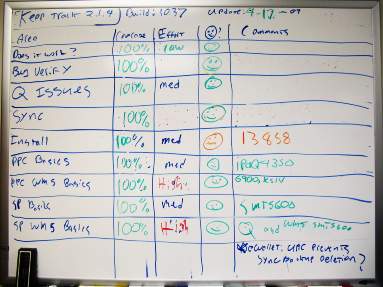
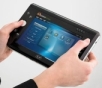 More and more it becomes clear that the definition of “mobile” in our market is changing. From wi-fi connectivity on the Nintendo DS to more obvious candidates like the iPhone, mobile computing is evolving before our very eyes.
 So I’m toying with our free products the other day and I think “Holy Cow! These babies need some help!” I figured this was a good time to turn to you guys and get some advice.
 Hey everyone. Just a quick CTIA follow-up. Rather than a blow-by-blow or other less than exciting method of telling you about it, I’ll give you the CNN news-blurb version including the most interesting things I saw (or didn’t see as the case may be!)
 It’s time to pick another winner in our ongoing blog contest, and give stuff away!