August 2007

Who Wants to be My Guinea Pig?

by Julie

help1.jpgYou can all be my guinea pigs! I don’t know if you remember (and 10 points to anyone who does) but several months ago, I added a handy little script to the home page of our site that would automatically redirect users to the mobile version if they were browsing on a mobile device. We tested it a lot, but I also wrote a post about it right here on the blog, to ask you guys for help to make sure you didn’t find any problems. Everything seemed to be going great, until Ellen found an issue no one else noticed, so I had to go back to the drawing board.

Well, even though it took a while, I finally had time to fix the script - hopefully for good. We tested it every way we could think of in the office, and I’m confident enough to put it online today. So, guinea pigs, do you want to try it out for me and make sure you don’t have any trouble? Here’s the behavior you should expect from our home page now:

  1. If you’re on your desktop, you should never, ever see the mobile version, unless you specifically click a link to go there
  2. If you visit www.iliumsoft.com on a mobile device, it should automatically redirect you to the mobile version. If you decide you really want to be on the “big” version of the site, and you click the “Visit Main Website” link at the bottom of the mobile version, you should be taken to our regular site, and you should stay there

So, if you check it out and think you’re being sent to the mobile site when you should be on the main site (or vice versa) please just drop a comment in this post and let me know what happened and what you saw, so I can fix it. Thanks!

Share this article:


ListPro 6.0?

by Marc

listpro-app-graphic300.jpgListPro 5.0 is officially out and so far the response is great. We’re really glad that so many of you like it. One tricky aspect of ListPro, however, is that the flexibility that makes it so popular, also allows each person to use the software in a completely different way. As a result, the feature request lists for ListPro are longer and more varied than for any other product we’ve ever released. Each person wants different features based on the way they use the software.

Something that many of you already know is that we place a lot of weight on the opinions of our customers. We keep careful track of what you are requesting, and when it comes time to create a new version we use those lists (made in ListPro I might add) to guide us in our development.

So, ListPro 5.0 out, you’ve given it a try, and you discovered we didn’t include the one feature you really wanted to see. Now is your chance to chime in with “Next time you have to add this!” or" Please fix that!" or even “You’re perfect! Never change!” (Hey, we can dream can’t we!)

 And finally, if you don’t feel like posting here, always feel free to email your ideas to us at support@iliumsoft.com .

Share this article:


Extra Thanks for an Extra-Great Writeup

by Ellen

Issue 64 of PDA Essentials MagazineOne of the most fun parts of my job is wandering into the bookstores every week or so, and finding that one of our products has been written up or mentioned in “real” magazine.
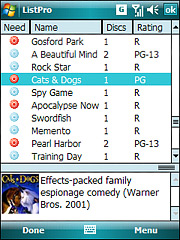
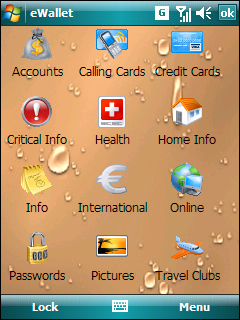
PDA Essentials Magazine had a fabulous writeup of eWallet in their last issue. It’s on the stands in the U.S. now; I think it’s already gone in the U.K. I knew it was coming - someone had told Kevin about it on the phone, and Judy mentioned it as part of a comment to our “Hidden Features of eWallet” post, but I had no idea it was going to be so extensive. Or so flattering.

We’ll be adding some quotes from it to our website next week - Julie’s been tied up with the ListPro release all this week - including my favorite: " If you want to securely protect confidential information on a PDA or smartphone, eWallet wins the battle of the wallet wars hand down".

Many, many thanks to PDA Essentials Magazine, Andy Nott and Andy Betts for the fabulous writeup.

Share this article:


ListPro 5.0 is here!

by Marc

lpssh_ebay.jpglistpro-app-graphic300.jpg It’s been a long wait for many loyal ListPro fans but ListPro 5.0 is now available. We’re very excited about this new version and we think you’re going to like what it offers. The “main event” of ListPro 5.0 is a feature that we received more requests for than any other. Pictures!

That’s right! With ListPro 5.0 you can add pictures to all your favorite lists. Link to pictures of people for your contacts list, book covers for your book collection, or maps for a list of your favorite restaurants. With a couple clicks you can easily add pictures to the notes pane of any list item.

The next big feature is the second most popular request, and that’s rich text formatting in the notes pane. Change the font, size and style or add bullets and numbering (plus the subtle, but long requested, ability to enter a TAB!) This new version completely changes the way you’ll use your lists. Plus we’ve thrown in the ability to add live links in the notes!

And of course we have a bunch of other great new features. Like HTML export! Now you can export your lists in an attractive html format file making it easy to email a list to a friend that doesn’t have ListPro (yet!) You can also export lists as XML (even selecting RSS format for those of you who would like to try using ListPro to build your RSS newsfeeds!) Throw in an updated appearance and a number of other features and fixes and we think you’ll really enjoy ListPro 5.0!

You can find out more here, or grab a copy of the new version here!

lpssk_dvd_sm.jpglpssh_ebay.jpg (Click this one for a full size screenshot!)

Share this article:


The Lost Features of eWallet

by Marc

ew_list1.pngdesktop.JPGew_icon3.png

When you near the planned release date for a product, it isn’t uncommon to find yourself with features that work great and are very cool, but that you just don’t have time to fully implement. When this happens, getting the product out takes priority over adding this one last feature. This is precisely what happened with a “lost feature” that I’m going to tell you about today!

So read on to learn about one of the Lost Features of eWallet (and even try it out in your own copy of the software!)

One of the things we always wanted to do in eWallet was to let people pick their own background images for the card list. We added this feature, did quite a bit of testing, and liked the overall results, but unfortunately we ran out of time. Since the feature is fully functional, however, we didn’t remove it completely. I mean, we plan to add it later and it didn’t hurt to leave it, so why take out the work we’d done?

The end result is a secret feature in eWallet 5.0 and greater that you can try. This feature is available in both the Windows PC version of the software and the Pocket PC version of the software. Here is how to use it:

  1. Find a .jpg image that you want to use as a background image
  2. Rename the image to ControlBkg.jpg
  3. Place the image in My Documents/eWallet/Graphics and Sounds
  4. Quit eWallet (on a Pocket PC, you can quite by going to eWallet and then tapping CTRL then Q on the onscreen keyboard)
  5. Start eWallet

That’s it! You’ve got background!

Now as you can see this isn’t the most user friendly interface. That’s part of what we didn’t have time to finish. Normally we’d have a nice menu where you can select images, choose centering, and things like that. In this case it takes a little more effort but the feature still works.

There are a few things I’ll mention about this “Lost Feature” as well. These are issues we typically work out prior to release.

  • On some older devices (mostly PPC High-Res 2003 and 2003SE devices) background graphics can slow the program down. This is one of the things we were still working on.
  • Really really big graphics can slow the program down on Pocket PC. This one is less common but still something we wanted to clean up for official release.
  • You have to use a .jpg file. JPEG, BMP, GIF won’t work. Only .jpg.
  • As mentioned before, you do have to rename the file and drop it manually into the right folder. It’s awkward, but we often have things like this when we first add a feature. It lets us start testing it right away before we have a glossy UI (user interface) to support it.

So we hope you enjoy this “Lost Feature” and have fun playing with it! We’re working on including it in the next release of eWallet of course, so feel free to send us any suggestions or problems!

Finally, to help you use it we’ve created a few background graphics that we like. You can download them from here:

Background 1 Background 2 Background 3

Just remember to change the names to ControlBkg (ControlBkg1, for example, won’t work!)

Enjoy! (Here are links to a few more screenshots!)

ew_icon2.pngew_list1.pngew_list2.pngdesktop.JPG

Share this article:


Happy Birthday Clinton Fitch (Dot) Com!

by Julie

happy birthday!We want to wish a very happy third birthday to Clinton Fitch (Dot) Com. Many of you may already be familiar with Clinton’s site, and for those of you who aren’t, you should definitely check it out! It’s full of mobile news and reviews of some of the coolest hardware and software out right now. And today is a good time to visit the site, because Clinton is celebrating with a contest, and you don’t want to miss out!

Congratulations, Clinton, and we wish you many more years of news and reviews to come!

Share this article: