August 2008

We have liftoff...

by Marc

Hey everyone! I just wanted to let everyone know that as of today, everything for eWallet 6.1.2 with complete iPhone Synchronization is on it’s way! Apple has the software, the desktop portion is locked and loaded, and all preparations are complete! We expect it to go live sometime next week!

Full details after the break, and as a warning, there are quite a few screenshots in case you’re running wireless…

First off, here are some answers to questions we’ve heard a lot:

  • The iPhone store should notify you in the “Updates” section when the iPhone version goes live.
  • We will email anyone who has registered their software with us when the product is officially out.
  • Yes, you will need the Windows PC desktop version to synchronize.
  • If you have eWallet 6.0 or 6.1, you can get the upgrade to 6.1.2 at no charge. Either download the desktop version again when we make the big announcement, or wait for the email from us which will include your download info.
  • If you don’t own the desktop portion, or you aren’t eligible for a free upgrade, you will be able to purchase the desktop piece at the discounted price of $9.95. Details on how to get this price will be coming.
  • Yes, we’re releasing a full help document that will cover basic iPhone functions as well as how to synchronize.
  • When you upgrade, any wallets you’ve created or cards you’ve built will remain intact. The upgrade doesn’t overwrite existing data.
  • If you already made a wallet on your device, you will be able to sync it up to the desktop.
  • If you’re already synching with a different device, you can sync with your iPhone as well using the same desktop version.

Now for some sync details. I won’t say a lot here because once the application is released I think you’ll find that it does an excellent job of walking you through the process. In fact, that is one of the things that we are quite pleased with. We really feel that we’ve done a good job of combining security with ease of use. Oh course we’ll let you folks give us the final verdict on that!

That said, I’d just like to share a couple of screenshots. First is the revamped “Add Devices” dialog on the desktop. This is something that should benefit everyone, not just iPhone users. It makes it easier than ever to add new sync locations. (As many of you know eWallet does more than sync with your iPhone - sync with remote locations like FTP sites, USB drives, other computers on a network, and more!)
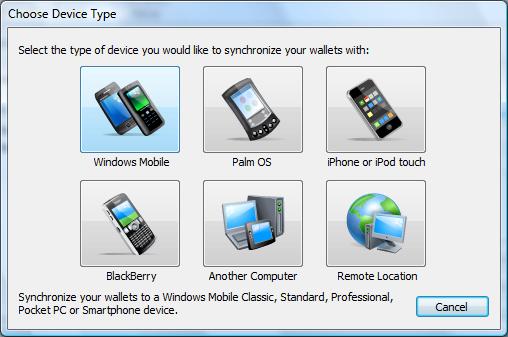
Not only does it make it easy to add new devices, but when you mouse over a button it offers a detailed description making it easy to know which device to choose.

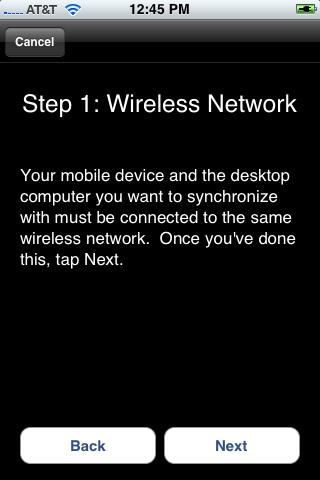
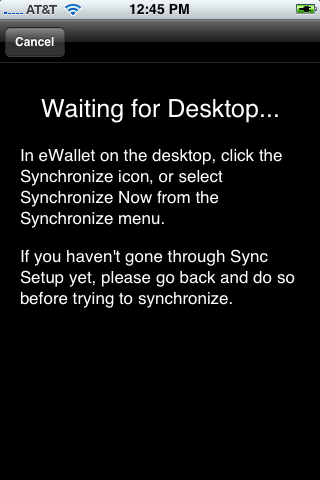
Next up are a some sample shots from the iPhone. What we’ve tried to do is keep the process simple, but still include clear instructions that will walk you through the process. One of the things that I really like is that if you need the steps you can walk through them, but if you already know what you are doing you can skip the whole thing. Just hit sync on the device, sync on the desktop, and go.
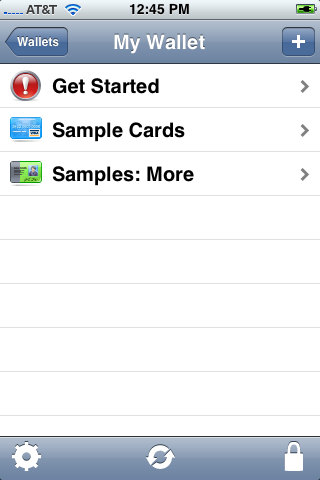
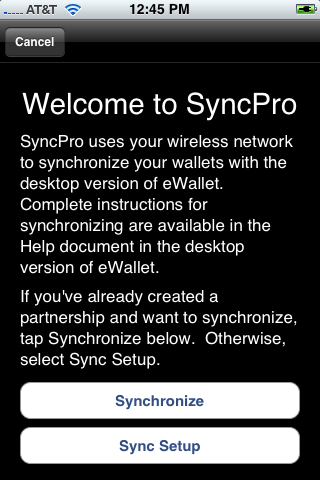
So these are just a few examples of how we’re handling sync. Now one thing some folks might notice is that when you first start synching there are a couple of steps you have to follow. First, they’re pretty darn simple and we walk you through it. Second, doing this makes it extremely easy to sync securely going forward. Finally, we noticed that some applications weren’t working very hard to ensure that you were always communicating with the correct computer. We wanted to make sure that the devices had a way identify one another BUT we wanted to do it behind the scenes where you don’t have to mess with it every time you sync!

So there you have it! The app is on its way and hopefully by this time next week we’ll all be talking about how great it is to have your wallets on your iPhone!

So thank you all for your patience and all the fantastic feedback. We know it’s been frustrating at times. It’s been great to hear from everyone, though, and in the meantime, please don’t burn down the castle! Sync Is On Its Way!

Sincerely, Marc

Share this article:


Goodbye, Smartphone and Pocket PC Magazine

by Ellen

It’s a sad day for Windows Mobile: Smartphone and Pocket PC Magazine have announced that they’re suspending publication as of the last issue in 2008.

The magazine - first called Handheld PC Magazine, then Pocket PC, then Smartphone and Pocket PC, has been around 11 years - just as long as we have. The first issue (Volume 1, Number 0) is dated “Fall 1997”, and if I knew how to work the scanner, I’d show our first ad and give everyone a laugh.

It’s no surprise that the magazine is suspending their Windows Mobile publication. Hal and his staff did an amazing job with it. I saw it in every major bookstore, and every airport magazine counter (I always checked). The articles and art were professional, the content interesting, and the information useful.

But that’s not enough to keep a magazine running. Looking back through my archives, the August issue had 26 advertisers. A random issue from 2004 had 52 and one from 2000 had 37. Microsoft advertised in some of these, not all of them, and the more recent issues had almost no hardware manufacturers, distributors or big companies advertising.

In contrast, the latest issue of MacWorld had 81 advertisers, including big companies like CDW, MacMall, Western Digital and other very recognizable names. Apple’s showing TV commercials specifically about the iPhone App Store and adding over 250 new apps each week.

I don’t understand why Microsoft isn’t doing much more to support the Windows Mobile consumer market - the people who have supported their OS for the last 11 years.

Of course the publishers of Smartphone and Pocket PC are going to try an iPhone publication - who wouldn’t, in those circumstances? I hope they have all the success they deserve with it.


And in one other mobile-media related note, if you’re interested in mobile news and analysis, the four new MediaBistro Mobile sites are doing a great job rounding up info I wouldn’t have found anywhere else. Thanks, guys - you’re making my job a lot easier.

Share this article:


Kudos to Lee!

by Marc

I’m going to risk sounding like we’re patting ourselves on the back here, because I really want to publicly acknowledge the great job Lee is doing. Lee is one of our support folks and has been with us for almost 7 years now. She does a fantastic job of helping people out, and if you ever call here for support it’s very likely that she’s the person you’ll talk to.

The inspiration for this post is a note somone left on tinyapps.org that read:

Ilium Software / eWallet: Best Support on the Planet Lee Stutesman at Ilium Software went WAY above the call of duty today (via toll-free support, no less!) in helping fix our Palm HotSync issue with an ancient version of eWallet . These guys set the standard for shareware support. If Rackspace has “fanatical” support (a fair assesment, BTW), I would call Ilium’s “completely and totally berserk” (in a good way - think “spider monkey on crack all over your tech problem” - there is no way that it is going to go unresolved). Thanks to Lee, I have become a lifetime cheerleader for Ilium.

 So congratulations Lee! And thanks for all your excellent work!

Share this article:


The Trouble With the No Reboot Challenge

by Marc

Let me start by saying I think it’s great that Mike at Mobile Jaw and Chris from GearDiary are doing this. It’s a neat idea and I’m looking forward to the results. At the same time, while I think this idea is interesting, it also has some inherent flaws. Again, I’m not saying their idea is a bad one or that the results won’t be interesting. I just feel that since our app is one of the ones being used in the experiment, and could thus be blamed if the device still crashes, that I need to say a thing or two about this idea.

So if you want to hear my take on device stability and the “No Reboot Challenge”, read on!

So the theory goes something like this:

Instability in the operating system is not a result of bad design by the OS manufacturer but rather a result of badly designed third party applications.

The goal, as I understand it, is to prove that MS gets way too much grief over the instability of its operating systems (mobile and otherwise.) I think this is true and I think proving this is a laudible goal. Unfortunately, I’m not sure that the methodolgy of the Challenge is sound. Not only might it fail to prove the point, but (and this is what worries me) it could wrongfully implicate a developer in the process.

That said, here are the potential problems that I see. I resisted going into specifics (*cough* WM memory management *cough*) because frankly, a lot of this applies to any OS, not just MS products.

Impossible to Prove Unfortunately, it will be impossible to pinpoint the source of instability, even with very few applications installed. A flaw in the OS might only rear its ugly head when an application is installed, not due to any failure on the part of the developer. It could be that the flaw remains hidden until an app is run.

It’s like building a bridge and watching it collapse when the first car goes across. Do you blame the car or its driver for driving across the bridge improperly? I mean, the bridge was working fine until the first car drove over it so it must be the car’s fault, right?

It Isn’t Easy to Screw Up the OS Some will surely disagree, but in my experience it isn’t easy to botch up an operating system accidentally. You’ve got to work really hard to mess up your software so much that the entire OS suffers. Crash your own application? Sure. But screwing up the whole OS is something else entirely.

And let’s be frank about this. The times I’ve seen our applications cause what appeared to be a wide-spread issue (and these were VERY rare and never made it out the door), in the end we discovered that some aspect of the OS was not working as advertised. Perhaps it was a custom method the device had for handling images that failed, an out-dated library, or a missing piece the hardware manufacturer didn’t think was important and cut. In the end, we wrote work arounds to avoid problems with the OS. Had we released the software without addressing this, to anyone on the outside it might have looked like “we broke the OS”, but that simply wasn’t the case.

Failure to Lock-Up the Dogs But let’s say that some application really IS screwing up the OS. Shouldn’t there be some sort of “police officer” built in to protect the user from this sort of thing? Isn’t it the responsibility of the OS manufacturer to provide customers with a stable user experience? If they are giving applications access to portions of the OS that can cause the entire system to perform badly, is that really the sign of a good OS? I’m all for freedom and flexibility for developers, but someone has to be the boss and say “You can ride in the car but you can’t drive it!”

So there you have it folks……my take on the No Reboot Challenge. It’s a cool idea and I hope something cool comes of it, but I’m very concerned about the conclusions folks may come to if things go south.

Share this article:


It's synching! IT'S SYNCHING!

by Marc

IT’S ALIVE SYNCHING! I’ve been responding to the various comments on the other posts, but I just wanted to give everyone a heads up that we are in fact synching with our iPhones and iPod Touch devices here at Ilium Software! We don’t see anything that will stand in the way of our release so watch this blog and your email. As soon as it is out we’ll let everyone know!

And just to offer a little more info - we’re synching LAN, ad-hoc, multiple locations and devices, bootcamp - it’s all working! Woo hoo!

Share this article:


Once More, with Feeling

by Ellen

Save Net Radio I’m going off-topic today because of Pandora.com’s recent’s announcement that they may shut down soon.

mocoNews.net says:

Pandora is “approaching a pull-the-plug kind of decision,” a potential “last stand for webcasting” as royalty fee increases begin to take hold. It’s clear he wants legislative support—and if that can be helped by spurning a coordinated outcry from the company’s million-plus users who listen to Pandora daily so be it.

and The iPhone Blog says:

We might be approaching Pandora’s Last Stand, but let’s make sure they don’t stand alone.

So, yes, let’s make sure they don’t stand alone. Go to SaveNetRadio.org and click the big button that says Call Your Senators and Representatives. Then make the call. If you care about internet radio, this is the time to act.

People who have been reading our blog for a long time know that this isn’t the first time I’ve written about this issue - I feel very strongly about it, enough that I’m breaking our rule about not posting about off-topic topics. But it’s my rule - I can break it. And this is a time when enough voices might make a difference.

So help make noise. Post this info, call or write your representatives in government. Don’t let the music die.

Share this article: