January 2014

eWallet 7.6.1 for Windows PC Update

by Ken

e-wallet

Today we released eWallet® for Windows PC version 7.6.1, a quick follow-up to the 7.6 upgrade that went out a few days ago. It’s a minor update that includes a fix to show category names in the Recent Cards and Search lists, and we also added tooltips the Quick Password and Add Details buttons on the edit screen.

eWallet 7.6.1 for Windows PC runs on all versions of Windows 7, and runs on Windows 8 and 8.1 in Desktop mode. This update is free for all users who already own a license of eWallet for Windows PC (desktop), version 7; you can download or upgrade to the latest Windows PC version from our site (you do not need new registration codes). If you have version 7.5 or later with automatic updates turned on, you’ll get prompted to update to the latest version (you can press “Check for Updates” in the About screen too). Get all the info about eWallet (including access to a 30-day trial version) here on our site.

Thanks as always for your feedback and keep it coming!

Share this article:

eWallet for Windows PC 7.6

by Ken

e-wallet

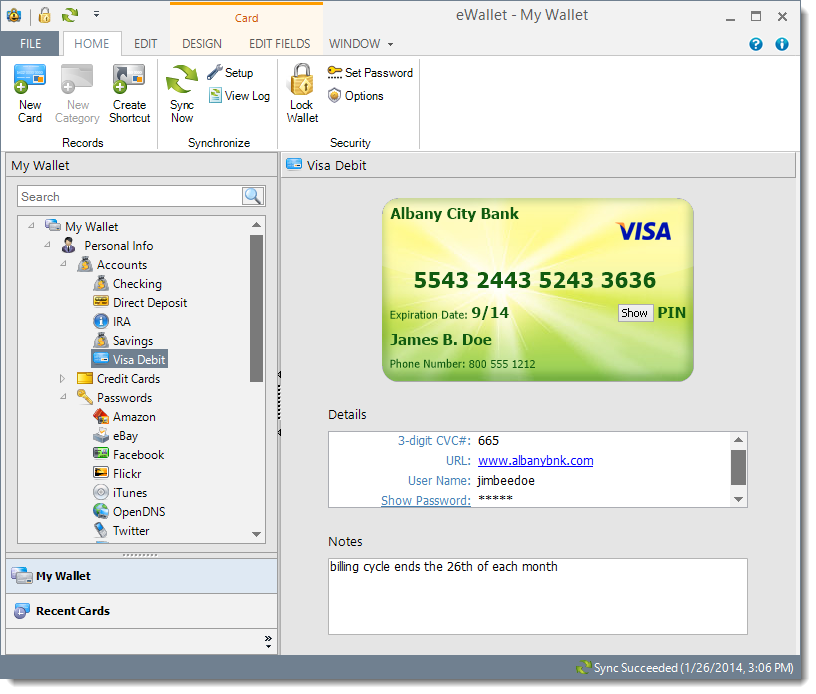
Today we released eWallet® for Windows PC version 7.6 with several new features, many of them user-requested:

  • Card display updated to simpler, cleaner look
  • Updated password generator and added new " instant password" button
  • Editing screen improved for easier entry and updating of information
  • New interface for adding additional detail fields
  • Note Card and Picture Card display improved
  • Credit card images updated
  • Fix to sync with FTP sites for systems with IE 11
  • Other miscellaneous improvements and fixes

eWallet for Windows PC screenshot

We made several user interface changes with this release, all with the goal of making your information easier to read, enter, and edit. One of the areas that was completely redone was the Password Generator. We really wanted it to be very easy to generate passwords, so you can now easily configure your default password rules, then when you press the little password button to the right of any password field, you’ll instantly get a new password built using those default rules.

Internet Explorer includes a piece of technology used by many applications called “WinINet”. Unfortunately, IE 11 appears to have been shipped with a version of WinINet that included a bug that adversely affected people trying to sync eWallet with FTP sites. eWallet 7.6 works around this bug so if you ran into it, upgrade eWallet and you should be all set.

eWallet for Windows PC runs on all versions of Windows 7, and runs on Windows 8 and 8.1 in Desktop mode. This upgrade is free for all users who already own a license of eWallet for Windows PC (desktop), version 7; you can download or upgrade to the latest Windows PC version from our site (you do not need new registration codes). If you have version 7.5 or later with automatic updates turned on, you’ll get prompted to update to the latest version (you can press “Check for Updates” in the About screen too). Get all the info about eWallet (including access to a 30-day trial version) here on our site.

Thanks as always for your feedback and keep it coming!

Share this article:


eWallet 7.4.4 for Mac OS X Update

by Ken

e-wallet

Today we released eWallet® for Mac OS X version 7.4.4. It’s a minor release that includes a fix for handling invalid bookmarks, a piece of Mac technology that helps manage permissions to files. A big thank you to our beta testers for helping us sort out this issue; not many people seemed to be effected but we’re happy to have it resolved.

eWallet for Mac runs on OS X 10.7 (Lion) or later. This upgrade is free for all users who already own a license of eWallet version 7 for the Mac. If you purchased a copy from Apple using their Mac App Store, then you’ll be able to use the Update feature in that store to get the new version. Get all the info about eWallet (including access to a 30-day trial version) here on our site.

Mac App Store Logo

Thanks as always for your feedback and keep it coming!

Share this article: