March 2016

eWallet 8.2.1 update for Windows PC (desktop) now available

by Ken

eWallet

Just a quick note to let you know that the eWallet® 8.2.1 update for Windows PC (desktop) is now available.

We heard back from some of you after the recent 8.2 release about a couple of issues that although perhaps minor, we wanted to get fixed up right away. This included fixing the menu case on the new Office 2016 ribbon style as well as fixing a couple of window related issues. Our installer was updated at the same time and is now digitally signed (as is eWallet itself) using Microsoft’s new Authenticode standards. The complete list of changes is:

  • Office 2016 ribbon style corrected to use mixed case for menus
  • Authenticode digital signatures updated to Microsoft’s new SHA-256 standards
  • Updated SyncPro sync engine to fix sync via SFTP issue
  • Updated to internationalized installer
  • Installer now sets DPI property for eWallet on Windows 7
  • Fixed issue where maximized window could not be moved

If you ever run into an issue, or want to suggest a new feature, please contact us.

eWallet 8.2.1 for Windows PC (desktop) runs on Windows 10 PCs and tablets as a desktop app, Windows 8 and 8.1 in Desktop mode, and all versions of Windows 7. This update is free for all users who already own a license of eWallet for Windows PC (desktop), version 7 or higher; you can download or upgrade to the latest Windows PC version from our site (you do not need new registration codes). If you have version 7.5 or later with automatic updates turned on, you’ll get prompted to update to the latest version (you can press “Check for Updates” in the About screen too). Get all the info about eWallet (including access to a 30-day trial version) here on our site.

eWallet and SyncPro are registered trademarks of Ilium Software, Inc.

Share this article:

eWallet 8.2 for Android update includes fingerprint support

by Ken

eWallet for Android logo

We’re very pleased to announce that eWallet® 8.2 for Android OS is now available in the Google Play and Amazon app stores. The new release includes fingerprint support for entering passwords, copy/pasting of cards within and between wallets, and the ability to rename and change the type of your card fields.

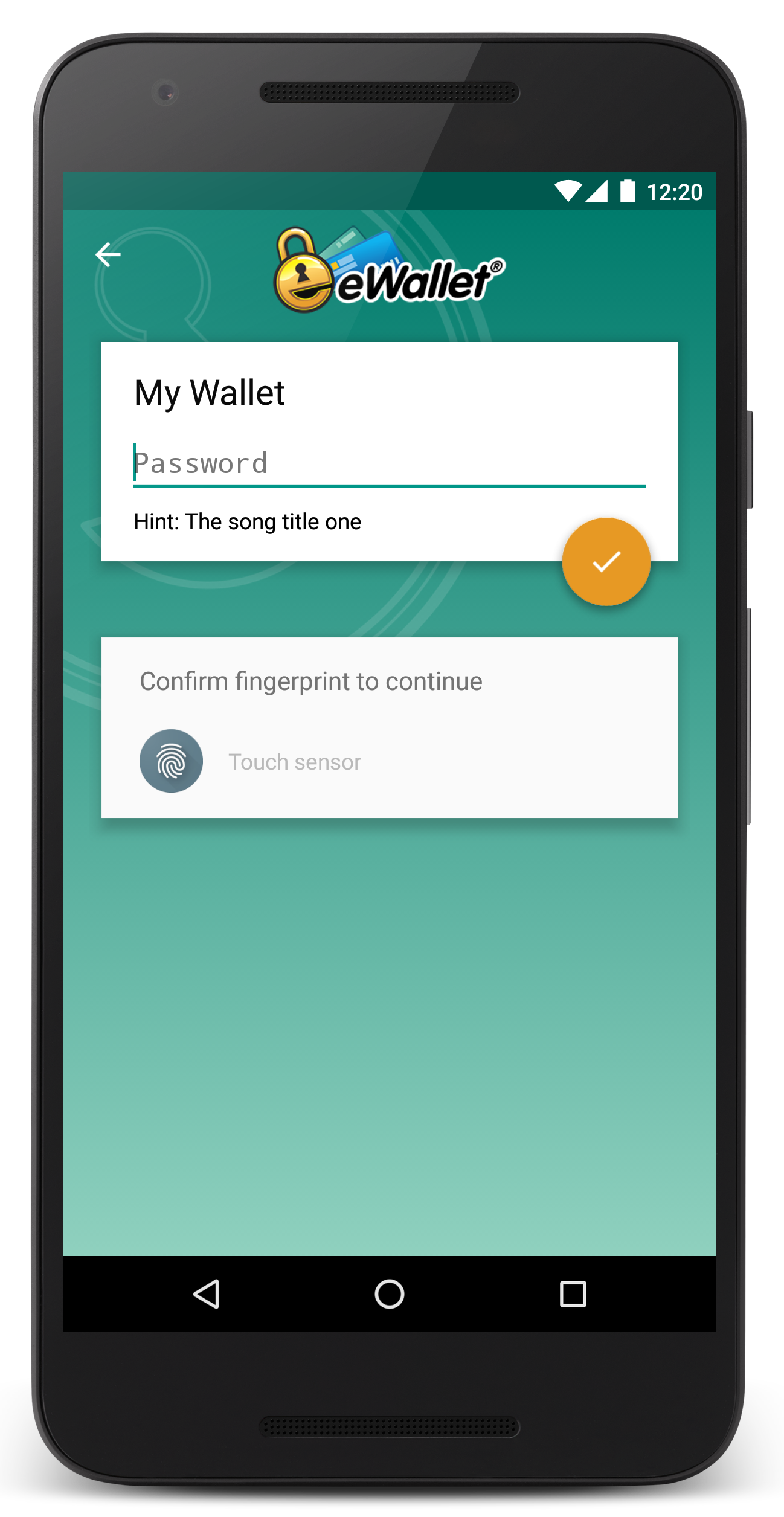
eWallet 8.2 for Android lock screen

Some Android devices have had fingerprint scanners for a while now, but until Android OS 6 (Marshmallow), the scanners were supported by the device manufacturers rather than Android itself. We heard from many users (loud and clear!) that they really like the convenience of the fingerprint scanner, and now that Android 6 supports it, so does eWallet. And you can decide on a wallet-by-wallet basis if you want to use the fingerprint scanner to unlock your wallet or not.

Many of you also sync with the PC or Mac version of eWallet where it’s very convenient to move cards around between categories. As we all use our mobile devices for more and more in our daily lives though, it’s handy to be able to reorganize a bit by copy/pasting your eWallet cards right on your Android device.

Finally, many of you requested that we allow changing the field names directly in the Android version, for example, changing a label like User Name to Email. You can change the type of the field too, so if you want to have an extra password on your card and make that field hidden, now you can. Oh, and one more thing: the new version should be much better about opening the last wallet you used, so when you start eWallet, you’ll be right at the lock screen rather than your list of wallets.

I know I’ve said this before, but we are truly fortunate to get so much great real-world help with beta testing. We again had an excellent beta team for the 8.2 release and their feedback helped immensely. If you’re interested in participating in a future beta, or have any questions or comments about the release, please contact us!

eWallet 8.2 for Android runs on Android OS 4.0.3 to 6.0 including both phones and tablets. Use of the fingerprint scanner requires Android 6 on compatible devices. This upgrade is free for all users who already own a license of eWallet version 7 or 8 for Android. If you purchased a copy from Google Play or Amazon using their app stores, then you’ll be able to use the Update feature in the respective store to get the new version. Get all the info about eWallet here on our site.

eWallet and SyncPro are registered trademarks of Ilium Software, Inc.

Share this article:

eWallet 8.2 for Windows PC (desktop) now available

by Ken

eWallet

By now most of you have probably already received automatic notification within eWallet® for the new 8.2 version for your Windows PC. This version includes the following improvements:

  • Several user interface updates for Windows 10
  • Change to better support high DPI screens on Windows 10
  • Option to provide bigger click/touch area for list of cards and categories
  • Shortcut button for editing notes
  • Office 2016 ribbon style
  • Improved Updater
  • Updated installer
  • Updated Users Guide
  • Several other miscellaneous fixes and enhancements

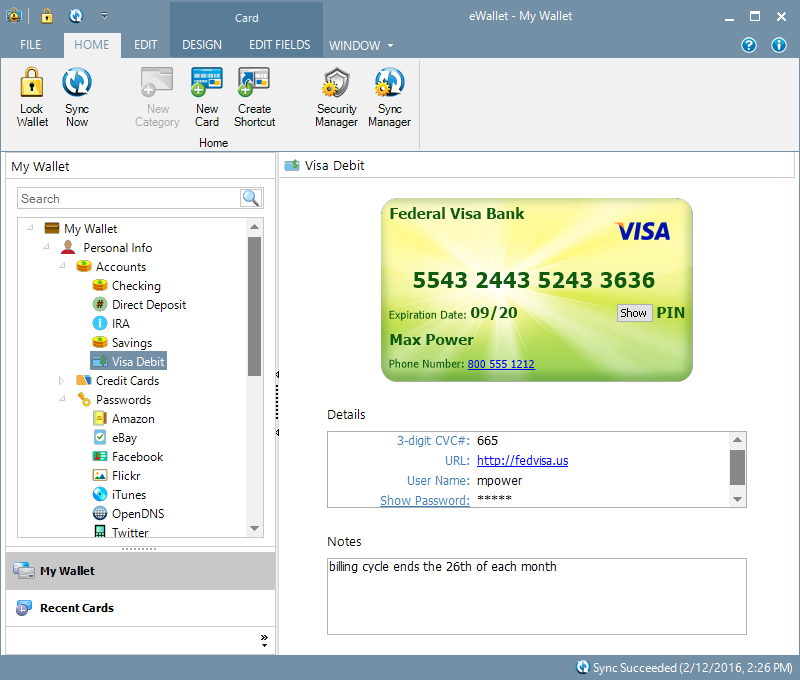
Our main focus with the 8.2 update was to improve support for Windows 10, which many of our customers have upgraded to. If you use a high DPI (resolution) screen with your Windows 10 PC, then you should see a big improvement with this version of eWallet over the previous versions, as Windows 10 itself has changed the way it deals with high density screens.

eWallet on Windows PC (desktop) Windows 10 screenshot

We also implemented some smaller but very popular requests, including making the name easier to click or touch on in the list of cards and categories as well as adding a shortcut for editing the Notes field of a card. eWallet can also now automatically store a card with your eWallet registration information in your wallet for easy lookup the next time you need it.

Many of our users have both PCs and Macs, and if that’s true for you as well you might be interested to know that eWallet 8 for Mac now has the full SyncPro® sync engine with cloud sync — which means you can now sync between your PC and Mac (not to mention your iOS and Android devices) using the cloud as well.

eWallet 8.2 for Windows PC (desktop) runs on Windows 10 PCs and tablets as a desktop app, Windows 8 and 8.1 in Desktop mode, and all versions of Windows 7. This update is free for all users who already own a license of eWallet for Windows PC (desktop), version 7 or higher; you can download or upgrade to the latest Windows PC version from our site (you do not need new registration codes). If you have version 7.5 or later with automatic updates turned on, you’ll get prompted to update to the latest version (you can press “Check for Updates” in the About screen too). Get all the info about eWallet (including access to a 30-day trial version) here on our site.

eWallet and SyncPro are registered trademarks of Ilium Software, Inc.

Share this article: