January 2018

eWallet and ListPro support iPhone X

by Ken

We still get a few prospective eWallet ® and ListPro ® users asking if the apps support the iPhone X — well, yes they do!
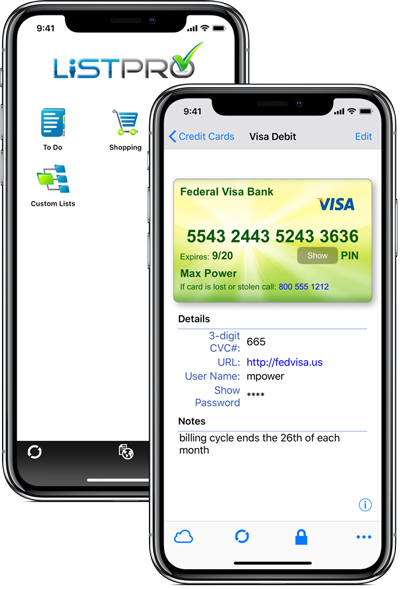
eWallet and ListPro screenshots

ListPro & eWallet on iPhone X

Although the iPhone X is similar in physical size to the iPhone 8, it actually has more pixels and a higher pixel density than the physically larger iPhone 8 Plus. The iPhone X also has the interesting notch at the top of the screen and of course, no home button. In addition to completely supporting this new high resolution iPhone X screen, eWallet also supports Apple’s Face ID technology allowing you to (optionally) unlock your wallets in the same way you unlock your phone.

Have other questions about eWallet or ListPro on the iPhone X – feel free to reach out to us and we’ll be happy to answer them.

eWallet 8.3 for iOS runs on iOS 8, iOS 9, iOS 10, and iOS 11 and is optimized for iPad Air and iPad Pro, iPhone 5, 6, 6 Plus, 6s, 6s Plus, SE, 7, 7 Plus, 8, 8 Plus, and iPhone X. The latest version is available via the on-device App Store. Get all the info about eWallet for iOS here on our site.

ListPro 5.2 for iPhone runs on iOS 8, iOS 9, iOS 10 and iOS 11 and is optimized for iPhone 5, 6, 6 Plus, 6s, and 6s Plus, SE, 7, 7 Plus, 8, 8 Plus, and iPhone X. The latest version is available via the on-device App Store. Get all the info about ListPro for iPhone here on our site.

eWallet and ListPro are registered trademarks of Ilium Software, Inc.

Share this article:


eWallet 8.4 for Windows PC (desktop) now available

by Ken

eWallet

We are very pleased to announce that eWallet® 8.4 for Windows PC (desktop) is now available. This new version includes the following improvements:

  • AutoPass now supports the Microsoft Edge browser
  • eWallet now launches newer versions of Firefox using the new registration method
  • We updated the AutoPass extension for Firefox (packaged and delivered separately) for Mozilla’s completely new extension system
  • Updated the Dropbox library code used by SyncPro®
  • Now include an alternative login method for Dropbox for cloud sync
  • Updated link color on cards with very dark background
  • If Microsoft’s .NET 4 is not installed, eWallet will offer to install . NET 4.7
  • Updated installer for high resolution screens
  • Several other miscellaneous fixes and enhancements

As you can see from the list of features, AutoPass got a lot of attention in this release, including support for the Microsoft Edge browser. Although we received lots of requests to support Edge, it wasn’t possible initially as the browser itself didn’t support any kind of extensions. Fortunately Microsoft changed that and were very helpful in getting our new extension through the approval process.

Mozilla also changed how Firefox registered itself with Windows and switched to a new system for their extensions and eWallet (and the companion AutoPass extension for Firefox) have been updated to fully support the changes. Stay tuned for more updates to all of the AutoPass extensions (Chrome, Microsoft Edge, Firefox, and Safari).

The release has several other improvements too, almost all of them based on user requests and feedback. Please keep the feedback coming and contact us any time you like.

eWallet 8.4 for Windows PC (desktop) runs on Windows 10 PCs and tablets as a desktop app, Windows 8 and 8.1 in Desktop mode, and all versions of Windows 7. This update is free for all users who already own a license of eWallet for Windows PC (desktop), version 7 or higher; you can download or upgrade to the latest Windows PC version from our site (you do not need new registration codes). If you have version 7.5 or later with automatic updates turned on, you’ll get prompted to update to the latest version (you can press “Check for Updates” in the About screen too). Get all the info about eWallet for Windows PC (desktop), including access to a 30-day trial version, here on our site.

eWallet and SyncPro are registered trademarks of Ilium Software, Inc.

Share this article: