May 2019

eWallet 8.5.1 for Windows PC (desktop) now available

by Ken

eWallet header logo

Just a quick note to let you know that eWallet® 8.5.1 for Windows PC is now available.

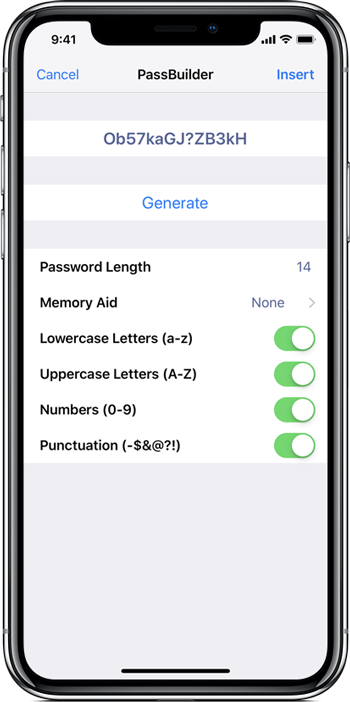
This is a minor update to address user-reported issues with eWallet 8.5 on the PC, including a situation where the password generator wasn’t always immediately updating the Notes field in some situations. That’s been fixed, and while we were making changes, we also increased the default password length used by the password generator to 14.

eWallet 8.5.1 for Windows PC (desktop) runs on Windows 10 PCs and tablets as a desktop app, Windows 8.1 in Desktop mode, and all versions of Windows 7 (sp1+). This update is free for all users who already own a license of eWallet for Windows PC (desktop), version 7 or higher; you can download or upgrade to the latest Windows PC version from our site (you do not need new registration codes). If you have version 7.5 or later with automatic updates turned on, you’ll get prompted to update to the latest version (you can press “Check for Updates” in the About screen too). Get all the info about eWallet for Windows PC (desktop), including access to a 30-day trial version, here on our site.

Share this article:

World Password Day 2019

by Ken
login screen

login screen

It’s World Password Day today — a day to promote better password habits. As we’ve been in the business of protecting personal and business information since 1997, we often get asked for advice on passwords, so here’s some best practices that can help:

  1. Create strong passwords or passphrases (at least 14 characters with a mix of uppercase, lowercase, numbers and punctuation — it should not be something easy to guess or unaltered from a dictionary.
  2. Use a different password for each account (easy with eWallet’s built-in password generator)
  3. Use a password manager — eWallet ® of course!
  4. Use multi-factor authentication with accounts that support it (and eWallet can store extra factor info too)

eWallet’s built-in password generator can help you generate random, long, complicated passwords for all your accounts, and of course it stores them for you so you don’t have remember them.

eWallet’s AutoPass feature will fill in the username and password for you on most sites. And with eWallet’s built-in SyncPro engine, you can sync your digital eWallet files between your devices and computers using the cloud or a local Wi-Fi network.

eWallet is available for the Android, iPhone/ iPad, Mac and Windows platforms.

Need more info? We’re here to help — just contact us!

eWallet is a registered trademark of Ilium Software, Inc.

Share this article: