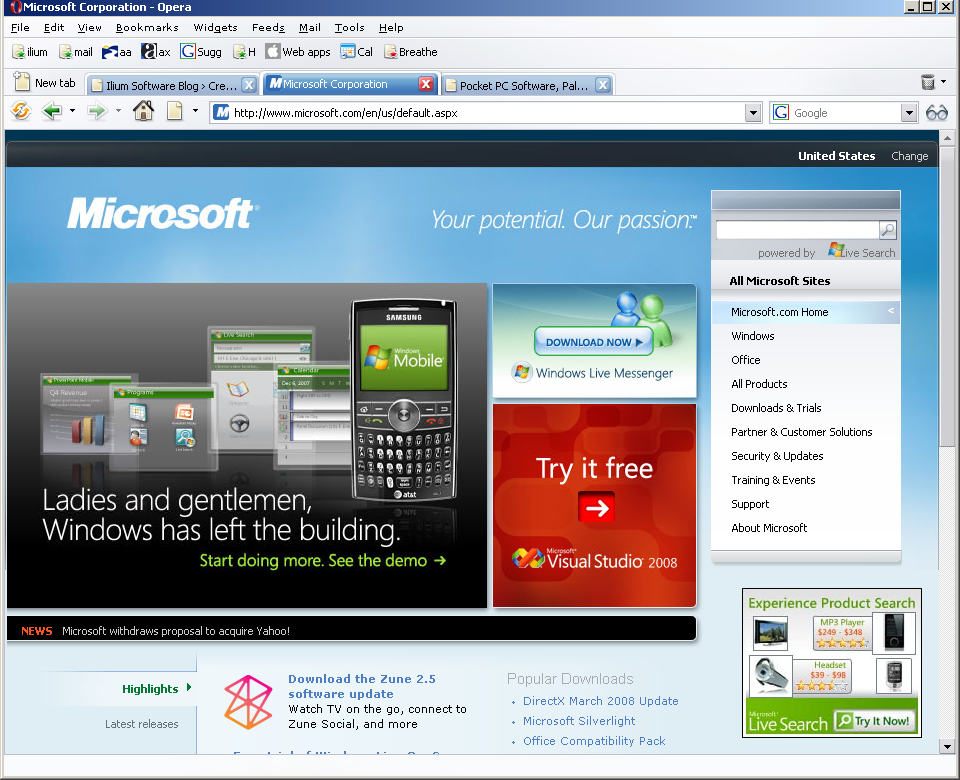
No, I’m not quoting one of the Microsoft-bashing sites. It’s not from one of the articles that says Microsoft’s lost their vision, is years behind Apple, or will never catch up with Google. It’s from Microsoft’s site - in fact, it’s from the biggest graphic on Microsoft.com’s top page today.
Ladies and gentlemen, Windows has left the building.
I’m delighted that Windows Mobile is being featured by Microsoft. Really I am. But that headline - even with pictures of Windows Mobile devices and screens behind it - just doesn’t seem to me like the right approach.
I may be wrong. I’m a marketing professional only in the broadest definition (I get paid for it), but I’m not an expert, or even close. And I’m sure that the Microsoft spot has was made by very highly trained, experienced, knowledgeable people, who know way more than I do.
But I still don’t think it’s a good idea. Anyone else? I’d be very interested in hearing what other people think.
Yes, the iPod Touch is very easy to use right out of the box. But I’ve been frustrated, both by the on-screen keyboard and by using it as an mp3 player while I was walking. And I thought - it’s supposed to be easy to use; I must be missing something. So I poked around, and found some slightly hidden features that really helped.
I figured everyone else knew these already, so wasn’t going to publish them, but it turned out that wasn’t true, at least around here. So in case anyone else might benefit from them, here are the 6 most useful things I’ve learned about using an iPhone or iPod Touch. In the tradition of top 10 lists everywhere, they’re in reverse order, so you might want to read bottom-up if you’re impatient.
Update: the 2.0 version of the iPhone and iPod Touch software changed some of these. I’ve made a few changes, below. And I’ve put all the tips here, as well, which I may be a little better about maintaining.
6 - Hold and double-tap gestures are recognized and useful in several places. I won’t list them here, but try holding your finger, or double-tapping, on a screen where you want more options. For example, holding the N on the keyboard gives you Ń and Ñ as well as N. On iPhone and iPod Touch 2.0, holding the .COM key gives you .NET and .ORG options, though not on the earlier OS. It’s probably worth upgrading just for that. And I believe that holding down the period key when entering an email address also gives you those options, but I can’t verify that until my iPod Touch comes back.
5 - Tapping space twice in a row on the main keyboard will put “. " (that is, period space) into your input.
4 - If you’re frustrated because your VOIP voice messages show up as .WAV files in your email, and your iPod touch can’t play them, you can send them through iphoneconvert, and you’ll be able to hear them right on your iPod touch. OR get the iPhone 2.0 software upgrade, and they’ll play automatically.
3 - To quickly add a punctuation or number key without changing keyboards, tapping the key, and changing back, you can instead drag your finger from the .?123 key to the key you want. This will insert that character, and change the keyboard right back to the alpha keyboard. Also, tapping the space key after most characters on the punctuation/number keyboard will send you directly back to the alpha keyboard as well.
2 - If you’ve having trouble getting the screen to change orientation, be sure you’re holding your iPhone perpendicular to the ground, rather than flat. That one’s saving me 3 or 4 swear words a day. Thanks, Marc.
1 - Double-clicking the Home button on an iPod Touch brings up a music controller, with volume, play/pause, next and previous buttons, that you can use without unlocking the device. This is extremely useful - it means I don’t have to turn it on, unlock it, and wiggle it until the screen is vertical just to change the volume or skip a song. I realize it’s less useful on the iPhones (it does work on the iPhone too, but only when you’re playing music; otherwise it brings up Contacts), that have hardware controls for music, but for me, it fixes what had been my biggest frustration about using the iPod Touch for mp3s.
Except for the one about how to hold the Touch to get the screen to change, these were all published on the internet, so many thanks to everyone who put them up originally.
It’s been a year of big announcements for Ilium Software and today is no different! We are extremely pleased to announce our plans to release eWallet for the Apple Newton!
With the overwhelming success of the iPhone we’re certain that it is only a matter of time before the Newton makes its big comeback. That said, we think it makes a lot of sense to make sure that we’re ready! The Newton is a fantastic platform and the opportunity to be the first to offer our products with full Newton compatibility is something we just couldn’t pass up!
Some of the great features you can expect to see include:
Full Calligrapher support
25 Artistically crafted gray-scale icons
Cross-soup database support for adding alarms to cards
Synchronization using the NCK!
And much more….
We’re awfully excited about this one and we hope you are too! Here’s a screenshot of the beta so you can see what you have to look forward to!
I’ve always thought that the kind of information people need - and the way they want to get it - when they’re using a mobile device isn’t really the same as on the desktop. While I very much like being able to get any kind of info on my mobile, without having to go through a non-standard browser, I also like being able to find specifically what I’m looking for, without going through pages and pages of options.
At home or in the office, I like the pages and pages of options, at least a lot of the time, especially when I’m doing research, comparing products, or looking for very complete information about something.
But on the road, unless I’m just trying to waste fill time while I’m waiting for someone, I usually just want the answer to a question.
Here’s one site that agrees with me. It’s a collection of some of the info I might need the most when I’m travelling.
I’m sure there are others, but I’m not having much luck finding them. Any suggestions?
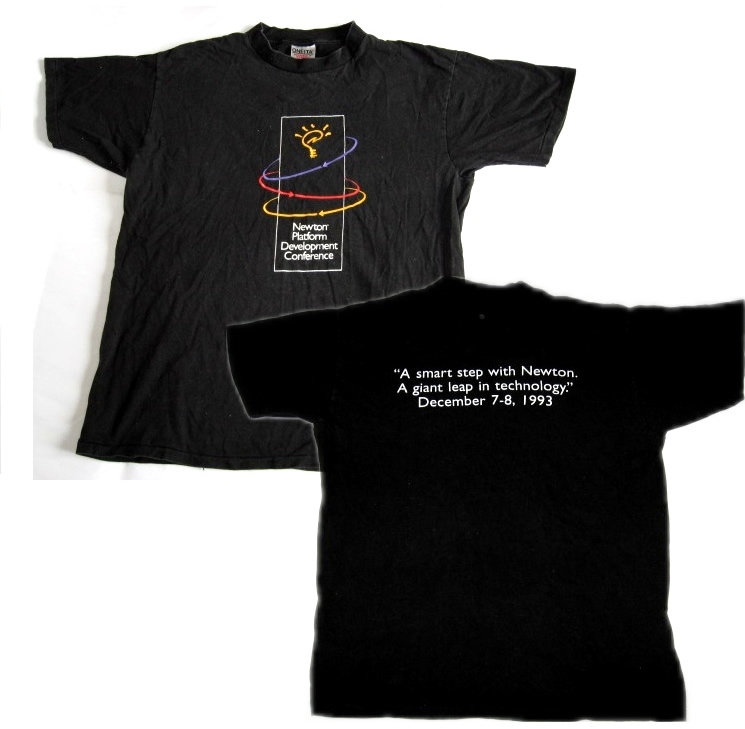
Cleaning out my Big Drawer of Geeky T-Shirts (the new one that came out of my recent Google visit just refused to fit), I ran across my original Newton Developers’ Conference t-shirt. I’m pretty sure there was only the one conference, and yes, I was there. As the shirt says:
A smart step for Newton.
A giant leap in technology.
And a long time ago.
I think that if Apple pulls off the iPhone/iPod Touch third-party apps the way they might (and I know that’s an “if”, not a given), they’ll do what they tried to do 15 years ago with the Newton - make a PDA that’s really mainstream. And, no,
I don’t think that exists right now. I see a lot of people with some kind of mobile device, but as far as I can tell, they’re primarily checking email, messages and websites. The majority of mobile users aren’t using most of the features, capacity and power of their devices.
What’s different? Quite a bit, including how much better technology is now than 15 years ago, and that the market’s in a very different state. Michael Mace wrote, several weeks ago: that
An elegant business model paired with mediocre technology beats an elegant technology paired with a mediocre business model.
and I think that the difference between the way Newton and iPhone hit the streets is a great illustration of that.
Apple’s learned a lot. I say: good for them. Many companies don’t. Here’s one opinion of the mistakes Apple made with Newton, and the critical difference between what they did then and what they do now.
Now if they could only make the iPhone commercials as good as the oldNewtonones (those are 3 separate links) were.
Yes, we absolutely plan to have our apps on the iPhone just as soon as we can. Like everyone else, we’re very excited about yesterday’s announcement. And no, I have no idea right now how we’ll pull it off. But I never do.
 No, I’m not quoting one of the Microsoft-bashing sites. It’s not from one of the articles that says Microsoft’s lost their vision, is years behind Apple, or will never catch up with Google. It’s from Microsoft’s site - in fact, it’s from the biggest graphic on Microsoft.com’s top page today.
 Yes, the iPod Touch is very easy to use right out of the box. But I’ve been frustrated, both by the on-screen keyboard and by using it as an mp3 player while I was walking. And I thought - it’s supposed to be easy to use; I must be missing something. So I poked around, and found some slightly hidden features that really helped.
 It’s been a year of big announcements for Ilium Software and today is no different! We are extremely pleased to announce our plans to release eWallet for the Apple Newton!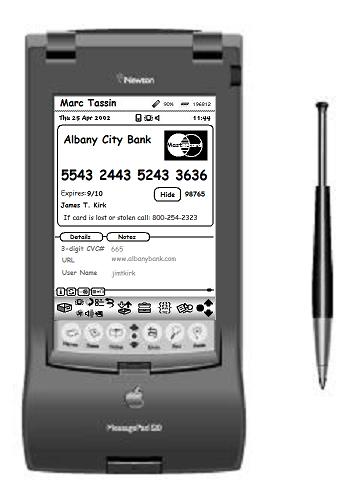
 I’ve always thought that the kind of information people need - and the way they want to get it - when they’re using a mobile device isn’t really the same as on the desktop. While I very much like being able to get any kind of info on my mobile, without having to go through a non-standard browser, I also like being able to find specifically what I’m looking for, without going through pages and pages of options.