General

Information Security

by Ellen

police.jpgI’m thinking a lot about information security lately. Not because we develop and sell eWallet, but because of two things that have happened recently:

Our office was broken into. Nothing but one laptop was taken (and it was just used for testing, so had no valuable info on it, plus was password-protected). We think that our alarm scared the person or people away, and they just took the nearest good-looking piece of equipment. While we’re all feeling a little rattled by the thought that someone was in our office, we’re also very aware it could have been much worse.

We stopped keeping the credit card numbers we get for sales several years ago, and are very careful to protect any confidential info - whether users’ email addresses or our own credit card numbers and passwords - on any of our PCs, so I know that anyone getting any of our equipment wouldn’t be able to get any useful information. And I know we’re good about keeping offsite backups of all the corporate and customer info. I hope we’re also good about keeping offsite backups of our own PCs, but I know at least I don’t do that every day. But we’d lose weeks of work if we all had to get new PCs and set them up. I’m not sure that 5-year-old PCs (mine’s at least that old) are even worth taking, but I hope I never find out.

The other thing that’s happened is that as part of two banks I use being acquired, I’m kicking off a long-postponed personal financial reorganization. Wow - there’s a lot of info to enter and keep with new bank accounts. Online security is a lot better than it used to be, which I’m very glad about. But it’s clear that no matter how excellent my memory is, there’s no way I could be without a good wallet program. And being able to enter free-form info - like my third boyfriend’s pet’s name, or the street my high school was on - is a lot more critical than it was when we first added the Notes fields to eWallet cards.

Anyway, I’m glad the banks are looking out for me, and I’m glad there’s good enough software that I can manage everything I need to. And I’m really glad we got an alarm when we moved into this office (we’d always planned to with the previous one, but never got around to it). It’s too bad we need all that, but since we do, it’s good that it’s there.

And, yes, I’m thinking a lot about mobile technology too, especially with all the new announcements lately. I just don’t have anything to say about it - yet - that hasn’t been said by many other people.

Share this article:


Vampire Electricity on Halloween

by Ellen

Happy Halloween, everyone! No, I don’t have a picture of all of us in wigs (and it’s not because I didn’t think of it, or don’t have enough wigs), sorry. But I did run into such a timely article today, I can’t help linking to it.

Apparently things like leaving charged phones and PDAs plugged into their chargers, as well as PCs and TVs in sleep or standby mode, and all those other things quietly running when not being used, take a lot of electricity. It’s now being called vampire electricity, and there’s an interesting and timely story here. My favorite quote is:

In California, lawmakers passed a proposal last year - dubbed the Vampire Slayers Act - to add vampire electronics labels to consumer products, detailing how much energy a charger, computer, DVD player, PlayStation, microwave or coffee maker uses when on, off or in standby mode.

Share this article:


Happy National Identity Fraud Prevention Week

by Ellen

OK, I realize it’s not as much fun as Talk Like a Pirate Day, but this is National Identity Fraud Prevention Week, at least in the UK. And there are some pretty scary stats (from a survey by McAfee) in this article, including:

  • 43% of respondents never change their password
  • 24% use the same password to access all online accounts
  • 59% ‘always’ or ‘mostly’ use the same password for everything
  • 30% of respondents surveyed use passwords of only one-to-six characters in length
  • 22% use only alpha characters

While I don’t believe everything I read on the internet, and I do understand that surveying a few thousand McAfee users isn’t the most representative group, the numbers are still pretty alarming.

Strong passwords, changed frequently, aren’t that hard to use. They’re hard to remember, but tools like eWallet mean that you don’t have to. eWallet - and other password managers - will safely store, and even generate, all your passwords.

Whether you use eWallet or not (and of course I hope you do), you should use good security - both online and off. Identity theft and other fraud is becoming more and more common, and it’s a real problem. Using good passwords, and shredding your paper info are two of the easiest and most effective way to protect yourself.

If you’re using passwords that are easy to crack, or haven’t changed them in a while, or use the same one too many places, change them now. Don’t put it off.

And to encourage and help everyone to use strong passwords, we’re giving half off eWallet (Professional Edition) until Monday, October 15. Use the following links to purchase eWallet at this special price for your: Pocket PC, Windows Mobile Smartphone, or Palm OS handheld. Remember, these come with the Windows PC version as well, so start protecting yourself now!

Share this article:


Order Like a Pirate

by Ellen

captainmarctassin.JPG Avast me hearties! As many of you lads and lasses know, today is International Talk Like A Pirate Day! And by Blackbeard’s braids, ya can’t be a pirate without the lure of treasure!

SO, today (and today only) call your order in by phone and get a 50% discount on any of our titles IF you order like a pirate! That’s right ya bunch a scallywags. Half-off just fer talkin’ like a pirate!

And don’t dilly dally ya bunch a layabouts! We set sail at 5:00 Eastern Time (I think that’s -4 GMT countin’ daylight savings), so the discount’s only available until then. And don’t go thinkin’ a piratey note in an online order will do it. Phone orders only!

Share this article:


Who Wants to be My Guinea Pig?

by Julie

help1.jpgYou can all be my guinea pigs! I don’t know if you remember (and 10 points to anyone who does) but several months ago, I added a handy little script to the home page of our site that would automatically redirect users to the mobile version if they were browsing on a mobile device. We tested it a lot, but I also wrote a post about it right here on the blog, to ask you guys for help to make sure you didn’t find any problems. Everything seemed to be going great, until Ellen found an issue no one else noticed, so I had to go back to the drawing board.
Well, even though it took a while, I finally had time to fix the script - hopefully for good. We tested it every way we could think of in the office, and I’m confident enough to put it online today. So, guinea pigs, do you want to try it out for me and make sure you don’t have any trouble? Here’s the behavior you should expect from our home page now:

  1. If you’re on your desktop, you should never, ever see the mobile version, unless you specifically click a link to go there
  2. If you visit www.iliumsoft.com on a mobile device, it should automatically redirect you to the mobile version. If you decide you really want to be on the “big” version of the site, and you click the “Visit Main Website” link at the bottom of the mobile version, you should be taken to our regular site, and you should stay there

So, if you check it out and think you’re being sent to the mobile site when you should be on the main site (or vice versa) please just drop a comment in this post and let me know what happened and what you saw, so I can fix it. Thanks!

Share this article:


The Lost Features of eWallet

by Marc

ew_list1.pngdesktop.JPGew_icon3.png

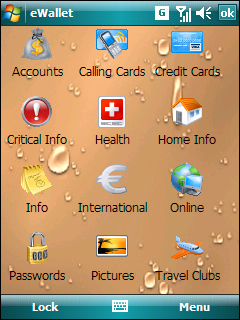
When you near the planned release date for a product, it isn’t uncommon to find yourself with features that work great and are very cool, but that you just don’t have time to fully implement. When this happens, getting the product out takes priority over adding this one last feature. This is precisely what happened with a “lost feature” that I’m going to tell you about today!

So read on to learn about one of the Lost Features of eWallet (and even try it out in your own copy of the software!)

One of the things we always wanted to do in eWallet was to let people pick their own background images for the card list. We added this feature, did quite a bit of testing, and liked the overall results, but unfortunately we ran out of time. Since the feature is fully functional, however, we didn’t remove it completely. I mean, we plan to add it later and it didn’t hurt to leave it, so why take out the work we’d done?

The end result is a secret feature in eWallet 5.0 and greater that you can try. This feature is available in both the Windows PC version of the software and the Pocket PC version of the software. Here is how to use it:

  1. Find a .jpg image that you want to use as a background image
  2. Rename the image to ControlBkg.jpg
  3. Place the image in My Documents/eWallet/Graphics and Sounds
  4. Quit eWallet (on a Pocket PC, you can quite by going to eWallet and then tapping CTRL then Q on the onscreen keyboard)
  5. Start eWallet

That’s it! You’ve got background!

Now as you can see this isn’t the most user friendly interface. That’s part of what we didn’t have time to finish. Normally we’d have a nice menu where you can select images, choose centering, and things like that. In this case it takes a little more effort but the feature still works.

There are a few things I’ll mention about this “Lost Feature” as well. These are issues we typically work out prior to release.

  • On some older devices (mostly PPC High-Res 2003 and 2003SE devices) background graphics can slow the program down. This is one of the things we were still working on.
  • Really really big graphics can slow the program down on Pocket PC. This one is less common but still something we wanted to clean up for official release.
  • You have to use a .jpg file. JPEG, BMP, GIF won’t work. Only .jpg.
  • As mentioned before, you do have to rename the file and drop it manually into the right folder. It’s awkward, but we often have things like this when we first add a feature. It lets us start testing it right away before we have a glossy UI (user interface) to support it.

So we hope you enjoy this “Lost Feature” and have fun playing with it! We’re working on including it in the next release of eWallet of course, so feel free to send us any suggestions or problems!

Finally, to help you use it we’ve created a few background graphics that we like. You can download them from here:

Background 1 Background 2 Background 3

Just remember to change the names to ControlBkg (ControlBkg1, for example, won’t work!)

Enjoy! (Here are links to a few more screenshots!)

ew_icon2.pngew_list1.pngew_list2.pngdesktop.JPG

Share this article: