We just posted a brand new keyboard layout pack for InScribe! This new pack includes eight layouts including Cloemak, Dvorak, Hcesar, Maltron, Plum, Qwerf, Quicktype, and Staggered. The layouts are self installing. All you need to do is download the pack here and when you run the installer it will automatically install the layouts for you. I want to extend special thanks to the folks at Plum for giving us permission to distribute a copy of their great layout.
In addition we’ve also posted a pack that includes all the default layouts. If you really botch up the defaults while customizing, running this installer will replace them with the original layout formats.
Michael Mace wrote a fantastic article about the mobile computing market. If you haven’t read it, you really need to read the entire article. I think he is on the money with his analysis and I quite literally could not have said it better.
BUT
The one thing he said that I disagree with is:
“Information manager [device] innovation has basically ground to a halt, and the users in this space are very frustrated.”
I agree that the users are frustrated. I don’t agree that innovation has ground to a halt. In fact, the information manager’s dream device is already out there.
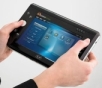
The UMPC.
Contradicting Microsoft
To prove my point I first need to contradict some of the things Microsoft has said. Mainly, they’ve insisted that the UMPC is not replacing laptops or PDAs, that it’s for a mysterious ’new market.’ This was a really unfortunate statement because it sent all the reviewers on a bigfoot hunt for this previously undiscovered market. When they couldn’t find this magic market they responded negatively!
The fact of the matter is that the UMPC WILL replace laptops for some users and the UMPC WILL replace PDAs for others. In some cases it might replace both the user’s laptop AND PDA. The reason is simple. There are some things that laptops and PDAs are just not very good at.
PDAs Aren’t PCs
I LOVE PDAs (and by “PDA” I mean true PDAs and also devices like the Windows Mobile Smartphones.) These are fantastic devices. The one thing I see all the time though are people trying to get their PDA to work like a PC. I’m guessing that these people are the “Information Managers” Michael Mace mentions in his article.
These people really, really, REALLY want to have their PC with them all the time. They spend countless hours synching data, they buy complex and memory intensive programs to emulate database software, they purchase piles of memory cards to get more memory to hold their data!
How do I know? Well first off, as the guy who spent years answering the phones for a company (Ilium Software) that sells information management software for PDAs, I talked to these people time and time again. Second, I’M one of those people! My dream was my PC in my pocket ALL the time. For years my Pocket PC was the closest I could come. So, like all the other Information Managers, I made do.
Laptops Aren’t Really Portable
“Get a laptop,” people would tell me. I’ve got a laptop. A really nice one in fact. BUT, and I know some people will say I’m nuts, laptops aren’t really portable. They aren’t. Yes you can move them around and yes they are more portable than a desktop, but I’ll bet that almost anyone who has ever…
\* Tried to get out and use a laptop in a coach seat on an airplane…
\* Balanced a laptop on their lap while trying to drink coffee with a free hand…
\* Tried to use a laptop while in the driver’s seat of a (PARKED) car…
\* Tried to use a laptop while reclining on the sofa…
\* Tried to use their laptop while standing around waiting for a bus…
…will admit that a laptop, even a small one, is just not that portable. It’s great when you need to move to a static location, setup at a table, and work for a couple hours. It’s excellent if you have a whole lot of typing to do, but when it comes to true portability the laptop doesn’t cut it. For one thing, the clamshell design makes it kind of clumsy. Plus, these days the demand for wide screen is making laptops bigger, not smaller!
So yes, a laptop gives me the POWER I (and other Information Managers) am looking for, but not the portability.
UMPCs to the Rescue!
So where do I get PC power with PDA portability? It seems obvious to me…the UMPC.
What it does better than my PDA:
*I don’t need special versions of software to use my data.
*I don’t need memory cards to get enough memory.
*The screen is big enough to see and manipulate the data I store on it!
*I have full access to all the software titles I use on my PC, never saying “I wish they’d make a PDA version!”
*I can read ebooks on it without squinting or zooming constantly!
What it does better than my laptop:
*It’s lighter.
*I can hold it with one hand and use it while sitting, standing, laying down, or even walking.
*I can carry it in just about any bag (although typically I just carry it around like a book). No more special computer bag draped around my neck.
*I can use it in confined spaces easily (cars, airplanes, etc.)
The Moral?
The moral of the story is that the UMPC is the Information Manager innovation that Michael Mace is looking for. It is also a device that WILL draw off both PDA and laptop users. Personally, I no longer use my laptop. For those occasions where I need the “laptop experience” I just plug in a mouse and a portable keyboard and I’m good to go. Even if I carried these all the time (which I don’t) they would still take less space than my laptop does.
As for a PDA, I have a Windows Mobile Smartphone, but the poor little thing no longer needs to live up to my overblown expectations of it’s capabilities. I keep a limited set of information on it for those occasions when I can’t bring my UMPC.
And finally, I KNOW the UMPC needs to improve. Battery life in particular stinks. Then again my first iPAQ only had a 45 minute battery life so I firmly believe that this is a temporary problem.
UMPCs are the new PDA. If anything, it’s smartphones that are the “new market.” UMPCs are just giving us the portable computing experience that PDAs always failed to deliver.
Just returned from attending the two day Windows Mobile Partner Summit held in the Seattle area. The summit included OEM, Mobile Operator, and key strategic partners to discuss what’s coming down the road from the Windows Mobile team. We’re under a NDA so I can’t say much about the meeting right now, but I can say that I very much liked what I saw. Stay tuned for more details as we’re allowed to release them. A big thank you to the Windows Mobile Partner team for putting on the event and sharing future plans with us.
With every release of new technology a million so-called experts jump up and start shouting about all the things that are wrong with it. I’m as supportive of critical analysis as the next guy, but I’m also a strong proponent of “appropriate analysis.” Too often people attack new technology from the wrong direction. The iPhone and the UMPC are two great examples of this…
My Toaster Won’t Make Cookies!
Many of the complaints I hear about the iPhone and UMPC strike me as exactly this sort of argument. Let me present a fictional argument about toasters that exemplifies the flaw in so much of the talk about both UMPCs and iPhones.
Reviewer: “Toastmatic says they are releasing a new toaster…but it won’t make cookies!”
Toastmatic: “Well, no. It’s a toaster after all.”
Reviewer: “But no cookies? I just bought a toaster oven from Mastertoast and IT makes cookies!”
Toastmatic: “Well sure, but our toaster is for, well, making toast.”
Reviewer: “But the toaster has the technology necessary to make cookies. So why would you prevent users from making cookies by designing your toaster with vertical slots??”
Toastmatic: “Because 90% of our customers only WANT to make toast in their toaster. Vertical slots are easier to use when making toast. We found that if users want cookies they prefer the normal oven. As a result we’ve focused on providing a really excellent toaster. Plus by focusing on toast we have a device that makes toast with the push of a single button. If it made cookies we’d need lots of additional controls that would needlessly complicate it.”
Reviewer: “There you have it folks. A device that is doomed to fail. Toastmatic really missed the boat on this one. Fortunately I still have my Mastertoast toaster oven so I won’t have to go without cookies!”
The Moral of the Story The UMPC is not meant to replace your desktop. It isn’t designed to replace the laptop of a heavy-use business person. The UMPC is an “at the coffee shop, around the house, email while watching TV, on the airplane, short business trip” device. Critiquing it from any other point of view is as silly as complaining that flashlights make a terrible lamps for the living room.
The iPhone is not meant to replace the business person’s blackberry or the hard core PDA user’s Windows Mobile Device. It is meant to offer “easy interface, internet checking, phone answering, music listening, fun video watching” functionality to a user base that doesn’t even know that the phone they have NOW lets them install software!
So, to the reviewers of the world, I implore you! Please look very carefully at the purpose of new technology before ranting about its failures. To do otherwise fails to serve your readers. Let them know how well new toasters makes toast, not how badly they fail when you put cookie dough in them.
When I bought my newest PC, I started keeping my program installation files. I do this because I don’t necessarily want to upgrade if I need to reinstall something - this isn’t a cost issue; I’ve just learned that if I’m happy with a program version, I’m not necessarily happier with a new version (as is probably obvious by the fact that I’m still using the “classic” Windows interface, above).
But I’m not quite disciplined enough to remember to erase the installations when I decide not to keep a program, so I’ve got quite a collection at this point. And as a result of some PC problems over the weekend, I ended up trying to clean out the folder where I save them.
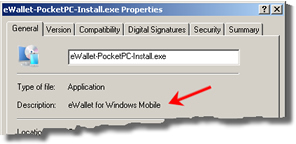
I’d never given much thought to the program properties of the installation files we make - I know that checking them for correct descriptions, version numbers and digital signatures is a part of our QA process, but pretty much had that in the “necessary evil” thought pile, or maybe even the “unnecessary overhead” one. But trying to figure out what installation files went with what programs on my PC made clear to me the value of that info. I didn’t have that many installation files that I wasn’t able to identify without running them, but the ones I had were pretty irritating (and I wasn’t in the best mood to start, given that my PC wasn’t booting well, or writing CDs).
Anyway, it’s nice to see that following the rules does have a point, at least once in a while.
 We just posted a brand new keyboard layout pack for InScribe! This new pack includes eight layouts including Cloemak, Dvorak, Hcesar, Maltron, Plum, Qwerf, Quicktype, and Staggered. The layouts are self installing. All you need to do is download the pack here and when you run the installer it will automatically install the layouts for you. I want to extend special thanks to the folks at Plum for giving us permission to distribute a copy of their great layout.
 Michael Mace wrote a
  Just returned from attending the two day Windows Mobile Partner Summit held in the Seattle area. The summit included OEM, Mobile Operator, and key strategic partners to discuss what’s coming down the road from the Windows Mobile team. We’re under a NDA so I can’t say much about the meeting right now, but I can say that I very much liked what I saw. Stay tuned for more details as we’re allowed to release them. A big thank you to the Windows Mobile Partner team for putting on the event and sharing future plans with us.
 With every release of new technology a million so-called experts jump up and start shouting about all the things that are wrong with it. I’m as supportive of critical analysis as the next guy, but I’m also a strong proponent of “appropriate analysis.” Too often people attack new technology from the wrong direction. The iPhone and the UMPC are two great examples of this…