General

A Good Name is Hard to Find!

by Marc

With the recent announcement of the Microsoft Zune I just felt a need to talk about naming products. I’ll give Microsoft a little credit. It’s really hard to name a product these days. Most of the good names are already taken by something. That leaves new products stuck with either made up names or names that squish two words together and pretend that it is one word (yes…we’ve done this too…I know).

Now, some of the made up names end up being quirky cool, like WOOT! and Google. Unfortunately, it seems that this has led big corporations to think that a wacky new word for their product name is the smart way to go.

Take the now infamous decision by Nintendo to rename their REVOLUTION! game system “wii”. (“wheeeee!”) I mean, seriously. Revolution was something I could get excited about. “Join the Nintendo Revolution!” “Become part of the gaming Revolution!”

But wii? I’m almost embarrassed to walk into a store and ask about this system.

“Hi, do you know when you’ll be getting the wee’s?”

It would be so much cooler to walk in and ask:

“Can you tell me when you’ll have THE REVOLUTION!?”

Back to the Zune. apparently Microsoft hired the same ad agency to name their Argo media device. The name “Argo” had power. It filled my head with images of going on adventures, of legendary journeys, and excitement. But Zune? I guess it’s a little like “Zoom” and that’s sort of cool. I don’t know. All I can think is that the big corps have a room full of suits trying to figure this stuff out:

Suit 1: “OK…what’s happening on the web and how can we tap it!” Suit 2: “Crazy product names!” Suit 1: “Good one Bob…now think crazy…what’ve you got?” Suit 3: “Um…zerbert?” Suit 1: “No no…crazier!” Suit 4: “Zuh…zuh…zune?” Suit 1: “YES Johnson! Now that’s crazy!”

And of coure there is the Origami. While the name “UMPC” isn’t a terrible name, it doesn’t evoke the same cool image of flexibility and zen comfort as Origami does.

I guess what I’d really like to know is what they are thinking. Is it really the scenario I described above? Or maybe some market research company in India calling thousands of people in the U.S. and asking them how the word Zune makes them feel? As I said, I know that it is hard to pick names for new products. Still, these guys seem to pick great names and then toss them out at the last minute.

Well, enough of the naming rant. I’ll close with what I thought was a pretty funny quote about the Zune from James Kendrick’s Blog, JKOnTheRun . It’s the very quote that got us on the subject of product names over here at Ilium Software.

" I don’t know if I like the name Zune or not, but I thought Microsoft would come up with something like Ultra Mobile Audio Media Adapter (UMAMA)."

Share this article:


Screen Resolution Rant VS. Samsung Q1:Fight!

by Kevin

After writing my little opinion essay on screen resolution, something was missing. “What about the new UMPCs!? Those have tiny screens!”

Actually, they’re not so tiny. The Samsung Q1 for example has a 800x480 screen, which seems small but it’s adequate. Anyone who remembers (or still uses!) the Handheld PC devices will recognize that as a similar format to the famous 640x240 screen, but with more wide and twice the tall.

The problem was, we didn’t have a UMPC to play with so I didn’t have any real-life experience. Well, now we do, and I’ve played with it.

In short, my verdict is: Needs Work. This is on a scale of, “Dismal Failure” to “Sliced Bread”. For a first-revision device in a ’new field’, Needs Work seems to be a pretty decent assessment. Certainly not a Dismal Failure.

For more details, a quick review, and a picture, read on.

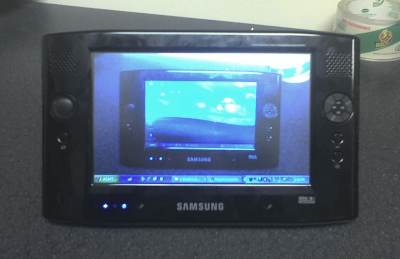
If you have no idea what a Samsung Q1 is, this is it:

Q1 to Infinity!

That’s a 7" diagonal touch-sensitive screen, a 900MHz Intel Celeron M processor, 512MB of ram, a 30GB hard drive, and Windows XP Tablet Edition.

The really good:

  • Touch Sensitive Screen: having used our office Acer TravelMate Tablet PC, the touch screen is really nice. Tablet PCs use RF screens that work like graphics digitizer tablets, which can be aggravating as the mouse cursor won’t end up right underneath the tip of the pen. With a UMPC, you touch the screen and that’s where the cursor goes.
  • Small: PDA’s are pocket-sized, laptops are lap-sized, while the Q1 is “messenger-bag sized”. If I was still a student, I wouldn’t hesitate to toss this thing into my bag and haul it everywhere with me. It weighs less than a medium-sized textbook.
  • Windows XP: If you sit around saying, “Gee, I wish I had a portable computer smaller than a laptop but ran th same software as my desktop PC!”, UMPCs like the Q1 are probably just the ticket. The Q1 will run the same software your desktop PC will.

The not-so good:

  • Touch Sensitive Screen: I don’t think that this is necessarily a problem with the Q… the Tablet PC OS seems to be designed to be used with an RF mouse or pen in mind. When you touch the screen, the cursor is moved to that location instantly and registers as if you clicked. This makes clicking and dragging items a pain sometimes, since it’s hard to position the cursor exactly when it won’t move until you touch the screen to click.
  • Battery life: You only get about 2 hours of battery life.
  • Portrait mode: You can flip the screen into portrait mode, which is nice. It also makes the Q1 much easier to hold with one hand this way. However, Windows XP’s taskbar isn’t really made to look good when it is 480 pixels wide, and webpages may get squashed to a skinny column of text.
  • Width: Not the screen, but the whole Q1. The device itself is 10 inches wide, which means holding it with one hand in landscape orientation puts a lot of levered force on your wrist and becomes tiring

The bad:

  • Text entry: If you’re a touch-typist, you will sorely miss a built-in keyboard of some type. If you hunt and peck and are a huge fan of writing on your PDA, you might be fine. I found entering in text with the standard tablet PC tools to be very annoying. I’m sure this may change if I use the device for a long time, but having a hardware keyboard right there would present zero learning curve.

The Q1 features a program called DialKeys, which splits a QWERTY keyboard in half and attaches the keys in quarter-circles centered at the lower left and lower right corner, so your thumbs can press the keys. I found this to be awkward and intuitive at the same time, and tended not to use it. There are other ways of doing text entry - the venerable Fitaly is available for Tablet PCs, as are several other options.

So how does the screen measure up?

Enough stuff on the screen at once, minimal squinting, not quite enough height. The big shortcoming here is vertical space - dialog boxes may not fit on the screen vertically and you’re left trying to figure out how to see the bottom of the box, not to mention all the scrolling up and down. [ I’m not the only one who thinks this.] The extra 120 pixels of 800x600 would go a long way, as it’s the default recommended resolution for standard Windows XP and many web designers still make sites to be functional at 800 pixels across without scrolling.

Unlike the VGA Pocket PCs (and Palms), the Q1 doesn’t change the DPI from a standard PC display, so you can see quite a bit of information despite the shortcomings. A direct comparison would be the old 640x240 screens on Handheld PCs and the Q1 just blows them away. If you’re going to be working with spreadsheets and have a choice between a VGA Pocket PC and a Q1, you’d probably pick the Q1 hands down.

Bear in mind this is a first-revision device, and Microsoft is already planning the next big revision, and some of the shortcomings (like battery life) are things that all companies struggle with.

Would I buy one? No - I just don’t have the money and I’m usually either here at work or at home, not out on the go as a “Mobile Professional”. If I had the disposable income, I’d snap one up for couch-surfing.

Oh, and our software - eWallet, ListPro, and KeepTrack - looks pretty good on it!

Share this article:


4 Tests for Mobile App Success

by Ellen

Michael Mace wrote another great post (I’m a huge fan of his) about 4 tests that a mobile application has to pass in order to be successful: meeting a real need, being easy to install, being easy to learn, and being something the user is aware of.

User awareness is our biggest problem as mobile software developers. Many, if not most, users are completely unaware that third-party software even exists for their handhelds. Or maybe are just peripherally aware of it - if you ask them if they can buy programs for their Palm handheld or smartphone, they’ll say something like “I guess”, but it’s clear that it’s not something they think or care about. For everyone like Michael Mace, who thought about a Palm application as a solution to his problem, there are probably a hundred who’d never even think to look for one.

Need, as opposed to want, is so interesting to me. A while ago, Handango ran a survey of its members, asking what kinds of applications they wanted for their handhelds. ISVs at their Summit got a copy of the results (probably under NDA, so please don’t ask me for a copy). I spent a fair amount of time looking at the results, and looking up the applications people said they wanted. Nearly all of them were already available. While Handango’s search wasn’t that great (they’ve since improved it), I’m fairly sure that the respondents just didn’t really want the apps enough to buy, or even look for, them. It’s the “real need” that Michael mentioned. There are many things that I want, but not quite enough to spend the time or money on them. I want to look a lot better, but apparently not enough to spend the time and money on what it would take. I’ve got a few dozen CDs on my want list at lala.com, but apparently I don’t want them enough to just buy them on eBay or Amazon.

Did Michael need Big Clock enough that he would have paid for it if it hadn’t been free?

I don’t have much to say about the ease of installation and learning, except that those apply much less to the early adopter / techno-geek people (Alan Cooper’s apologists), who probably prefer apps that are a little more “challenging”, and so keep fooling us ISVs about what’s going to be popular with most people.

Share this article:


Ilium Software, meet Google Homepage.

by Kevin

Here at Ilium Software, we now have three RSS feeds: the one for this blog, the one for our News Page , and the one for our ListPro List Exchange. These work great in desktop RSS aggregators like NewsGator, FeedDemon, or in Windows Mobile software like our own NewsBreak.

I’m not much of an early-adopter. I bought my car as soon as it was introduced because I needed a car, I bought my shiny Apple iMac Core Duo because a refurbished one went on sale for a good price, and I bought my first PDA because I was going through that age where I wanted to buy everything that was a gadget. These things were coincidences; I didn’t intentionally jump on the bandwagon while it was still a skateboard, I just happened to step on it and didn’t fall off.

RSS aggregators confuse me, because they take content from a website and shove it into one little new and special place that still makes me open up the original website in a browser. Most websites don’t post entire articles to their feeds, so why not just go to the site and read the whole thing? (Incidentally, I don’t like RSS aggregators on the desktop, but on a PDA? I’m all for packing information into a compact central place.)

That changed when I discovered Google’s Personalized Homepage. The idea is similar to portals such as My Yahoo!, where all kinds of stuff like weather, news, photos, stock quotes get aggregated onto one page you can set as your browser homepage. It’s been around for a while, and jumped out of Beta less than a while ago, but now is as good a time as any to mention it to anyone who wants to try out RSS without investing in a complete standalone program.

You get a simple website that shows news headlines from various websites (and other information), in classic Google bare-bones style, and you can add anything you want to it. It’s right in your browser, something you already use all the time.

That said, our RSS feeds go great with it. You can click on the following links to add them right away:

Blog: Add to Google

News: Add to Google

List Exchange: Add to Google

You don’t even need a Google account to use these - it can work with cookies in your browser to recognize you when you go back to the Google homepage. Of course, My Yahoo! has become a similar service, and they basically offer the same features with a Yahoo! flavor. I’m not promoting Google for any reason besides the fact that I like them and I know about them. Google Homepage, NewsGator, Yahoo - similar ideas, different flair.

I want to encourage you (the user) to subscribe to our RSS feeds somehow, because they help us tell you interesting and important things without having to send out mass-emails. When you subscribe to a news feed, you are in control. If a company sends out mass emails, they have to figure out how to avoid being marked as a spammer or blacklisted for putting out 10,000 emails in one day, and it’s often hard for you - the user - to control whether or not you get the email.

Imagine: instead of hoping that an upgrade email that we send out makes it through the muddy waters of the internet and through spam filters, you simply open your browser and right there, “Ilium Software announces a new program that will do everything for you!”. We’re not there yet, but if you subscribe, you’ll find out when we are.

Share this article:


The Best of Everything: A Lesson in Great Ideas

by Marc

When Pocket PC Magazine first suggested the idea of building a huge CD filled with the winners of their annual software awards, and then giving it a $300 price tag, I’ll admit…I was skeptical. I just couldn’t envision a person shelling out that much money for a collection of PDA software. Still, the folks at Pocket PC magazine have always been good partners so we agreed to give it a shot.

As it turns out there are a lot of people out there who are happy to pay a high price to get all the best. I imagine that this is a pretty handy option for on-the-go business types who don’t have time to wade through the stacks of product at Handango or who don’t want to try 20 programs to find the best one.

This is a great example of something I’ve learned working at Ilium Software. It is extremely difficult to predict what people want and will pay for. Things that get lots of buzz and everyone clamors for end up with lackluster sales. Things that no one was really excited about end up being best sellers. In the end it is often just as important to go with a product that feels right as it is to listen to the ‘hard data’ you get back about an idea.

And in the end, if you really believe in something, you just need to take the idea and run with it. Sometimes you’ll flop and sometimes you’ll soar, but until you get that idea out there you’ll never know if it can succeed.

Mobility Site recently covered the CD here . Pocket PC and Smartphone Magazine actually started talking about the latest version back in April but the official announcements just went out to the mobile community in the last week.

The 2006 edition of Pocket PC Magazine’s Best of Everything CD is available at: http://www.pocketpcmag.com/CD/

Share this article:


Win bets using your mobile device and ListPro!

by Marc

Some people may not know it but we have a great mobile version of our website (in fact we’re only officially announcing it this week). The thing that I like best is the mobile List Exchange. You can get access to any of the 600+ lists on the exchange from your Pocket PC or Smartphone, even performing searches and downloading whichever lists you need. I thought of it again over the weekend because my friends and I were arguing about which season finale of Deep Space 9 had that great battle with Klingons and the Jem’Hadar (it was Season 5 if you’re interested…yeah, this is the kind of thing we argue about) and we ended up betting on it. I won the bet and proved it by pulling the DS9 episode guide down from the list exchange onto my e800 via the coffee shop’s wireless network. Woo-hoo! Free coffee for me. :)

If you want to check out the List Exchange on your mobile device just visit http://mobile.iliumsoft.com and pick the List Exchange link at the bottom of the page.

Share this article: