It’s only been just over a week since the iPad version of eWallet was approved by Apple, and I’ve already got an update - with some cool new features - to tell you about!
The big news is that we’ve added a method for backing up and restoring wallets from email in eWallet for iPad. Just select a wallet and click the Backup button to send a copy of your wallet to yourself via email. You can also move wallets into eWallet on the iPad by emailing them and opening the attached wallet on your iPad. eWallet will automatically save the wallet and open it on your device.
It’s a great way to move and restore wallets, especially if you aren’t using a desktop computer to synchronize with. And to those with iPhones, the announcements regarding iPhone OS 4.0 suggest that we’ll be able to add the same functionality to eWallet for the iPhone and iPod touch in the future.
We also improved the tap and hold functionality. A number of eWallet functions (renaming field labels, accessing the password generator, and changing field types) are accessed by tapping and holding on a field. With this release we’ve tweaked that function a bit to make it a little easier to use.
And we also released eWallet Lite for the iPad this week! eWallet Lite for iPad will let customers try out eWallet before they buy. Just like eWallet Lite for iPhone, it limits you to a single wallet and 10 cards, but it has all the other features you’ll find in the full version of eWallet.
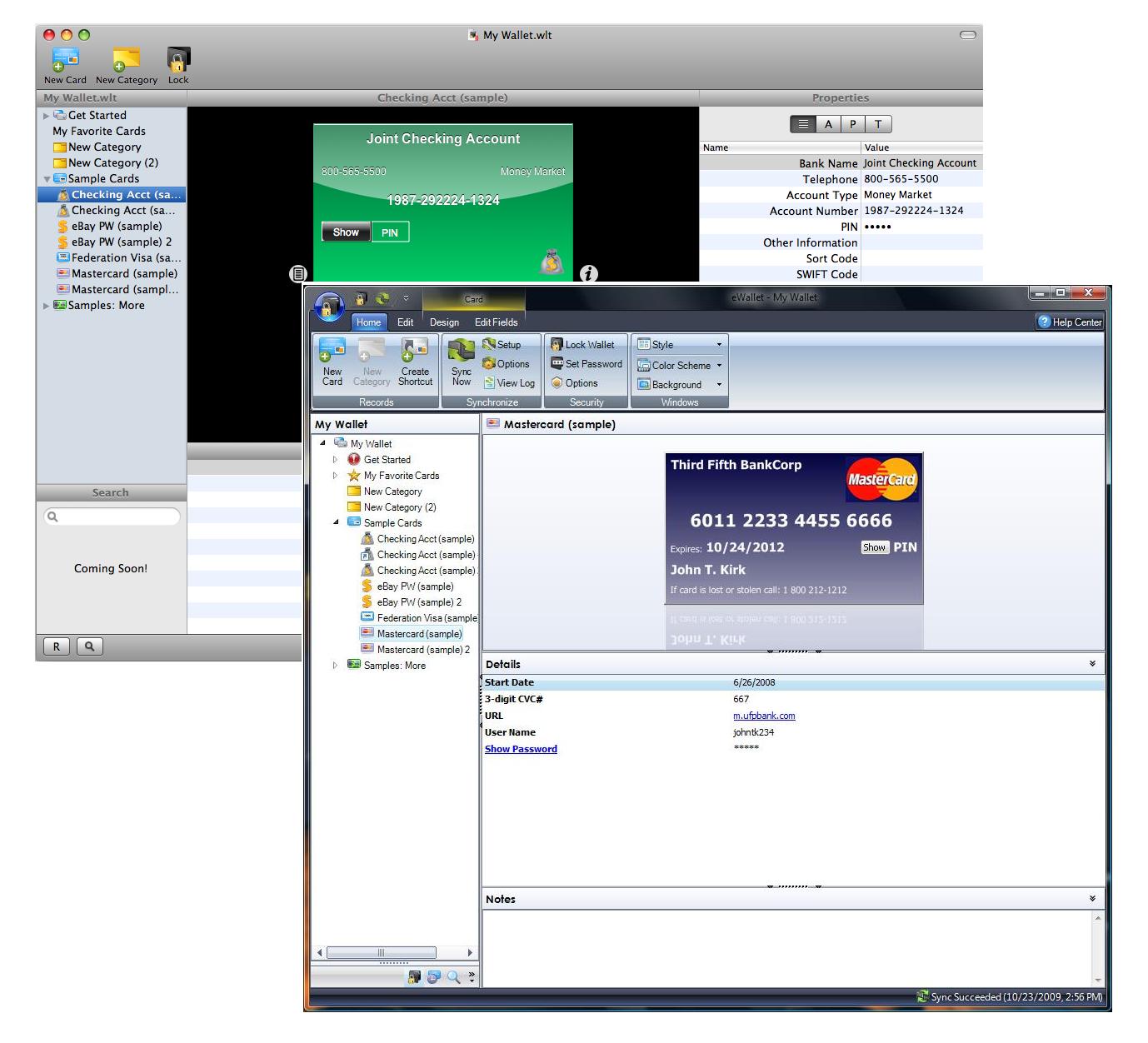
We are extremely excited to announce that eWallet 7 has just been released. Not only does eWallet 7 include a completely revamped Windows PC version, a working preview of eWallet for Mac, and a host of new features, we’re working to create a new approach to selling mobile software.
Also - if you’re just coming back to the blog, make sure to read the update at the bottom of the post!
For the full story on eWallet 7, read on after the jump…
Software is for People, Not Devices I love the new features in eWallet 7, but I’m going to start with something that I think is the biggest news. With the release of eWallet 7 we’re reshaping the idea of how people buy mobile software. For years there has been an idea that you buy software for your mobile device. This doesn’t make sense to us. People aren’t buying the software for the device. The software is for the person. That’s why with eWallet 7 we’ve completely re-imagined how you buy the product.
Now, for $19.95, you can use eWallet on any device we support. No extra versions. No extra purchases. When you buy eWallet it’s for you - not your device. This is true even for iPhone users (see the information here for details on how this works for iPhone.)
And for our existing customers, upgrading just got better (and cheaper!) For just $10.00 you can use the latest version of eWallet on your Windows PC, Windows Mobile device, or BlackBerry, and get full access to the Mac Preview.
A New Desktop Version The next big news is that we’ve rewritten eWallet for Windows PC from the ground up. With eWallet 7, the Windows PC version is easier to use than ever before, offers more options for customization, brings you some great new features, and looks amazing. We even included a way to get the Old School eWallet feel for folks who aren’t ready for a big change!
eWallet for Mac Preview
With eWallet 7 we’re also releasing a special 30 day preview of eWallet for Mac. It doesn’t include everything, but this special preview edition is ready for you to try. We even built a special tool into the iPhone version that lets you manually transfer files from your iPhone to your Mac so you can try it with your own wallets!
And if you’re an owner of the complete eWallet package, use your eWallet registration codes to unlock the Mac Preview for unlimited use!
Image Synching and More…
And that’s not all…eWallet 7 adds a number of other new features as well, including synching for inserted background images. Now, you can create an amazing wallet on your desktop complete with background images and sync it over to your iPhone or Windows Mobile device where you’ll get the same, great looking wallet!
What Do You Need to Do?
We’ll be sending out upgrade notifications over the next week with all the information you need to get eWallet 7. If you purchased within the last 90 days, we’ll upgrade you to the full eWallet package at no charge. If you purchased before that time, it’s just $10.00 to upgrade the entire package.
iPhone customers will get the upgrade to eWallet 7 for free, but please be aware that if you purchased the desktop version more than 90 days ago, you will need to pay for the upgrade if you wish to use the eWallet 7 Windows PC version.
And if you use the iPhone and DON’T WANT TO UPGRADE your desktop software, we have a special version of eWallet 6 that you can use. Read all about it here!RELEASE UPDATE 12-1-09
As you can probably tell this is a HUGE release. We’ve changed more things in more places than we ever have in any release of our software ever. We aren’t surprised to hit a few bumps along the way. SO here is what I can offer as far as how things are going!
People Love It! OK, I couldn’t resist mentioning this - in part as a pat-on-the-back to all the folks who have busted their tails on this project here at Ilum Software. Thank you to EVERYONE OUT THERE who has been emailing and posting compliments about this release. It’s great to hear so many positive comments!
Non-English Windows Installs: It looks like some folks running non-English installs of Windows are getting errors when they run eWallet 7. We are working on this as we speak and getting very close to discovering why this is happening!
BlackBerry Unlock Codes: We’ve also had some folks hitting snags when they try to register their BlackBerry version. Again - we’re working on this and will keep you updated.
Support Calls and Emails: We WILL respond to everyone, but right now Lee and Kevin are absolutely swamped - mostly good stuff but still swamped all the same - we apologize for the delays but at this stage we’re going as fast as we can. SO we’ll try to post on the biggest issues here on the blog and will try to get through all the request for support before the week is out. Sorry for the wait and thanks for your patience!
iTunes Reviews: We totally understand the frustration a lot of folks felt over the trouble with the iPhone update and we’re really sorry for the grief it caused. Even though we provided a fix, I imagine that not all of that has disappated - HOWEVER - if you feel so inclined to either provide us with a positive review OR improve a negative one, we would REALLY appreciate it. We’d really like folks to know that when something goes wrong we don’t just sit back and ignore it - I really hate asking for reviews but in this case we’d really appreciate the support if you feel so inclined. Thanks!
And that’s it for now! We’ll keep you updated as we go. It’s an exciting time here and I think as the year progresses you’ll find that this is just he beginning!
So in talking with folks about the upgrade to 7.0 issues, two commenters, Simon and Brett, were able to clearly point out something that I really do see as a significant problem. Our iPhone upgrade information read:
This upgrade requires the latest Windows desktop version to sync your data. If you bought the desktop version before August 30, 2009, you may need to pay for the upgrade. Visit our website for all the details.
Well that’s all well and good - but if you went to our site to make sure you had the right version, we tell you that the “latest Windows desktop version” is 6.1.4.
SO if you upgrade your iPhone, it should sync fine with 6.1.4 right? Wrong!
If you want the rest of the story…read on after the jump!
You see, when we wrote that statement, it was while under the impression that it would take more than 4 days to approve our app - more like 4 weeks - but in an effort to keep us on our toes, Apple DID release it in 4 days (after we closed - the night before Thanksgiving - Thanks, Apple!)
Well, I know there are lots of folks who don’t believe it, but we really aren’t over here thinking of ways to screw over our customers or squeeze a buck out of them. I realize that Corporate America has trained us all to expect that, but that truly isn’t our goal. We spend tons of time trying to make the best choice for the largest number of our customers. It’s the reason you can call us on the phone in an age where the prevailing wisdom is that no company should be reachable by phone.
SO - we’re working on a solution that would let you sync your 7.0 iPhone version with an update of the 6.1 desktop version. I’m not making promises here. It’s what we’re shooting for, but we just started working on this so I’m not sure what the end result will be or how long it will take. Now in theory, 7.0 will rock so hard no one will want this solution, but we’re working on it just in case.
The point is that you’ve made a fair argument with this one and we will do what we can to resolve the situation in this case. On other issues we may just have to agree to disagree, but on this one you’ve made a good point.
OK - back to prepping for the release!
- Marc
UPDATE: I just got handed a first try at a solution for the 7.0 iPhone/6.1 Windows PC issue. It will need some serious testing and likely a number of tweaks but it’s a good start.
I’m in the middle of a major software release right now so I’ll make this quick. I apologize that I can’t respond to all your comments individually, but considering how many of them there are, that simply isn’t possible. So - let’s get started…
Thanks!
First let me say thanks to everyone who posted their support. We really appreciate it and we are working very hard to live up to your expectations. The new release is a pretty big deal and I think you’ll all like it. In fact I think you’ll REALLY like it. So thanks for your kind words and we hope you like eWallet 7.0!
eWallet 7.0 Will Be Out Tuesday
eWallet 7.0 will be out tomorrow morning. This was the planned release date all along and we’re sticking to it.
More after the jump!
Why Did iPhone Come Out First?
Ask Apple! Our last update took 4 weeks to get approved. This one? 4 days. Seriously. We wanted them to come out pretty close (or at least have the desktop version out first) and we thought our timing was pretty good but once again Apple proved us wrong. What can I tell you - we’re at their mercy on this and we have absolutely zero control over when they release our software. It sucks. They should let us choose a date to go live once they approve it.
I Have to Pay to Upgrade?
As it says in the update notes for iPhone version, the upgrade to eWallet 7.0 on desktop may be a paid upgrade if you purchased more than 90 days ago. The price is going to be our usual $10.00 upgrade price, but with this release you’re getting something extra as well. More on that tomorrow.
I Don’t Want to Pay to Upgrade!
If you don’t want to upgrade, then you don’t have to. We’ll continue to support our previous versions just like we always have. Heck – we’ve got a couple of eWallet 2.0 users we still take calls from now and then. So if you fall outside the 90 days and you don’t want to pay to upgrade, feel free to keep using the previous version.
I Already Upgraded My iPhone and Don’t Want to Pay to Upgrade! I’m sorry. We made it extremely clear in the upgrade information that you may be required to purchase an upgrade to the desktop version. I’m very sorry if you didn’t read that before you upgraded. Update information really is very important and worth reading.Although Apple doesn’t provide you with any way to backup to an older version (although they should) there are some work-arounds out there in google searches. Here is one that Pierre posted in the blog comments here:
You can revert back to your iPhone e-wallet version 6. You need to look at your Recycle bin and check for ewallet.ipa. It should be 2.8meg. Delete your version 7 in iphone and itune. Double click ewallet.ipa and reconfigure sync. Back to normal.
Keep in mind that this is a non-supported function. I can make no promises about how well this will work. UPDATE: OK, so in talking to folks we discovered that our perfectly clear message was anything but. In fact it was a bit misleading. Please check out the NEXT blog post for an update on that - we’re working very hard on a solution to help out folks who are having trouble now or who don’t want to upgrade. Again, sorry about that!Just Send Me the Old Version If I send you the old version today, we’ll be kicked off the AppStore tomorrow and there won’t be an eWallet for iPhone. Apple won’t let us do that. Period. In fact they don’t even give us a way to get software onto your device outside of iTunes.
You Shouldn’t Charge For Upgrades!
Not charging is not a sustainable business model for a product like eWallet. New sales alone don’t cover the costs for development of major changes in functionality. We have to charge for upgrades.
You Should Have There was lots of advice in the blog comments. Some constructive - some not. I can’t answer all of them here but we thought - carefully - through pretty much every idea you posted. For any number of reasons they wouldn’t work, with reasons ranging from the limits of the AppStore to economic suicide. We truly did choose what we believed was the best possible path for this process in an environment where we have less and less control over that very same process.
Mac? Mac? MAC!!??
I’ve got something for you - not exactly what you’re expecting but I think you’ll like it! Check back tomorrow!
There is trouble brewing in the iTunes App Store, thanks to the combination of two App Store features. The first is the pre-existing Rate It If You Hate It ratings prompt system, where they prompt for ratings when you uninstall. The second is the recent change that allows free applications to use In App Purchasing to expand functionality, effectively creating a trial version system for the store.
I’m not a fan of how they’ve implemented either of these, but more importantly, when you combine these two it creates a perfect storm of trouble! Read on after the jump for the entire story about the problem Apple has created…
Rate It If You Hate It
When you uninstall an application from your iPhone, Apple prompts you to rate it. One of the main reasons people uninstall is that they don’t like the application. This encourages everyone who hates an application to rate it and makes it VERY easy to do so - a single button push at the end of an unisntall.
Unfortunately Apple doesn’t do anything to encourage people who like an application to rate it. If you like the app, use it every day, and never uninstall, Apple never prompts you to rate it.
The end result is what I call the Rate It If You Hate It rating system. It’s an ugly system, and its effects are best seen in free applications where hundreds, sometimes thousands, of negative reviews get posted. Paid apps are protected from this (slightly) since you have to own an application to rate it - if you paid for the app there is a good chance you wanted it and like it.
But since anyone can download a free app, lots of people try it, find it doesn’t suit them, uninstall, and give it a bad rating. In many cases it isn’t that the application is bad - it’s just that this isn’t the right app for that person, wasn’t quite what they were looking for, or some other knee jerk response.
There are hundreds of amazing free applications with tens of thousands of happy users and two star ratings for this very reason.
In App Purchasing
The next issue is the decision to allow free applications to use In App Purchasing. With In App Purchasing you can download a free, limited version of an application, and if you like it you pay a set amount to unlock full functionality. On the surface this sounds great - in reality there are some serious pitfalls.
With this system, it encourages every developer to build their apps this way. The result is an app store where everything is free and you can’t tell how much applications actually cost. In addition, paid (via In App Purchasing) applications get stacked in the same lists as free applications making it tough to tell what is actually free!
There are other challenges as well but these are a couple of the big ones for customers.
A Deadly Combination
By themselves these two issues are pretty serious. Combine them and it could spell disaster. Suddenly every amazing paid application in the app store is getting its star rating tanked by the Rate It If You Hate It system. How are users supposed to gauge the actual quality of an application when they all have 2 stars or less thanks to this misguided “feature?”
It also opens up the rating system for tampering. Requiring ownership of an application helped protect paid applications from underhanded competitive practices. Few competitors are going to go out and pay people to buy your application for $10 a pop just to give it bad ratings.
But what happens when it is free, and they can get anyone and everyone who is willing to download it, uninstall, and give it a one star rating? I’d like to say that I’m just being overly paranoid but we aren’t new to the mobile software market. This is a very real danger.
Hey, Apple! I Hope You’re Listening!
I sure hope Apple is listening. It isn’t too late to avoid this problem. By making a few small changes, such as categorizing free applications that use In App Purchasing as “Paid Apps”, and only allowing people to review a free application that uses In App Purchasing after they’ve made the In App Purchase, they could prevent this. It won’t solve all the problems these two policies create, but it will certainly help to avoid a much, much larger problem.
Since a lot of questions about platforms and release plans have come up in the other blog posts, I thought I’d take a second to write a quick update. I hope this helps to answer some of your questions! Keep in mind that in many cases I won’t be able to give specifics, but I will do my best to tell you what I can.
So, if you want some insight into what’s happening at Ilium Software, read on after the jump!
Wait! What? Why no specifics?
A few reasons. The main one is that there is a lot of stuff I’m not allowed to tell you. We have NDAs (Non-Disclosure Agreements) with a lot of people, and the work we’re doing is almost always covered under one of these. I’m just not allowed to tell you some of the things I’d like to.
Also, I recently compared this job to doing improv. The nature of our market means that everything is changing all the time these days. Trying to get specific about something that hasn’t happened just causes problems when circumstances change (and then I can’t explain why due to the first issue I mentioned!)
A Note on Etiquette
I know people have some strong feelings about our products, and sometimes that comes out in blog comments. If I feel that a comment really isn’t constructive or isn’t civil, I will remove it. For a long time I never did this, but I’ve found that there are a lot of people who want to talk about these things but get turned off by too much “passion” so I want this to be an environment where they can be heard.
That said, if you have a “passionate” comment you’d like to make - just email me personally and I’ll reply to you. Send it to info@iliumsoft.com and put Attn: Marc in the subject.
So without further ado, on with the show…
eWallet for Mac: Let’s jump right in shall we? Here is the status:
We’re still planning to release it!
We already gave a version to a high level beta team to play with.
I’m expecting a new build within the next couple weeks.
I personally think it rocks.
This is quite literally ALL I can tell you right now. Again - we’re not posting this to convince people to hold out for it - we’re just letting you know what’s up!
eWallet for iPhone: We’ve heard your requests and we’re working on it! As you know we added Copy & Paste recently, and just last week we released eWallet Lite.
eWallet for Windows, Windows Mobile, and BlackBerry: All of these platforms are getting attention right now. I can’t say much more but we’re pretty excited about what is in store and we think you’ll like the results.
ListPro for iPhone: Here is the rundown:
It’s still in development.
A version exists that we’re using in-house.
Creating a good sync solution is still a VERY challenging issue.
We’ve set our sites farther than the “read only” solution we talked about a long time ago.
Like eWallet for Mac, this is ALL I can say about this right now.
Windows Mobile: We did a lot of behind the scenes work getting the Windows Mobile applications ready for Marketplace and we’re quite happy with how that is going. We have additional updates in the works and are very happy with the platform (from a developer and sales perspective.)
Android: Look, I like Android a lot but so far it hasn’t proven itself as a strong market for software development. We already have a lot on our plate and developing versions of our products for other platforms is a HUGE task. It eats up lots of time and lots of money. As a result we need confidence in the platform if we’re going to embrace it. So far, despite its good points, I still don’t have confidence in Android. That could change but I’m still in a wait-and-see mode.
Palm’s WebOS: Palm is a fighter - I’ll give them that. Unfortunately, none of the things I’ve talked about in the past regarding Palm have changed, and although they are seeing moderate success with their application market, it has a long way to go before it’s a strong competitor. Like Android, I’m watching this one close but so far we haven’t committed one way or another on WebOS.
NewsBreak for : We don’t have plans for other versions of NewsBreak right now but the requests keep coming in so we’re leaving our options open!
ADDED 10-21-09 eWallet Web Companion: Yes, the EWC (as we’ve taken to calling it around here) is still in the works. We ended up delaying it for a number of reasons. The main thing that happened was eWallet for Mac/ListPro for iPhone came back in-house. The resources only stretch so far. There are other reasons as well, inluding some work going on with the normal version of eWallet that could impact the EWC (in a good way!) So yes - we still want to make this a reality but it remains in Beta for now.
I’m sure I’ve skipped things people want to know about so feel free to post them below!
 It’s only been just over a week since the iPad version of eWallet was approved by Apple, and I’ve already got an update - with some cool new features - to tell you about!
 We are extremely excited to announce that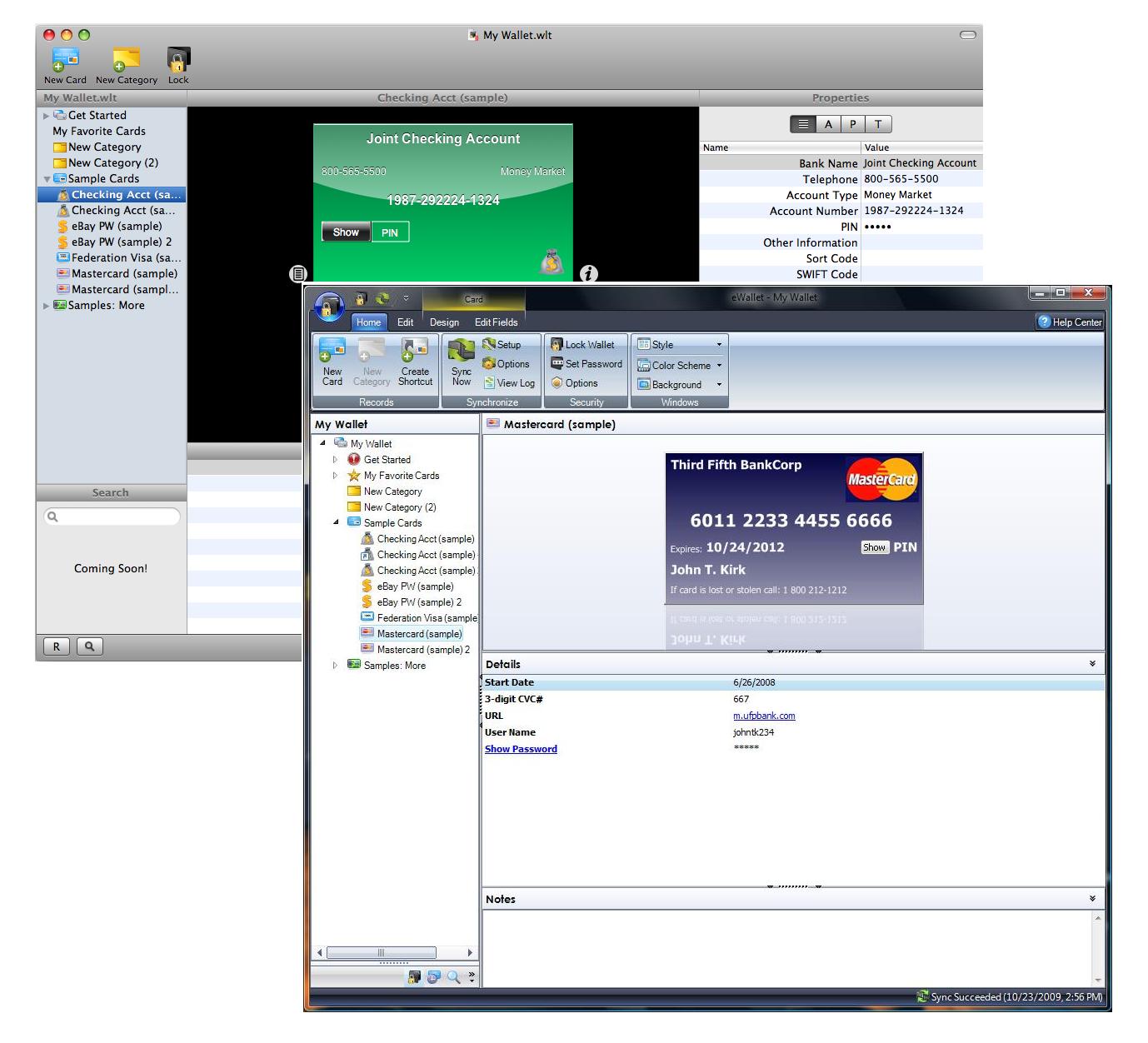
 I’m in the middle of a major software release right now so I’ll make this quick. I apologize that I can’t respond to all your comments individually, but considering how many of them there are, that simply isn’t possible. So - let’s get started…
 There is trouble brewing in the iTunes App Store, thanks to the combination of two App Store features. The first is the pre-existing Rate It If You Hate It ratings prompt system, where they prompt for ratings when you uninstall. The second is the recent change that allows free applications to use In App Purchasing to expand functionality, effectively creating a trial version system for the store.
 Since a lot of questions about platforms and release plans have come up in the other blog posts, I thought I’d take a second to write a quick update. I hope this helps to answer some of your questions! Keep in mind that in many cases I won’t be able to give specifics, but I will do my best to tell you what I can.