eWallet for BlackBerry is now available! That’s right! It isn’t a beta - it’s the real deal. For a limited time, eWallet for BlackBerry is only available directly from Ilium Software and WebIS. We are working on getting it into your favorite retail stores, but rather than delaying the release further we figured we would make it available through our direct store today.
It has all the great features you’ve come to expect from our products, syncs with the current version of eWallet for Windows PC, and is fully compatible with all of your existing wallet files. We worked with WebIS to bring this great product to you, and please contact Ilium Software directly if you have any questions. Our support staff is here to help you with eWallet for BlackBerry just like we do for eWallet on all the other platforms. (For those of you who are new to eWallet, we’re available toll free at 888-632-5388 M-F 9am to 4:30pm ET or via email at support@iliumsoft.com.)
You can download eWallet for BlackBerry here. Try it for 30 days to see if you like it! If you do, you can purchase eWallet for BlackBerry here. And if you are a current eWallet user, find out about getting BlackBerry for the discounted $10 add-on price!
As you may have already heard, Apple just started making promo codes available for their iPhone apps. That’s right - we get 50 codes for each of our programs. It’s great news for us, and we’re very happy that Apple has decided to implement this. To celebrate we’re going to hand out some free codes right off the bat!
The first 10 people to grab one of the codes below get a free copy of Kings Corners on the App Store! Please leave a comment mentioning which code you used so others won’t try the same one - they only work once. Right now, promo codes only work in the US iTunes Store, and they will expire in 4 weeks (although I have a feeling it won’t take you that long to use yours).
After you play a few games, it’d be great if you wanted to leave your thoughts in a review on the App Store. Of course, it’s not necessary, but we always love to hear what you think. Have fun with Kings Corners, and try not to get addicted to it!
Just a quick update on eWallet for Mac. Contrary to what I’ve seen posted in some of the blog comments, we are in fact making eWallet for Mac. As a matter of fact, we’ve ALWAYS planned to make eWallet for Mac at some point. This is something we’ve had in the works for a few years - pre-iPhone even. If you want to know more about eWallet for Mac, check out the rest of the post after the jump!
Disclaimer: In all of my posts I’ve always been very honest in what I tell you - brutally so at times. That won’t change here. Everything I’m writing in this blog post is a business side analysis. I AM IN NO WAY MAKING A JUDGEMENT ON THE QUALITY OF THE MAC OS. Frankly, it’s an incredible OS. This blog, however, is about the business of making software and not my personal feelings about the quality of an operating system.Mac and Me
Before I get too far into things I want to give you a little history about Mac and Me. Before I graduated from the University of Michigan I’d used two types of computers - Commodores and Macs (OK - I’ll admit, I played Civilization and Doom on Windows towards the end of college but that was it). I was a Mac guy through and through. I owned the top of the line PowerMac and LOVED it. Three things moved me away from Mac. 1st - I couldn’t get software, hardware, or anything else for it. :( 2nd - I used Windows for my work. 3rd - Price. After college I had no money. When the ol’ PowerMac died I moved on to a Windows machine.
And for those who don’t know, even our founders are “Mac People”. Just making clear that decisions about Mac are unrelated to how much we like the OS.
SO, ON TO THE PRESENT DAY….
Why a Mac Version of eWallet and Why Now?
As I mentioned above, we’ve always planned to release eWallet for Mac at some point. The problem was that for a long time the market didn’t support this. Just looking at desktop OS use alone and even today it comes out to something like this:
Making and maintaining Mac software is no easier than making and maintaining Windows software. At the same time, a Windows product has a potential market more than 10 times that of a Mac product. This is a HUGE difference. Simple math demands that we put our emphasis on Windows. 11+ years down the road that decision has proven a wise one.
But there is even more to it than that. We aren’t a desktop software company. Yes, our desktop software rocks, but our primary focus is Mobile Software. The desktop system used by most Mobile Device users has long been Windows. This further reduced the potential market for a Mac version, since people typically buy our desktop software to add-on to their Mobile experience - and these people used Windows.
So for a VERY long time, Mac just didn’t make good business sense based on our company focus.
Enter, the iPod (thought I was going to say iPhone didn’t you?) Suddenly, huge numbers of people were being introduced to the world of Mac devices. Apple got cool rather than fringe. Next came the iPhone! Now we had a full blown mobile device running Apple software.
So here are the factors that changed the market:
The iPod becomes THE music device. Apple is now everywhere.
The iPhone/Touch took the world by storm - and moved Mac into our area - Mobile Software
The internet becomes one of the most used “applications” cutting the importance of the OS
The latest Macs really CAN run Windows well, offering the “best of both worlds”
Suddenly, the Mac becomes a valid platform (financially) for us to invest in. I see the Mac market share continuing to grow over time, especially as young people who have grown up with white earbuds attached to their skulls go out and buy their first post-college computers. The name recognition alone will drive sales.
But There is a Catch! The Cold Hard Facts…
Look back at those market share numbers I posted. Even though Mac has been around for a long time, from our business perspective it is still an “emerging market.” Mac still commands less than 1/10th the market share that Windows does. No matter how much excitement surrounds the iPhone, we still have to remain realistic about what we will get back on our investment into Mac software.
I mention this due to blog comments saying “why aren’t you throwing everything you have at Mac?” Simple - we’d be completely abandoning the enormous market that pays our bills. Windows is WHY we have the opportunity to make a Mac version. Without Windows and Windows Mobile, we simply couldn’t afford to make a Mac version.
This means that when I sit down and mete out the limited resources available to me, I can’t drop everything to focus on Mac.
Now don’t get me wrong - when we do something, we do it right. Our Mac version is already INCREDIBLY cool. I’m totally geeked about it. And once it is out we plan to support it 100%. I just can’t afford to pull resources from the things that pay the bills to push Mac out faster.
Which Brings Us To the Big Question…When Will It Be Out?
My initial guess was by the end of the year. Now before I go on, I would like to clarify something.
Although it is possible I mispoke at some point (seriously, we aren’t in the business of trying to trick people or mislead them - it’s bad business and goes against our ethics), I always did my best to say “Our hope is that it will be out by the end of the year” and “We are shooting for the end of the year.” I did this because frankly, we don’t do “release dates” (See the other post for more about why release dates and software don’t mix.) As it stands right now, knowing what I know about how long it takes to get things done, I doubt it will be done by year end.
How long until it is ready? Sorry, but I’m not going to try to guess. Recently, my guesses have been interpreted as release dates so I’m going to have to stop doing that. I will say that we have a working version, the UI is coming along, and we actually have people outside Ilium Software using it right now.
Can you show us a screenshot? Nope, sorry. Trade secrets. Seriously, people like to copy our stuff so we seldom reveal it in advance.
So there you have it. We’re definitely going to release eWallet for Mac, but I’m not sure of the exact release date. You can be assured that as soon is it is ready, though, you’ll hear about it here!
Hey, everyone! We just released a new version of eWallet for Windows PC. Based on some of the great feedback we got from iPhone customers, we were able to make a couple of tweaks that should help to avoid some of the iPhone sync problems some people have seen.
We’ve sent this version to many users now and it does seem to help with the following issues:
Some cases where it can’t find the iPhone.
The problem where it can’t find the wallet on the phone and tries to create a new one there very time.
So, if you’re running into either of these issues, give this new version a try. Just install it over the old desktop version and it will auto-register. You can download it here. And this way, if you’re still having trouble, it will let us eliminate a variety of problems.
We don’t plan a mass email about this. The reason is that while the problems are insanely annoying to the folks that see them, the iPhone sync issues are really quite rare. We hate to have people go through an update process when there is really no advantage for them in doing so. Not only that, but even “there is a new version” emails feel like SPAM to many folks. Despite the fact that lots of people like to get these, even more don’t like to get them. Even opting-in to get the notifications, people still view corporate email negatively.
So there you go - your ‘insight into the mind of an Ilium Software product manager’ for the day! And for those of you with sync issues, hopefully this will solve some problems!
UPDATE: I forgot to mention that we’re also working on a minor iPhone side update that resolves the ‘invisible keyboard’ issue some people have run into with the 2.1 iPhone update. While we aren’t entirely sure what Apple changed that resulted in this problem, we did manage to fix it! Probably a week or two and it will be out.
Hey everyone! As I announced, eWallet sync is out and it’s going really well. For most folks it’s a simple process and is working like a charm. Of course as one would expect with the number of folks we have upgrading right now, some people are running into some problems. Fortunately, most of these are pretty easily fixed.
So if you’re one of the folks who are having some trouble, read on. I’ve got some easy fixes, and if you’re still having trouble let us know via our support lines! We’ll get you up and running.
Quick And Easy Problem Solving!
Before I go into details on various issues, let me give you the top ways we’ve helped people solve their problems so far!
Make Sure You Run Sync on the Device: If you want to synchronize, you need to start sync on both the device AND on the desktop. A lot of times folks have hit sync on the desktop but not in eWallet on the device. We do it this way for security reasons I’ll address in a future post. You can find detailed step-by-step instructions for doing this under Help->eWallet Tutorials on the desktop or in the Help file that installs with the desktop software.
Make Sure You’ve Installed eWallet 6.1.2 on the Desktop and Device: You need the very latest version of eWallet in both places to make sync work. The iPhone update will show up under updates in the App Store. You can download the latest desktop version of eWallet here. It’s a free upgrade if you own eWallet 6.0+ (it will auto-register when you install it) and $9.95 if you are adding it on or upgrading ( get it at the discounted price here if you already own 5.0 or less or are adding on.)
Create a Partnership With the Phone: Before you can start synching you have to create a partnership in eWallet between your phone and the desktop version. You only have to do this the first time you sync. After that you just sync. There are a number of reasons for doing it this way, security in particular, but I’ll talk about that in a later post. For now, if you have trouble setting up the partnership, check out the step-by-step instructions in eWallet on the desktop (Help->eWallet Tutorials) or the help doc on the desktop for detailed instructions.
Reinstall Bonjour: We’ve found that some folks need to reinstall Bonjour. You can get Bonjour here. It may ask you if you want to do a repair installation. If so, say yes!
Delete and Re-create the Partnership: Stop any wallets from synching with the iPhone using Setup under Synchronize on the desktop. Then, still in setup, remove the phone from the list of sync locations. Now recreate the partnership with the phone.
Close eWallet on Both Sides and Try Again: A simple one but you’d be surprised at how often this fixes things!
This may or may not solve the problems you are having, but so far we’ve found that one of these resolves most of the issues folks are having. Of course if you’re still having trouble you can always contact us. That’s what we’re here for.
Specific Questions and Problems
I called/sent an email! When will you get back to me?
We hope that no one will wait more than one business day for a reply. The response to this new release has been TREMENDOUS. We’ve got folks working non-stop here just fulfilling desktop add-on phone orders (yep - we still get a lot of orders by phone!) So if you don’t get a response right away, know that we’re plugging away and hope to get back to you as soon as we can!
If you want to speed up response/solution time, make sure to include the following info:
Version of Windows you are running (and is it running on a Mac)
If Vista, are you using UAC
Are you on a commercial/work network, or a home network
Are you using AdHoc wifi to connect
Is your phone Jailbroken.
Why don’t my pictures and custom icons sync?
Unfortunately, eWallet hasn’t ever done image synching and iPhone is no exception. The original reason (for Windows Mobile/Palm) was sync speed and device memory. These aren’t issues with the iPhone so we are working on this for a future release.
It keeps saying the wallet doesn’t exist and asks if I want to create it!
This one is a puzzler and we’re working on it. We haven’t seen it here nor have our beta testers. We’re trying to replicate it and if you’ve seen this problem, please email us. We’d love any additional input folks have! In at least one case, trying some of the Quick and Easy steps solved the problem but I’m afraid it didn’t tell us why someone might run into it. The good news (to anyone who hasn’t seen it) is that the problem is pretty rare. The bad news is that this makes it tricky to diagnose!
UPDATE 9-10-8: Matt, one of our developers here, figured out why this happens! He is working on it as we speak! We’ll keep you updated!
Ahh! I updated but my wallets are gone!
In theory, Apple should be handling the updates in a way that this won’t happen. This is one ball that is firmly in the Apple court though. The good news is that normally this doesn’t happen. IF it does happen, try restoring your device. iTunes is supposed to be backing up even the data files when you sync to iTunes.
It can’t find my iPhone but I’m connected!
Again, for some folks the Quick and Easy steps did the trick but for a couple it didn’t. One of the most common secondary problems is a network using subnets. In simple terms, it’s like driving in the Express lane on a highway with a Local/Express split. You’re both going the same speed on the same road in the same direction but there is a wall between you. Another common problem is that the Firewall is blocking the connection. To see if this is the issue, try turning off the Firewall (temporarily) just to see if that makes any difference. (It will be good for support to know you tried this if you’re still having trouble!)
Oh - And one thing one of our posters here reminded me (Thanks M!). Although I don’t usually give ANY Firewall settings advice, he mentioned that in the Vista built-in settings there is an Exceptions tab where you can check to allow eWallet through! Might help folks with this problem!
OK! I’m going back to help with answering emails. Hopefully this will help some of the people who have run into challenges. If not, let us know!
In case you hadn’t already heard the news, eWallet iPhone sync is out! It went out yesterday evening. Thanks to everyone here who worked so hard to make this happen, and thank you to all of you out there who stuck with us and gave us your support along the way. It’s great to hit the “finish line!”
So, on to the other sync topics!
First let me extend my congratulations to Adrian, who noticed and posted about the release a few minutes before we even got the notification from Apple! He can officially shout “FIRST!”
Second, I’m thrilled to say that sync is working great. With a few exceptions folks are not having any trouble at all. If you’re having problems absolutely contact us. I’ll let you know that we’re getting a LOT of calls/emails right now as people rush to get the new version and upgrade their desktop versions, but we’ll do our absolute best to get back to you quickly.
Third, here is how to fix the most common problem we’ve seen. Make sure you have eWallet 6.1.2 on your desktop. Just download and install the latest version from this page or using this direct link. You don’t need unlock codes if you’re already using a full/unlocked version of eWallet 6.0+ on your desktop. It will auto-register. This has solved the majority of issues we’ve seen.
Fourth, I’ve made a note of all the other questions folks have had and I’ll reply later today. Needless to say things are a little hectic this morning, but I’ll definitely get to all of your concerns. I just need a couple hours to sort through the couple hundred emails and blog comments. :)
Fifth, we’re emailing everyone who has registered! We’re in the process of sending those out so everyone should get a notification along with the appropriate link for the latest desktop version update.
Thanks again everyone! I hope you like it and feel free to contact us if you have any questions!
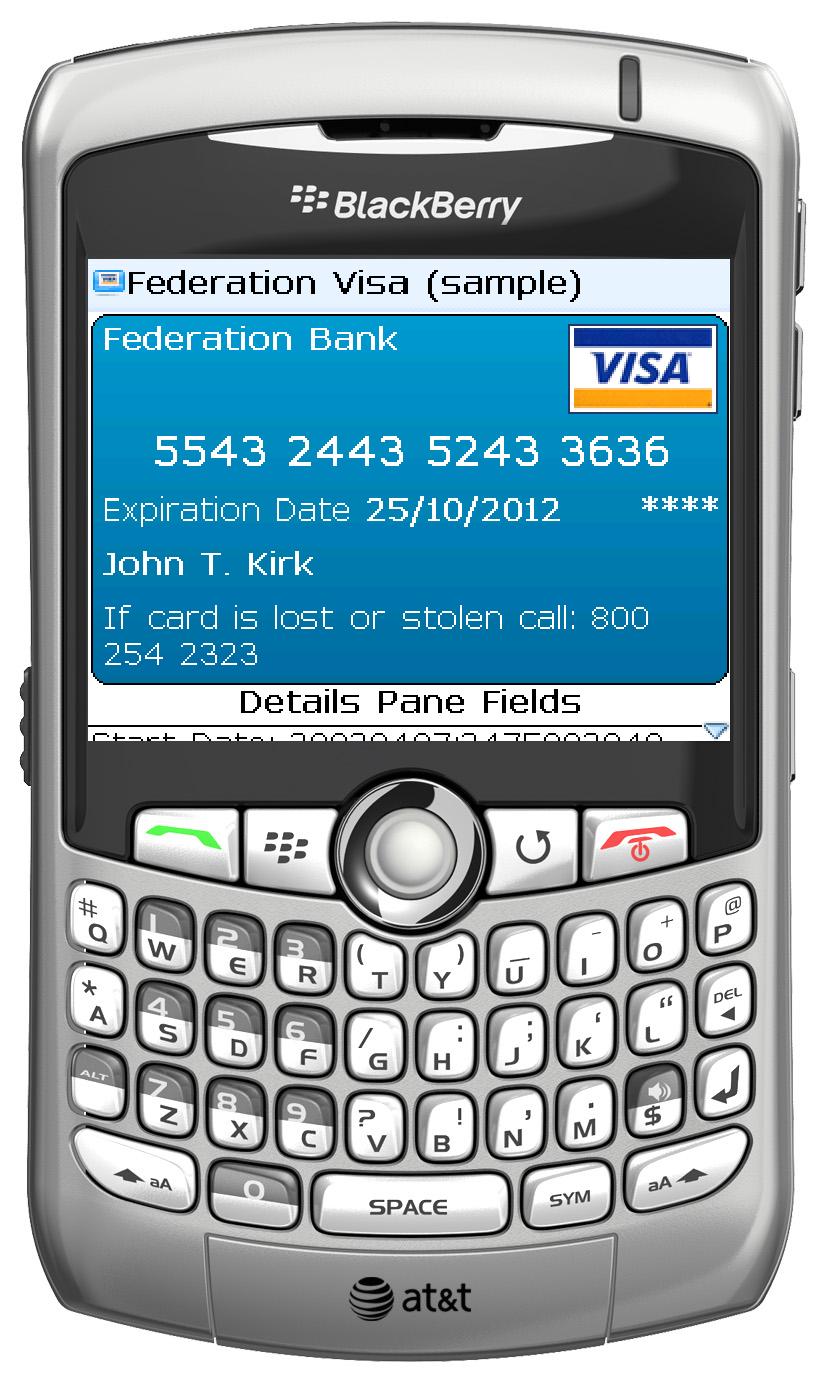 eWallet for BlackBerry is now available! That’s right! It isn’t a beta - it’s the real deal. For a limited time, eWallet for BlackBerry is only available directly from Ilium Software and WebIS. We are working on getting it into your favorite retail stores, but rather than delaying the release further we figured we would make it available through our direct store today.
 As you may have already heard, Apple just started making promo codes available for their iPhone apps. That’s right - we get 50 codes for each of our programs. It’s great news for us, and we’re very happy that Apple has decided to implement this. To celebrate we’re going to hand out some free codes right off the bat!

