Every once and a while, Ilium Software tech support gets a heads-up about an interesting and unexpected use of one of our products. We aren’t the only ones; Patrick at MicroISV on a Shoestring had the same experience and his story prompted me to think.
Sometimes the use case isn’t much of a stretch; ListPro is a program to make lists, so it’s hard to find a use for ListPro that isn’t obvious by definition. Prayer lists, scavenger hunts, web bookmarks, flight checklists… they’re all still just lists. NewsBreak is the same way; RSS and ATOM are usually used for simple ’newspaper headlines’, but all sorts of information such as your NetFlix queue, Gmail account, eBay search results and weather reports are available via RSS. These uses are just part of what NewsBreak is designed to do.
eWallet, on the other hand, is really designed to be a program to hold your sensitive personal information like passwords, credit card numbers, bank account numbers, frequent flier mile cards. That’s it; you put personal information in, eWallet encrypts it under one password. That doesn’t stop people from coming up with their own uses.
Just yesterday, we had a user mention that she used eWallet to keep track of things she wanted to buy on the web. She would create cards with the backgrounds set to a picture of a particular item, with the weblink to the item and a description in the notes. That way, she could see at a glance exactly what something was, instead of having to go visit the website to figure out why it was in the list.
This is not something eWallet was intended to do, but it works and made the user happy. The ‘pictures of stuff to buy’ list works because eWallet supports both card background graphics and Picture Cards (useful for pictures of your dog / cat / gerbil with fruitless dreams of freedom / kid / favorite flower pot / car / boat / that really big fish you caught that was thiiiiiiiis big, really! / etc.) You know, stuff you would keep in a real wallet.
It also brings up the great can-of-worms question, “Should we pursue this with eWallet?” I definitely don’t have the answer. Questions like these are great, because they open up all those weird little opportunities you - the developer, or tester, or anyone else in software development - wouldn’t necessarily think of on your own.
I had to share something that came up in a support call yesterday. It’s either really horrible or incredibly funny depending on your point of view.
We received a panicked call from someone trying desperately to access an eWallet file that they didn’t know the password for. This isn’t all that unusual. We all know that it’s easy to forget the “really good” password you came up with (one of the things that makes eWallet so handy!) The problem of course is that eWallet, being a secure information manager, really IS secure. If you forget your password there is NO backdoor, NO way to reset the password, and NO reasonable way to hack the wallet*.
In this case though, the problem was that Company A bought out Company B and laid off all the IT staff from Company B. Unfortunately for “A”, the IT staff at “B” stored all the vital IT info in eWallet and no one bothered to ask them for the password when they laid everybody off.
Needless to say, panic ensued. As a person who knows how bad it would be if we lost access to all our passwords, I can feel their pain…but on the other hand, as a guy who has seen his friends dumped out on the street during a merger, I can’t help but snicker.
\* There are numerous articles about hacking 256-bit encryption. Estimates to do so typically involve a few hundred thousand computers linked together and working continuously for tens of thousands of years. Yeah…pick a good password and you’re all set.
In eleven days, I will have been working for Ilium Software for two years exactly. I think. I’m really bad at numbers. In those two years, I have slowly drifted towards being something of a Good Customer Support advocate. Now that we have a blog, I can actually say something about what goes on in my head.
I get to be on both sides of the fence when it comes to customer support. I’m a customer getting support from other companies, and I provide support to our customers. Some people probably don’t reconcile this state very well; I can’t imagine that spammers are delighted to sift through spam email every morning while they have their coffee and wake up, nor can I imagine that telemarketers are very pleased when someone selling vinyl siding interrupts their dinner.
I can’t stand receiving poor service, though, and I don’t want to give it to anyone else. I also can’t stand it when other people describe poor service, or describe the way they treat customers/service reps.
As a result, I’ve come up with this guide to Customer Support Etiquette, for both sides. It’s not very complete, but it’s a good start.
Customer Etiquette
Be polite. You don’t have to be cheerful, but don’t be a jerk. Say, “I’m unhappy, why did this happen?” Don’t say, “What are you trying to do, rob me?”
Don’t call the representative names. Unleashing a string of profanity at a service rep won’t do anything except indicate that you are angry, and that you are very likely to be unreasonable. Interestingly, I have never had this happen here at Ilium Software, but I did have to hang up on someone who was screaming into the phone at my previous job. An exception to this rule is if you are trapped in an obnoxious telephone menu system - some people have noticed that if you start swearing at a phone system, it drops you to a human.
Know when to walk away. Sometimes, hassle isn’t worth the effort you put into it. If you are in line at the grocery store and you are hassling the clerk about how your hot dogs came up the wrong price, and the line is fifteen people long behind you, getting your forty cents back is going to cost fifteen people their time and the anguish of listening to you complain while their ice cream melts.
Know when to push. It’s like that song by Kenny Rogers - know when to hold ’em, know when to fold ’em, and I won’t go on with the rest of the song. If the answer is “No” the first time, asking a second time is probably not going to kill either you or the other person but they may change their tune. Ask a third time and you’re going too far.
Show respect. You are probably talking to a human being. What answers they give you may not be your own answers, but mandated by their employer. Understand this, and don’t give them too much of a hard time. I can’t say how many times I’ve read comments on websites where people completely tear up sales associates at retail stores. It might be annoying to be swarmed by sales people when you go to buy a CD, or asked to buy a service plan on something inconsequential like a small carrying case, but it’s not the actual person’s fault. This is actually a touchy issue - you might very well consider that it really is the person’s fault because they chose to work at that job. It should be somewhat evident if they are out of line, or just reciting drivel. Pity the drivel, stand up to behavior that’s out of line, and that is the meaning of respect in this case.
Do not treat CSRs as if they are automatically going to be a problem. Customer Service is not your enemy until proven as such. At its best, customer service is your best friend in the whole world. At its worst, it will drive you insane. It will not, however, kill you in the huge majority of cases. You will cause needless stress on both sides if you approach a service interaction as if the other person is going to try to destroy you.
Customer Service Representative (and company) Etiquette
Don’t insult the customer. No matter how stupid someone is or seems to be, never say anything about it and don’t throw them a line you’re not holding onto. Even if you have to stomp the floor and scream into a pillow when you get off the line, hold your tongue.
Don’t create CSR rules that only exist to help you maximize your profits. This one’s for companies - if you have created a rule that doesn’t just stem losses but tries to raise your profits with no necessary benefit to the customer, you’re opening yourself up for all kinds of ill will. See the link in the above bullet.
Learn to speak. If.You.Sound.Like.You.Are.Giving.A.Book.Report.In.Third.Grade or you sound like You.Are.The.Magazine.Salesman.From.“Office.Space”, You.Might.Be.In.The.Wrong.Job. That said, by the end of the day my standard “Ilium Software, this is Kevin, what can I do for you?” greeting becomes impossible to say without stuttering.
Fix mistakes and apologize. If you make a mistake, fix it and say you’re sorry. If someone else makes a mistake, fix it and say you’re sorry. I recently had to talk to five different people at my cable company just to get my service properly moved from one apartment to the next. However, at the end, the rep apologized for the mess and fixed it. They didn’t blame me, they didn’t pass the buck, they said, “I’m real sorry that happened, I don’t know how they could have scheduled an appointment for before you called, everything is set up now, really, honest.”
Don’t give out useless compensation.“I’m sorry you had a bad time with us and now want to kill all of our service reps. Please accept this pointless gift card good only for something from the company you now despise, or this coupon that looks great but can’t be used for anything.” Bzzzt. Wrong answer.
Remember what a customer is. They’re paying your for something. You wouldn’t have a job without them.
A plug here for a really excellent blog about development, release, marketing and support of a new product. I especially liked the two posts: Support Does Not Scale and The Passion of the Customers. How Patrick has the time to write this much as well as actually do everything he’s writing about is beyond me.
Ilium Software is really happy to have customers, but not so happy to have them that we would do anything to keep them. On the surface, doing anything seems like ‘bending over backwards’ to satisfy the customer. That’s not a horrible idea - we really try to make people happy within reasonable limits and company policy.
When I say ‘do anything’, I include threatening, badgering, obsfucating, hard-selling, and otherwise retaining. The first - and quasi-official - thing that I want to get across is that we don’t have a retention policy or a manual. Ilium Software does not have a document that says how to retain customers when they say, “I don’t like [product], I want a refund.”
For more examples and some ranting, keep reading.
Example: The Consumerist [Warning: links in this paragraph may lead to articles containing profanity] is a blog that collects good and bad stories of customer service. A while back, they cracked a story about AOL’s customer retention policy with a stunning recording that a customer made while on the phone with a CSR (customer service representative) to cancel his account. The customer, Vincent, even appeared on national TV with his story. More recently, The Consumerist received a supposed copy of AOL’s retention manual and published it online.
Ilium Software has a ’no questions asked’ return policy. This means that we don’t try to hassle you, give you tons of surveys to fill out, make you jump through flaming hoops, etc.
If you ask for a refund, you may actually be asked a question, but that’s usually if you indicate in the request that you had a specific problem with the software - an error message, failure, etc. When I get a request to refund a purchase that seems motivated by a problem that I know we have a solution for, I offer the solution first. If you don’t want eWallet because it won’t install onto your PDA, but I happen to know how to make it install since you are running into a common problem, I want you to be happy with what you purchased and get it working. If it isn’t going to work, or if you just don’t want to spend the time, that’s fine too. I don’t consider this ‘retention’, more like the original refund request is really a technical support issue and the refund portion is just out of frustration.
In other words, I’ll offer you help if I can, and if you don’t want it, I stop there - I’ll process your refund as soon as I have all the necessary information.
So, to conclude the mostly-official-Kevin-interpretation-of-company-policy statement, we don’t do what AOL and other companies apparently do. If you want a refund, we’re happy to refund you if we can.
If you want to read my personal opinion on this whole ‘retention’ issue, read on. Otherwise, stop. Put down your pencils and do not keep writing.
Warning: personal exclamations of incredulity that may or may not be shared by other people who work for Ilium Software ahead.
I have one question for you, companies that have policies in place to sell a customer on something they don’t want: WHY? I almost feel like the startled, angry use of a profane word or two would be relevant. When I found the stories about AOL on The Consumerist, I was mad.
I try to help customers who have problems leading to a refund request because I want them to be happy with our software, and if the reason they aren’t happy is fixable without a refund, then why not offer it? The exchange is usually pretty short.
Customer: “[Program] won’t install, I get this error, I tried it ten times and it still gave me the error, I want a refund.”
Me: “It looks like you’re having this well-known problem. You can fix it by doing [sequence of steps to fix problem.] If that doesn’t work, let me know and I’ll be happy to refund your purchase.”
You: “Yay, it worked!” Or, sometimes, “I don’t care, refund me,” or, “It didn’t work, refund me.” In which case, I refund you.
I really hope this doesn’t make me into a hypocrite, saying that we don’t try to retain customers, while there I am trying to retain them. If I bought something at a store and angrily stormed up to the service desk demanding to return it because it didn’t do X, and the desk rep said, “oh, did you try this?” and educated me on how to make it work, I don’t think I’d still want to return it. I might feel a little dumb, but I wanted the product in the first place and I can assume I’d still want it if it worked right in the end. I assume this is why most consumer electronics now come with a large graphic on the inside box flap, reading, “STOP! Having problems? Don’t take this back to the store! Call this phone number instead!”
But a manual detailing the process to convince a user they’re wrong? People hired by a company specifically to sell you something you don’t want any more? People whose job future depends on how many people they successfully “win back”? People whose job is to make the customer defend their own reasoning repeatedly in order to ‘satisfy’ them? Give me a break.
Aren’t customers important? Wouldn’t trying to sell someone on something they truly didn’t want just alienate them? Doesn’t it effectively prey on their own confusion, lack of knowledge, or fear of confrontation to get them to do what the company wants? That’s ethically awful in my eyes. I will certainly never, ever refer someone to AOL since I’ve heard about this mess. I don’t feel afraid saying that publically - why would I want anyone I know to have to potentially deal with customer support reps who won’t let them go? Why would anyone want that?
It makes me wonder if whoever made this business decision ever ends up on the other side, like with spam (Do spammers hate spam too?) I try to imagine an executive putting in motion a system to retain customers, then having to discontinue his cell phone and having to say, “pretty please with sugar on top” to the CSR.
I have had one exactly one experience with a retention department. I cancelled my mobile phone service with T-Mobile to switch to Cingular for various reasons, mostly because I wanted a phone T-Mobile didn’t have. The exchange went something like this:
Them: “Is there a particular reason you wish to cancel service?”
Me: [Lists reasons]
Them: “Is there anything else we could do to make you wish to stay with T-Mobile?”
Me: “Well, not really. You actualy have really good service, I just want to do something that you don’t offer.”
Them: “Okay. Your account will be terminated, you’ll receive a final bill for X amount on date Y, blah blah blah.”
That’s about as far as I want to see ‘retention’ ever go.
Is the bottom line so important, the minimization of ‘churn’ so vital, that a company is willing to do whatever it takes?
I hope that someone who reads this has a different opinion than I do. I want to see the other side to this, to see what it’s like to be in a position where the decision to forcefully retain customers is one that you or your company feels is necessary. I promise not to create some sort of argument if anyone posts a comment like that, and you can certainly post comments anonymously with our blog system.
Bach has a very good point when it comes to using those two concepts as ways to explain away a problem.
The article also made me think about how often I run into issues of common sense or intuition while providing tech support. Keep reading for some examples, and a little discussion on how I think the common sense and intuition pitfalls can be avoided.
Common Sense
Dictionary.com says: “Sound judgment not based on specialized knowledge; native good judgment.” [ link] This is a good definition, since the idea of common sense is that it’s common, or rather not uncommon. Take crossing the road. You look both ways, right? That’s common sense - if you don’t look, you get hit by a car. This is common because most people are taught it when they’re a child.
The problem is when you, me, or anyone else thinks that something is common sense, but isn’t. “ It’s common sense that to make a new file, you go to File -> New File, right?” No. One key part of tech support is instructing users on how to accomplish tasks. If the user doesn’t know how to do something, then thinking, “But that’s common sense!” is pointless. It’s only common to you.
A related problem concept is ‘obviousness’. I think the only way something can be truly obvious is if it is simply in plain sight and clearly delineated. If you say something is obvious and it’s not staring you in the face saying, “I’m obvious!”, it’s not.
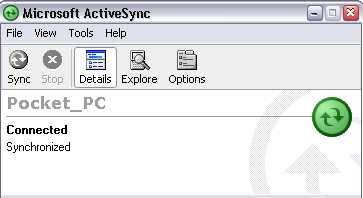
My favorite example is the picture below:
This is the Microsoft ActiveSync connection window, with a Pocket PC 2002 PDA connected. I’m not trying to pick on ActiveSync, but this happens to be a very common scenario that I have to deal with, and it’s a subtle one.
If you are familiar with Pocket PCs, forget that you’ve ever used one before. If you aren’t familiar with them, stay that way for the next 30 seconds.
Now, pretend that you’re on the phone with me getting help:
Me: “Okay, now I need to know the partnership name of your Pocket PC.”
You: “How do I find that?”
Me: “Open your ActiveSync window on your PC and you’ll see the name listed.”
You (more often than not): “Uh, where’s the name?”
Where is the name? Something is connected, and probably synchronized. Do you know where the name is?
The name is “Pocket_PC” - that’s the name assigned to your Pocket PC by ActiveSync, for use in identifying it in other software. That’s the piece of information I needed. Do I blame you for not knowing how to get it? Not at all. That piece of information is not obvious.
My solution for this obvious problem would be to place the following in front of the actual name text, so it reads Device Name: Pocket_PC . That way, if I ask you for the name of your Pocket PC, there’s a much higher chance you could look at the ActiveSync window and say, “Oh, it’s Pocket underscore PC.”
Obvious things are a kind of discoverable common sense. To learn not to walk blindly into the street, your parents had to tell you not to do it - you can’t really discover ’look both ways’ unless you want to get hit by a car. To learn how to save an article as a draft and keep writing it in WordPress, you hopefully just look down below where you’re typing and see the large button labeled “Save and Continue Editing” - in other words, you discover the obvious button.
From a tech support perspective, everything should be obvious - this helps maximize a user’s happiness with software and minimizes tech support for things that aren’t actually broken. Obviousness helps people develop their own common sense and helps them explore the software on their own.
Intuition
If common sense is something everyone is supposed to know, intuition is something no one knows. “The act or faculty of knowing or sensing without the use of rational processes; immediate cognition.” [ link] James Bach argues that intuition is really, “I don’t know how I did it,” and I agree with that definition.
Sometimes it’s easiest to throw out a counter example - here’s the file menu I see when I’m right-clicking a file in my FTP client to rename it to a backup copy:
What’s wrong with this picture? Let’s say that wasn’t SurvivorGuide.clf, but instead ThisFileIsSoImportantYouWillDieIfYouDeleteIt.ext . Let’s say you sneeze right before clicking ‘Rename’. What other option might you click? DELETE.
You could argue that this is not an intuitive thing to do - it’s counter-intuitive. But what’s the reason? Well, because. Maybe it’s a bad idea to put delete next to a very innocuous thing such as Rename. It just feels funny, at least to me.
Part of tech support involves fielding feature requests. A user decides that it’d be easier to use OurProduct if the Widgets are configurable by right-clicking on them, and so they send something along which gets to me. But why is it any better to have right-click on Widgets? Sometimes the user gives a really good explanation, but other times, it’s just, “I like it better that way.” It’s like explaining why you like pistachio ice cream - you just do. I could implement my GTD organizational system using Microsoft Outlook, but I don’t like the way Outlook works, and for the most part I don’t know why. Other options just feel better.
When users can’t use our software, I want to know why. It’s in my best interest to figure out what the problem is, since I’ll be helping people with it when it becomes a problem. Are we assuming users know something that they really don’t know (“it’s common sense!”)? Are we ignoring an easy way to make things ‘feel’ right for users (“it’s not intuitive unless the category tree’s on the right!”)?
It’s all very linked together. Users come to technical support with problems, technical support goes to the developers with common problems, developers fix the problems and refine the software, users take the refined software and find more problems.
 I had to share something that came up in a support call yesterday. It’s either really horrible or incredibly funny depending on your point of view.