• Skip to primary navigation
  • Skip to main content
  • Skip to primary sidebar
ilium software logo

Ilium Software Blog

Behind the Scenes at Ilium Software

  • Home
  • eWallet
  • ListPro
  • Other

eWallet 7.5 for Android now available

September 11, 2013 by Ken

eWallet logoFollowing up the recent releases of eWallet® on iOS, Mac, and Windows we’re happy to announce that the new 7.5 version is now available on Android. This version is a major update and includes a ton of user requested features, some visible, and some “underneath the hood.”

The biggest visible changes are to the user interface. We added Card View for an alternate view of your data (flex view is still available) and also added a completely new interface specifically for tablets. You’ll see we’ve put a lot of the common functions on new Action Bars to make it easy to access and change your important information. 
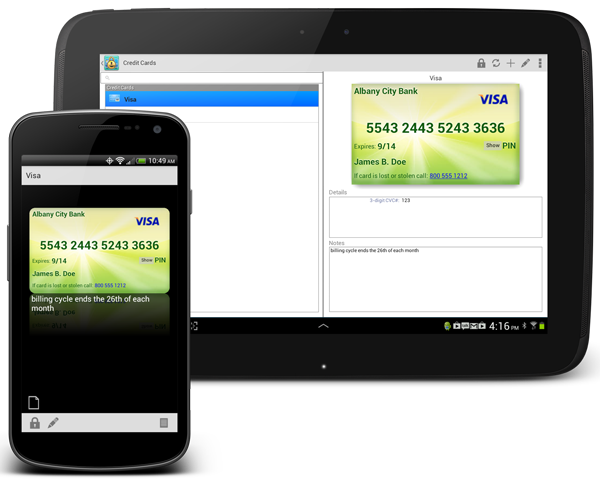
eWallet for Android

The Android version now supports picture cards too, as well as background images on non-picture cards. The new tablet interface includes both card view and flex view so you can decide which way you prefer to see your information.

Some of our users take advantage of using multiple wallet files, and we’ve improved synchronization for multiple files at once, even if you’re not using Bonjour. We also found a more reliable way to get the identifier of the device (the IP address). We also fixed several other things that were minor, but make the product better. Thank you for all the great feedback and please keep it coming.

eWallet for Android runs on Android OS 2.3 to 4.x including both phones and tablets. This upgrade is free for all users who already own a license of eWallet version 7 for Android. If you purchased a copy from Google Play or Amazon using their app stores, then you’ll be able to use the Update feature in the respective store to get the new version. Get all the info about eWallet here on our site.

You can find eWallet in both Google Play (aka the Android Market) as well as on the Amazon appstore.

Get eWallet on Google Play

Update (September 13, 2013): A couple of users reported issues with images in 7.5 that we didn’t catch in testing; the 7.5.1 release is now available and resolves those issues.


Share this:

  • Click to share on X (Opens in new window) X
  • Click to share on Facebook (Opens in new window) Facebook
  • Click to share on LinkedIn (Opens in new window) LinkedIn

Filed Under: General

eWallet 7.4.2 for Mac OS X Update

September 9, 2013 by Ken

e-wallet

Just a quick update — today we released eWallet® for Mac OS X version 7.4.2. It’s a minor release but includes a fix for a display issue with categories on some versions of OS X, and updated sample wallet, and several other small fixes.

eWallet for Mac runs on OS X 10.7 (Lion) or later. This upgrade is free for all users who already own a license of eWallet version 7 for the Mac. If you purchased a copy from Apple using their Mac App Store, then you’ll be able to use the Update feature in that store to get the new version. Get all the info about eWallet (including access to a 30-day trial version) here on our site.

Mac App Store Logo

Thanks as always for your feedback and keep it coming!

Share this:

  • Click to share on X (Opens in new window) X
  • Click to share on Facebook (Opens in new window) Facebook
  • Click to share on LinkedIn (Opens in new window) LinkedIn

Filed Under: General

eWallet 7.5 for iPhone and iPad in App Store

September 4, 2013 by Ken

eWallet logoeWallet® 7.5 for iPad, iPhone and iPod touch is now in the App Store. This new version includes several highly requested features from our users (some of whom have been with us for our 16+ year history!):

  • Now includes AutoPass for automatically inserting user names and passwords on websites
  • Direct editing added for faster and easier entry of card information
  • New screen for easier adding of new cards
  • Includes Intro for new users
  • List of wallets improved and sample shown separately
  • Updated sample wallet

We’ve got new features coming out soon for the Android version as well; we hope to share something with you on that platform in the next couple of weeks.

eWallet 7.5 for iOS is packaged as a Universal Version. That means you get both iPhone (iPod touch) and iPad combined into one product. eWallet 7.5 for iPhone and iPad runs on iOS 4.3 or higher. Get all the info about eWallet here on our site.

As always, please keep the great feedback coming!

App Store Logo

Share this:

  • Click to share on X (Opens in new window) X
  • Click to share on Facebook (Opens in new window) Facebook
  • Click to share on LinkedIn (Opens in new window) LinkedIn

Filed Under: eWallet, iPhone and iPad

eWallet for Windows PC 7.5

July 29, 2013 by Ken

e-wallet

Today we released eWallet® for Windows PC version 7.5 with several new user-requested features:

  • Now uses Microsoft’s .NET 4 technology for improved reliability and speed
  • Built-in notification of updates with option to download and install directly
  • Includes support for high DPI screens now found on some laptops
  • Ribbon bar improved, gets Office 2013 style, background images
  • Now show more information about cards
  • First card field automatically gets title when appropriate
  • SyncPro® updated in preparation for Windows 8.1
  • Now automatically handle case where Windows decides to mess with settings file
  • Improvements to recent cards list
  • Other miscellaneous improvements and fixes

eWallet for Windows PC runs on all versions of Windows 7, and runs on Windows 8 in Desktop mode. You can download the latest Windows PC version from our site.

Thanks as always for your feedback and keep it coming!

Share this:

  • Click to share on X (Opens in new window) X
  • Click to share on Facebook (Opens in new window) Facebook
  • Click to share on LinkedIn (Opens in new window) LinkedIn

Filed Under: eWallet, General

eWallet for Windows 8/RT 7.2 update

July 3, 2013 by Ken

Windows logo

The new 7.2 version of eWallet® for Windows 8/RT is now in the Windows Store. This new version adds printing, a change to the show/hide password button, the ability to set the default card type for a category, and several other fixes and enhancements.

The new printing feature (always a popular request) allows you to print a single card, all the cards in a category, the cards in search results, or all the cards in your wallet. You access printing in the standard way, from Devices in the Charms area. Several users wrote to us that they didn’t like the default Windows 8 behavior of having to hold the show/hide password button to see the password. We updated the behavior so it’s sticky now, pressing the button will toggle and keep the password hidden or visible, whichever you like.

Windows 8.1 Preview
Windows 8.1 Preview

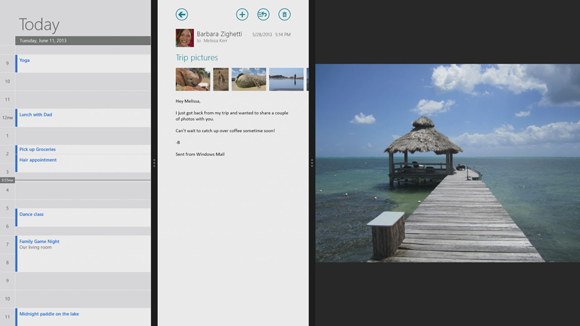
In other news, Microsoft recently announced Windows 8.1 (no official release date yet). This new version includes several UI changes, including more than two apps on a screen, that we think will make Windows 8 even nicer to use when not in desktop mode. We’re busy looking at all the changes now to see what we’ll need to do to eWallet to take advantage of the new features.

Share this:

  • Click to share on X (Opens in new window) X
  • Click to share on Facebook (Opens in new window) Facebook
  • Click to share on LinkedIn (Opens in new window) LinkedIn

Filed Under: General

Moxier Wallet

June 20, 2013 by Lee

After getting emails from several Moxier Wallet users about their wallet app being discontinued, we thought it might be useful to put the information they are looking for right up on our blog.

eWallet supports Windows PC, Mac, iOS, and Android.

Since Moxier Wallet exports to a CSV file, users will be able to import their existing wallet data into the free trial version of “eWallet for Windows PC” with little modification. The instructions for getting your data ready to import are here.  And you can get more info about how the eWallet importer works here.

You can download the 30-day free trial version of  eWallet for WinPC.

Questions?  You can contact us directly, or search our support articles.

Welcome!  From the Support Team at Ilium Software!

Share this:

  • Click to share on X (Opens in new window) X
  • Click to share on Facebook (Opens in new window) Facebook
  • Click to share on LinkedIn (Opens in new window) LinkedIn

Filed Under: General

  • « Go to Previous Page
  • Page 1
  • Interim pages omitted …
  • Page 9
  • Page 10
  • Page 11
  • Page 12
  • Page 13
  • Interim pages omitted …
  • Page 82
  • Go to Next Page »

Primary Sidebar

Archives

Categories

RSS Feed

RSS feed

Mobile Blogs

  • Android News
  • Laridian
  • Mobile Opportunity
  • WebIS Blog

News

  • Android News
  • Apple Newsroom
  • Windows Blog

Copyright © Ilium Software Inc. | All Rights Reserved. | Contact Us