iPhone Password Hacking App

by Ellen

thief3No, it’s not ours.

And while I can see a need for password recovery, I admit I’m having a hard time seeing the line between recovering a password of your own and hacking someone else’s.

But, that’s actually not my point. My point is that apps like this exist. Security holes exist. Sites are attacked and passwords stolen.

If you’re using the same password on a lot of sites, you’re asking for trouble.

If you’re using weak passwords, you’re asking for trouble.

I get so frustrated when people tell me they keep their passwords in Excel. Or Notepad. Or TextEdit or iWork. Or “I just let my browsers keep them”, or “I use the same password everywhere”.

Let your browser keep your Twitter password, by all means. Use Notepad for the passwords you have to create just to comment on some site. But don’t be that careless with the passwords to your bank accounts, IRA accounts and credit cards. It’s your money. I can’t make it any clearer than that. If someone gets your passwords, they can get at all your money online. And except for what’s in your pocket, purse, underwear drawer, and the floor of your car, all your money’s accessible online.

Be careful of your passwords. Get and use a password manager - a good one, with strong encryption. And then use strong passwords, use different passwords for each site, and change them regularly.

Don’t let the bad guys go off with what’s yours.

Available for iPhone, Windows, Blackberry, iPod Touch, Windows Mobile, Netbooks

Share this article:


Proof the Google Tablet is Coming!

by Marc

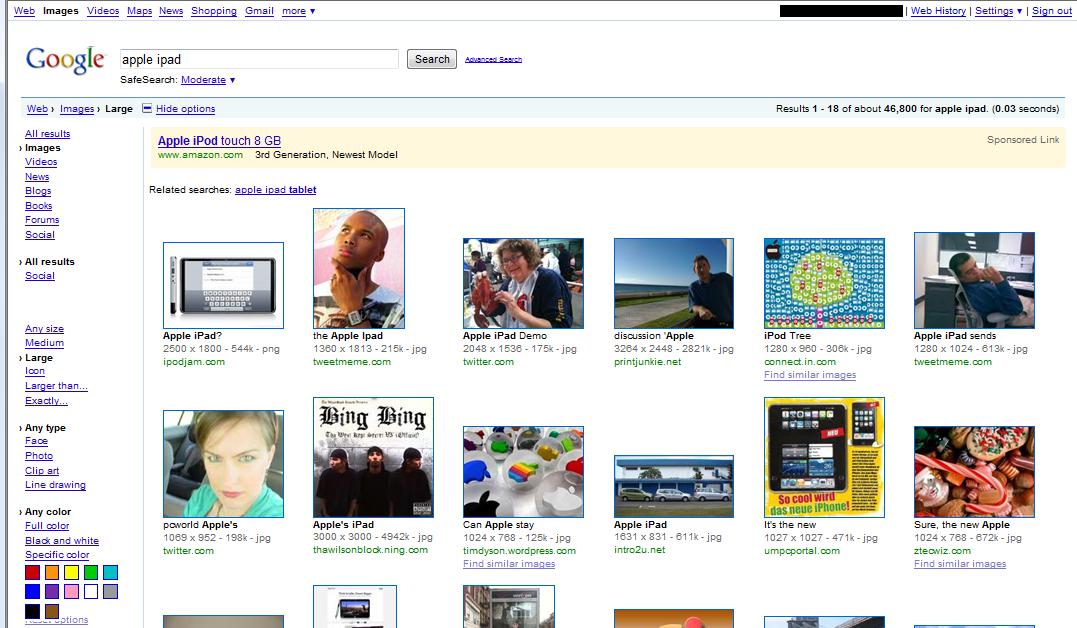
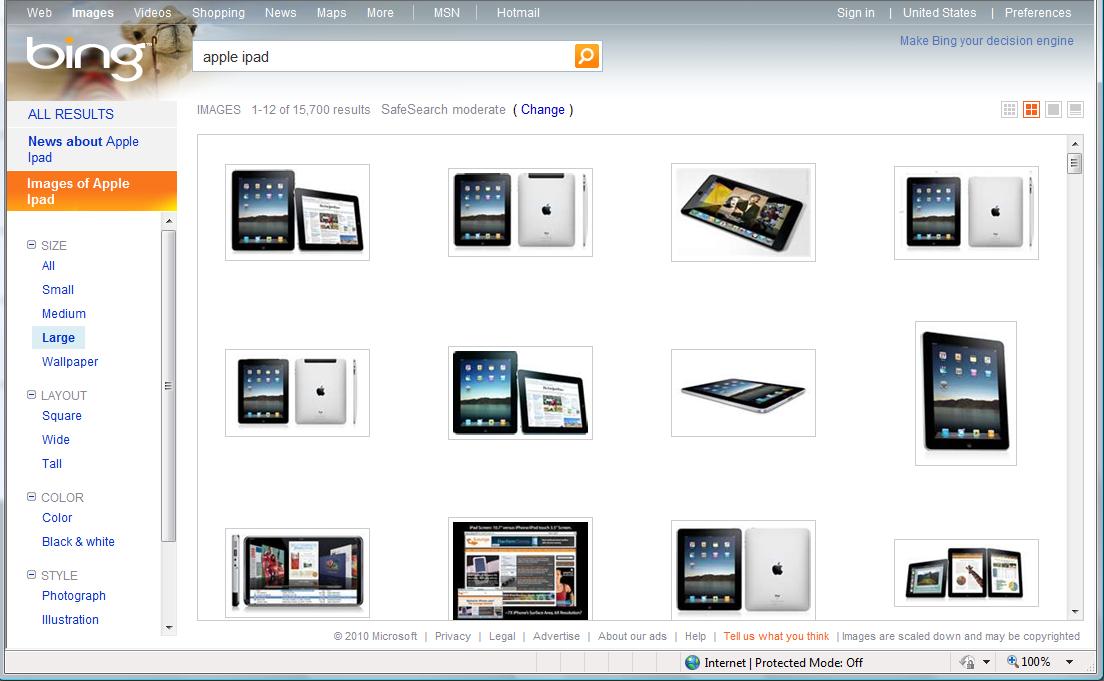
I found the most convincing proof I’ve seen that Google is making a Tablet. I found it while hunting down screenshots and pictures of the Apple iPad using Google Image Search. No matter how hard I tried I kept coming up with everything but pictures of the iPad.

So I did something I very seldom try - I used Bing…and suddenly I have tons of pics!

Now I love a lot of things about Microsoft, but Bing isn’t one of them. In all honesty, it very seldom returns the thing I’m actually looking for. And trust me - I’ve used Bing a LOT. I was in the beta program and used it enough to get a free copy of Zoo Tycoon.

I gotta say, it really looks like Google is “cooking the books” on this one. Missing the mark on a search this badly  just doesn’t fit. Even if you yank the image size criteria I entered, you still get a bunch of images that very clearly are not an actual iPad.

I’m sure folks will come up with all sorts of reasons that it makes perfect sense that Google has completely failed to return the search results I expected, but they’ve never missed this badly before - it just doesn’t make sense!

What do you think?

googlesearchbingsearch

Search Criteria:

Text = Apple iPad

Image Size = Large

Share this article:


iPad, Kindle, and an Idea for Amazon

by Ellen

azA lot of people are writing their opinions on the effect the iPad will have on Amazon’s Kindle sales, and their ideas of Amazon should be doing in light of last week’s Apple announcement. Here’s mine:

Turn their eBook collection into an online, cloud-based lending library.

What I mean by this is to offer a service like the one LaLa now has, where I can buy songs for 1/10 of what I’d pay for the downloadable mp3, but I can’t download the songs. I can, however, listen to them any time I want - I “own” the listening rights, but the songs stay online.

If Amazon could do this for books - charge me something like US$1.00 per book, but only let me read the cloud’s version (or maybe download it to a device for a limited time - I’ll let them work out the details), I’d buy a Kindle right now, just for that.

Apple, of course, could do the same thing, and maybe they will. They’ve bought LaLa, after all, though it’s still not clear what they intend to do with it. But they’ve probably got their hands a little full right now.

Why I think this would be a great idea for anyone to do - it’s conceptually no different from a regular, brick and mortar library. There are a lot of people who read a lot, but don’t buy many books. I know; I’m one of them. I go through a lot of books, and I’m completely spoiled by the fact that I can borrow almost anything I want. I’m not going to give that up just for the convenience of eBooks. I read less than I used to, but I still go through 2 or 3 books a week. I’m not willing to pay $10.00 or so for each one.

But if I could “borrow” a book for $1.00 - especially with the Kindle’s existing ability to let me try out the first chapter before I make up my mind - that’s a no-brainer. And not only would it be exactly what I want, Amazon and the publishers would do great on it too. I can easily see people like me spending $150 or so a year on a service like that, plus of course the cost of the Kindles.

How about it, Amazon?

Share this article:


The Weird World of Promos

by Ellen

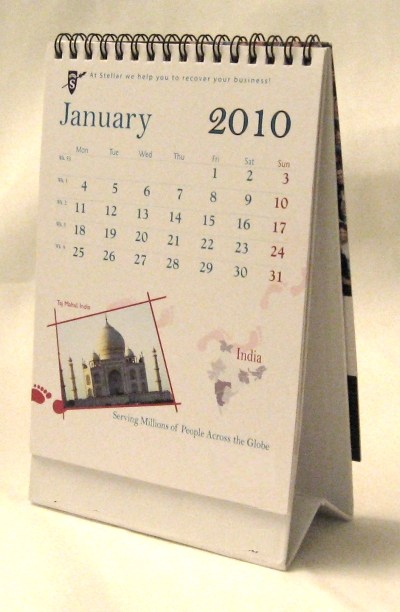
It’s not the promotional calendar I got a few weeks ago that was so strange:

calendar

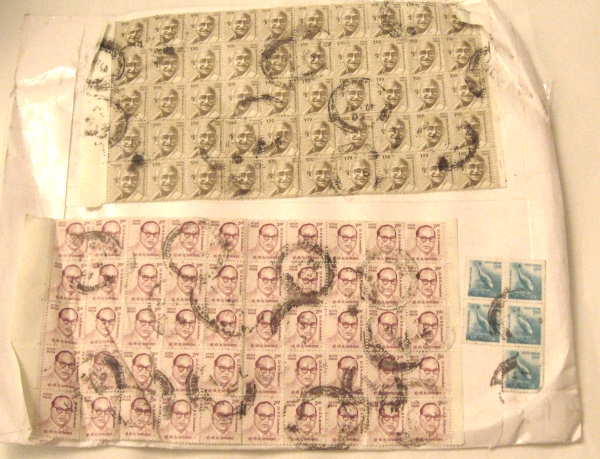
It was the envelope it was sent in:

stamps

We used to get a lot of strange promotional stuff in the mail, but it’s trailed off in the last few years, for which I thank the recession. That’s a sincere thanks: I don’t need - or want - cigars, bicycle shorts, melted candy or dog biscuits.

Anyway, to the senders of the calendar, it’s not the kind of thing that makes me think well of your company. But I appreciate the laugh.

Share this article:


CES Minus Apple Equals Showtunes

by Ellen

One thing you may not know about Marc is that he’s a really good singer.

One thing you may not know about me is that I really like musicals.

So when Marc and I decided to bet on whether Apple would exhibit at CES after announcing they were dropping MacWorld, the obvious stakes to put up were that he’d sing a few showtunes of my choosing.

Now that I’ve won (I’m pretty sure that Marc was just humoring me with the whole thing, but I’m not letting that get in the way), I’m working on my choices. I’ve got a big list of songs - my problem is narrowing them down.

But since I know that at least a few people who read this are also musicals fans, I thought I’d ask for suggestions before I make my final decision. So if you’ve got an idea for what you think would be good to have Marc perform, post it here, or reply on Twitter.

And watch this space for the final picks, as well as the release of the videos to YouTube!

Share this article:


eWallet 7.0.2 for Windows and Windows Mobile

by Marc

As promised, eWallet 7.0.2 for Windows and Windows Mobile is now available. You can download the latest version here. BlackBerry and iPhone users who own the desktop version should update their Windows PC version, but they don’t need to upgrade their device version.

For the details, read on after the jump!

I don’t typically do bug lists on new releases, but since I know some of you have been waiting for these I’ll make an exception. This isn’t everything we fixed but they’re the ones we’ve talked about here. Most people never saw these but for the folks that did I think this will be a welcome update!

The following bugs are fixed in eWallet 7.0.2:

  • Windows 7 64-bit Explorer Crash
  • Problems with synching custom icons to Windows Mobile
  • Error when running from two users on one computer
  • Fails to retain card list pane size between uses
  • “Non-Com” Exception when synching BlackBerry after entering password
  • Some sites didn’t work with AutoPass and FireFox
  • Problems with eWallet on 144 DPI displays
  • Problems with sync on close to a folder as a destination
  • CTRL + X produces an error
  • Global card display options reset on sync
  • Problems saving text pasted from a note card
  • Problems with passwords longer than 28 characters
  • Passbuilder Copy & Close button failed to copy

Again, we made many other minor tweaks but they weren’t things you’ll notice or they are things you likely never saw. And as I said - odds are you never saw any of the things listed here. I just wanted to list some of these for people waiting to hear about the fixes!

If you are still having trouble, please email our support team at support@iliumsoft.com. We really can’t do support in the blog comments.

And yes - the free upgrade emails are going out as we speak. If you didn’t receive yours, they will all be sent by middle of next week!

Take care, happy holidays, and don’t forget - we close for the holidays. Find all the details about our holiday hours here!

Share this article:


Search

Archives

Categories

RSS Feed

News