In case you hadn’t already heard the news, eWallet iPhone sync is out! It went out yesterday evening. Thanks to everyone here who worked so hard to make this happen, and thank you to all of you out there who stuck with us and gave us your support along the way. It’s great to hit the “finish line!”
So, on to the other sync topics!
First let me extend my congratulations to Adrian, who noticed and posted about the release a few minutes before we even got the notification from Apple! He can officially shout “FIRST!”
Second, I’m thrilled to say that sync is working great. With a few exceptions folks are not having any trouble at all. If you’re having problems absolutely contact us. I’ll let you know that we’re getting a LOT of calls/emails right now as people rush to get the new version and upgrade their desktop versions, but we’ll do our absolute best to get back to you quickly.
Third, here is how to fix the most common problem we’ve seen. Make sure you have eWallet 6.1.2 on your desktop. Just download and install the latest version from this page or using this direct link. You don’t need unlock codes if you’re already using a full/unlocked version of eWallet 6.0+ on your desktop. It will auto-register. This has solved the majority of issues we’ve seen.
Fourth, I’ve made a note of all the other questions folks have had and I’ll reply later today. Needless to say things are a little hectic this morning, but I’ll definitely get to all of your concerns. I just need a couple hours to sort through the couple hundred emails and blog comments. :)
Fifth, we’re emailing everyone who has registered! We’re in the process of sending those out so everyone should get a notification along with the appropriate link for the latest desktop version update.
Thanks again everyone! I hope you like it and feel free to contact us if you have any questions!
I know everyone is waiting with bated breath for the release of the sync component for iPhone. I’ve heard the grumbling and I don’t blame people for being impatient. And what I talk about here isn’t meant to make you feel happy or wash away frustrations. I just want to address these concerns, especially for folks new to dealing with Ilium Software, so you understand the way we do things.
I’m also writing this because when we first created this blog, we told you that we’d give you a little insight into what happens behind the scenes at Ilium Software. The things I talk about here really highlight the sort of decisions and challenges we face everyday. So if you’re interested, read on after the jump!
So let’s talk about releasing software. Here is my philosophy…
First and foremost, I will never release an application that isn’t ready. Period. If that means releasing it a week, two weeks, or even a month late, then that’s what I’ll do. I hate to do it. It screws things up here when we release past our deadline, it is frustrating for folks waiting for it, but quality is the number one most important issue when it comes to our software.
Of course that leads to the question of “then why did you release eWallet without sync?” I’ve actually addressed this a few times - same answer. While some folks can’t even use eWallet without sync, a lot of folks are perfectly happy with a device only solution. So, for those people, eWallet without sync was everything they needed and we could give that to them on day one. And the application we released is, in my opinion, the best in class. Sync for iPhone is a “new feature” and not a requirement for eWallet to be a fantastic product on its own.
Second, I hate giving release dates and generally I don’t. In fact up until this iPhone release, we have never given release dates for anything. And after this release I doubt you’ll see release dates given for other products. We’re not stopping because of this release, but for the same reason we never posted release dates in the past: software releases aren’t like building a car. You can’t predict exactly how long it will take to put all the parts together. Unforeseen problems come up. Glitches happen.
So why did we give a release date for this and the original release? Well for the initial release, we gave a date because Apple said “It will be out on this date!” Seemed safe to us. Ah well. Live and learn. And for the sync release, we wanted to assure our loyal customers that we really were going to release a sync component. We wanted to assure folks that sync wasn’t just a cool idea we had but something we were working on.
And boy, did we work on it. As I’ve said before, not only did we work on this thing constantly, putting in many extra hours to get it done, we even brought in contractors. We take our promises very seriously. Did we get it out to customers by the end of August as we’d predicted? Sadly we didn’t. I’m really sorry about that and it frustrates me. At the same time, the entire project was complete by August 27th and considering the challenges we faced along the way (we killed three computers during development - we must have overworked them!) I’m really pleased at the speed with which the team here got the work done. (My thanks to all of them!)
Third, whatever we do should treat the customer right. We gave out a LOT of free desktop software to thank folks for buying early (just ask Kevin, Lee, and Don who had to fulfil all of those requests!) We effectively halved our potential revenue as a way to show our customers that they always come first. Did we take a major hit? Absolutely. Do we think it was worth it? Without a doubt. This is how we’ve done business since day one and I like to think that this is part of the reason we’re still here 11+ years later. Now for some folks, it isn’t enough. I understand and respect that, but at least I know we did all that we could to help out the folks who supported us.
I’ll close by saying I don’t blame folks for being frustrated. I know this software is important to a lot of people. I also know that for some folks, sync makes the difference between eWallet being useful or memory filler on their phone. I also want to make clear that I don’t blame Apple. After the initial release we knew just what to expect from Apple. So does that mean it’s our fault? You bet. In fact as Product Manager I take full responsibility for a late release.
But at the same time, while I’m sorry for the wait, I wouldn’t have done it any different. The end result is a fantastic product we’re all very proud of, and one that we really believe is going to make folks lives easier. Releasing the stand alone version first made a lot of people really happy. Releasing the sync component a little bit late means we’re releasing the best software we could build that will work properly the first time you use it.
In the end, folks that purchase eWallet will have the best product in its class, that works every time they use it, with the best support in the industry to back it up.
Warning: this post is completely non-Apple related. It’s just me and my little contest hat again. I thought now would be a good time to offer a happy little diversion to you. Take a break from clicking your mouse and refreshing the eWallet page on the App Store - hurry, before you get carpal tunnel!
It’s now time to reach into my hat and see who the monthly blog contest winner is for August. It looks like the lucky winner this time is David, for commenting on the post It’s Syncing! It’s Syncing! Congratulations! Now, there were quite a few Davids commenting on that post, so to preemptively clear up any outcries of “Which one? Was it me?” the David that was chosen left his comment on August 24th at 11:23am. So, “David at 11:23am” - I just sent you an email explaining how to get your prize. If you don’t receive it, reply to this post and let me know.
To everyone else, thanks so much for staying tuned and leaving your thoughts and comments. We hit the over-100 comment mark on two posts in August, which I think is just amazing. Keep coming back and keep on responding, because I’ll drag the hat out again in less than a month and you’ll have another chance to win.
You may now return to anxiously awaiting news from the App Store. Just watch out for that carpal tunnel!
For a while now, there has been a lot of speculation about just what the Apple AppStore review process consists of. Do they actually run the applications? Is it simply a rubber stamp? Is there any sort of criteria for acceptance or rejection? As a developer with a product in the AppStore I can confirm that the review process is very real and frankly this is a good thing!
The reason I bring this up is that besides having to prove export approval, Apple asked us for a copy of the desktop portion of eWallet so that they could review the synchronization process. Never that I know of have we had a distributor specifically tell us that they were going to test sync. Maybe they did, but I’m not convinced of that. I’m fairly certain the review process for most device software stores is much looser.
Now this process means some waiting to get apps OK’d by Apple, but in the end I believe that people will come to appreciate Apple’s careful approach to this. It will save hours of frustration for consumers who often have to “beta test” applications that don’t actually work as advertised.
So in the meantime, we’re waiting patiently. The Apple black box isn’t quite so black anymore (more of a dark grey) so we know what is happening and where we are in the process.
And in the end, I think the extra time folks have to wait to see an app go live will prove to be a long term benefit for everyone involved.
Every now and then we receive an email from a customer who shares an eWallet “Success Story” with us. Now admittedly, as is the case in this example, these stories usually involve some sort of misadventure, but eWallet is the silver lining! We love to hear these, because stories like this are part of the reason we created eWallet. Making enough to pay the bills is certainly a motivator, but the thing that makes this job so fun is working on a product that really does help people!
So here it is! A very cool eWallet success story:
I was pick pocketed in St. Petersburg, Russia; I had my iPhone with ewallet and was able to cancel all credit and debit cards within an hour of the event.Thanks for great software.Now I’m looking forward to being able to synch with a version on my PC.
The thing the customer told me (I promised him I wouldn’t share his name) was that he’d entered all of the “Call of Lost or Stolen” numbers from his credit cards into his eWallet cards. No searching for old billing statements at home, no wracking his brain to figure out which cards he had. He just opened eWallet and started calling.
So there you go! A little bit of self-congratulatory back patting, I know, but the story put me in a great mood so I just had to share it.
Hey everyone! I just wanted to let everyone know that as of today, everything for eWallet 6.1.2 with complete iPhone Synchronization is on it’s way! Apple has the software, the desktop portion is locked and loaded, and all preparations are complete! We expect it to go live sometime next week!
Full details after the break, and as a warning, there are quite a few screenshots in case you’re running wireless…
First off, here are some answers to questions we’ve heard a lot:
The iPhone store should notify you in the “Updates” section when the iPhone version goes live.
We will email anyone who has registered their software with us when the product is officially out.
Yes, you will need the Windows PC desktop version to synchronize.
If you have eWallet 6.0 or 6.1, you can get the upgrade to 6.1.2 at no charge. Either download the desktop version again when we make the big announcement, or wait for the email from us which will include your download info.
If you don’t own the desktop portion, or you aren’t eligible for a free upgrade, you will be able to purchase the desktop piece at the discounted price of $9.95. Details on how to get this price will be coming.
Yes, we’re releasing a full help document that will cover basic iPhone functions as well as how to synchronize.
When you upgrade, any wallets you’ve created or cards you’ve built will remain intact. The upgrade doesn’t overwrite existing data.
If you already made a wallet on your device, you will be able to sync it up to the desktop.
If you’re already synching with a different device, you can sync with your iPhone as well using the same desktop version.
Now for some sync details. I won’t say a lot here because once the application is released I think you’ll find that it does an excellent job of walking you through the process. In fact, that is one of the things that we are quite pleased with. We really feel that we’ve done a good job of combining security with ease of use. Oh course we’ll let you folks give us the final verdict on that!
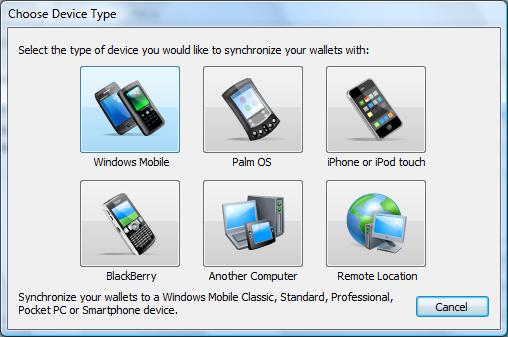
That said, I’d just like to share a couple of screenshots. First is the revamped “Add Devices” dialog on the desktop. This is something that should benefit everyone, not just iPhone users. It makes it easier than ever to add new sync locations. (As many of you know eWallet does more than sync with your iPhone - sync with remote locations like FTP sites, USB drives, other computers on a network, and more!)
Not only does it make it easy to add new devices, but when you mouse over a button it offers a detailed description making it easy to know which device to choose.
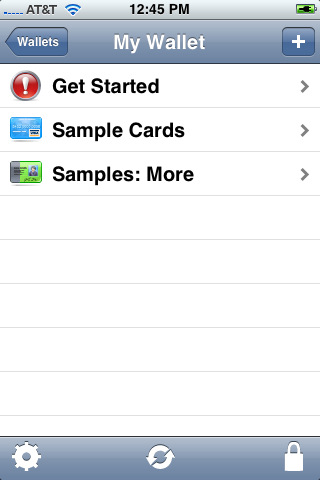
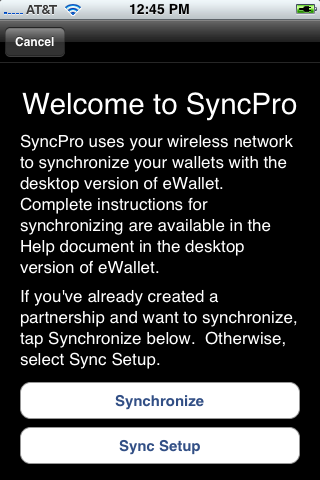
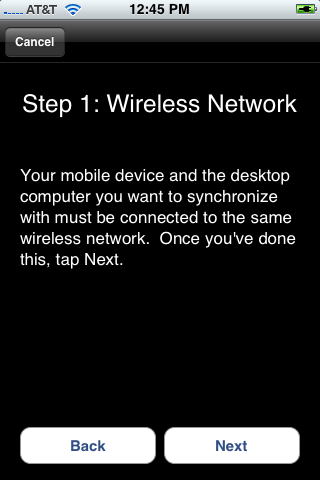
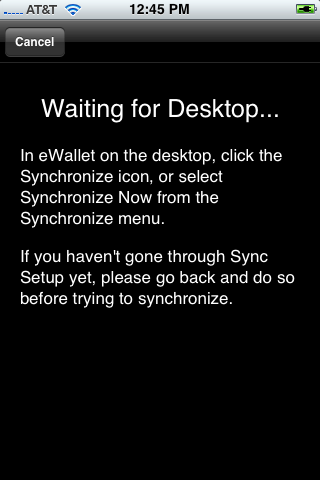
Next up are a some sample shots from the iPhone. What we’ve tried to do is keep the process simple, but still include clear instructions that will walk you through the process. One of the things that I really like is that if you need the steps you can walk through them, but if you already know what you are doing you can skip the whole thing. Just hit sync on the device, sync on the desktop, and go.
So these are just a few examples of how we’re handling sync. Now one thing some folks might notice is that when you first start synching there are a couple of steps you have to follow. First, they’re pretty darn simple and we walk you through it. Second, doing this makes it extremely easy to sync securely going forward. Finally, we noticed that some applications weren’t working very hard to ensure that you were always communicating with the correct computer. We wanted to make sure that the devices had a way identify one another BUT we wanted to do it behind the scenes where you don’t have to mess with it every time you sync!
So there you have it! The app is on its way and hopefully by this time next week we’ll all be talking about how great it is to have your wallets on your iPhone!
So thank you all for your patience and all the fantastic feedback. We know it’s been frustrating at times. It’s been great to hear from everyone, though, and in the meantime, please don’t burn down the castle! Sync Is On Its Way!
 In case you hadn’t already heard the news, eWallet iPhone sync is out! It went out yesterday evening. Thanks to everyone here who worked so hard to make this happen, and thank you to all of you out there who stuck with us and gave us your support along the way. It’s great to hit the “finish line!”