Hey everyone! I just wanted to let everyone know that as of today, everything for eWallet 6.1.2 with complete iPhone Synchronization is on it’s way! Apple has the software, the desktop portion is locked and loaded, and all preparations are complete! We expect it to go live sometime next week!
Full details after the break, and as a warning, there are quite a few screenshots in case you’re running wireless…
First off, here are some answers to questions we’ve heard a lot:
- The iPhone store should notify you in the “Updates” section when the iPhone version goes live.
- We will email anyone who has registered their software with us when the product is officially out.
- Yes, you will need the Windows PC desktop version to synchronize.
- If you have eWallet 6.0 or 6.1, you can get the upgrade to 6.1.2 at no charge. Either download the desktop version again when we make the big announcement, or wait for the email from us which will include your download info.
- If you don’t own the desktop portion, or you aren’t eligible for a free upgrade, you will be able to purchase the desktop piece at the discounted price of $9.95. Details on how to get this price will be coming.
- Yes, we’re releasing a full help document that will cover basic iPhone functions as well as how to synchronize.
- When you upgrade, any wallets you’ve created or cards you’ve built will remain intact. The upgrade doesn’t overwrite existing data.
- If you already made a wallet on your device, you will be able to sync it up to the desktop.
- If you’re already synching with a different device, you can sync with your iPhone as well using the same desktop version.
Now for some sync details. I won’t say a lot here because once the application is released I think you’ll find that it does an excellent job of walking you through the process. In fact, that is one of the things that we are quite pleased with. We really feel that we’ve done a good job of combining security with ease of use. Oh course we’ll let you folks give us the final verdict on that!
That said, I’d just like to share a couple of screenshots. First is the revamped “Add Devices” dialog on the desktop. This is something that should benefit everyone, not just iPhone users. It makes it easier than ever to add new sync locations. (As many of you know eWallet does more than sync with your iPhone – sync with remote locations like FTP sites, USB drives, other computers on a network, and more!)
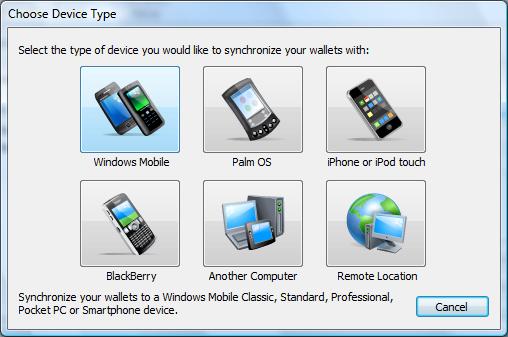
Not only does it make it easy to add new devices, but when you mouse over a button it offers a detailed description making it easy to know which device to choose.
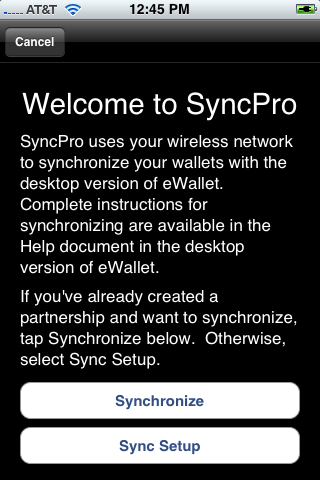
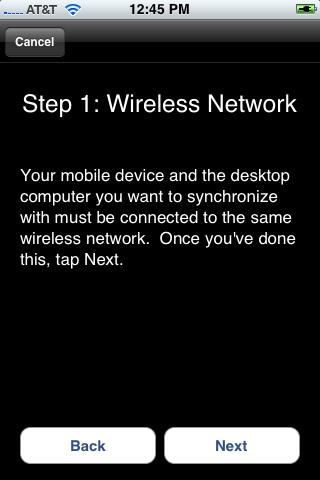
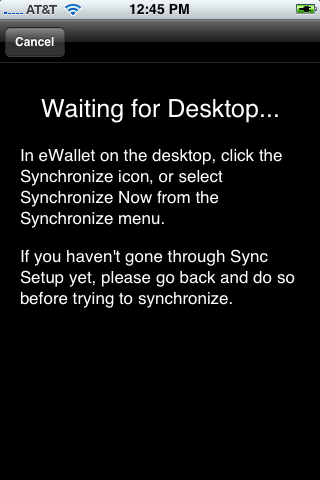
Next up are a some sample shots from the iPhone. What we’ve tried to do is keep the process simple, but still include clear instructions that will walk you through the process. One of the things that I really like is that if you need the steps you can walk through them, but if you already know what you are doing you can skip the whole thing. Just hit sync on the device, sync on the desktop, and go.
So these are just a few examples of how we’re handling sync. Now one thing some folks might notice is that when you first start synching there are a couple of steps you have to follow. First, they’re pretty darn simple and we walk you through it. Second, doing this makes it extremely easy to sync securely going forward. Finally, we noticed that some applications weren’t working very hard to ensure that you were always communicating with the correct computer. We wanted to make sure that the devices had a way identify one another BUT we wanted to do it behind the scenes where you don’t have to mess with it every time you sync!
So there you have it! The app is on its way and hopefully by this time next week we’ll all be talking about how great it is to have your wallets on your iPhone!
So thank you all for your patience and all the fantastic feedback. We know it’s been frustrating at times. It’s been great to hear from everyone, though, and in the meantime, please don’t burn down the castle! Sync Is On Its Way!
Sincerely, Marc



Cheryl,
Send the email to: service@iliumsoft.com
Com’on Apple release the thing would ya !!!
ilium is brilliant as ever: I sent them a screen shot of the iTunes receipt, showing the eWallet for iPhone purchase, and within 24 hours they sent me codes that render the desktop version free. Way to go, Ilium!
Now, in just a few years, when the iPhone – desktop sync becomes reality, it’ll be bliss & happiness!
Still waiting for the sync with the desktop (like everyone else around here). Ill echo some of the bonjour comments made here as I’ve also found it somewhat flaky if you have to go across different subnets. I had my house wired for networking when it was built 10 years ago so my wireless network access is on a different sub_network from my internal wired one (for security) so anyone hacking the wireless network does not automatically get access to the internal network – Ive had to proxy/gateway some services like UPNP AV to get things working across the subnets but bonjour itself never quite worked right and I always had to plug my MACbook into the network to get bonjour working properly for me.
Thanks for the tip Andrew!
Like you I am hesitant to jailbreak. Looks like I will have to do the syncing from home where I begrudgingly installed Bonjour (for the slick iTunes Remote app).
I’m curious about transferring via SSH…
Before I downloaded the new version for my PC, I loaded eWallet on my iPhone and transferred all the wallets I use to the same directory where the sample wallet was located.
iPhone eWallet would not open any of the files I transferred.
If I were to re-transfer the files after opening them with the new PC version of eWallet, would that solve my problem?
The error I received was along the lines of my files being corrupt or unrecognizable.
SFTP was used to transfer the files…
sgt-spam
This was mentioned a few months ago… If your wallets were being used by an older desktop version then they need to be converted first via a newer desktop version. I have SSH’d my files over using the 6.1.0 desktop version and it works fine.
The latest desktop is 6.1.2 and it upconverted my 6.1.0 files… i have not SSHd since then, but I am pretty sure ewallet would not open them on the iPhone.
I think you are stuck untill you get both desktop and iphone versions to match, and until Apple releases the update, that will be hard to do.
Thanks. I just confirmed the error below.
Operation could not be completed.
(com.iliumsoft.DBWallet.ErrorDomain error -13.)
I’ll have to look through my files to see if I have an older installer…
Really looking forward to the new release with the synch!! I’ve been using Windows Smartphone with ewallet and looking forward to iPhone and ewallet.
One Question: will the FTP synch work from the iPhone, or only iPhone to Desktop?
@Rasman: Assuming you mean the FTP sync we talk about eWallet supporting, that only works from the desktop (although we hope to expand the ‘on-device’ synching options in the future!
Please Jobsie!! Release it already!
Does Apple give different priority to different types of updates, like giving higher priority to bug fixes and lower priority to new features? This would be ridiculous if there was some bug and the developer had the fix but Apple sat on it for a week. I wish Apple would work on this system.
Quoting Mark in regards to a request for eWallet to handle the automatic input of passwords via Safari:
“b) bloating eWallet with duplicate software the iPhone already has. ”
What software are you referring to that works on the PC, will synch with iPhone and enable Safari to automatically input passwords? I really need something like that. Thanks!
Robert
We may have liftoff but the app seems to still be orbiting around Apple world….will it ever come back to earth? It’s getting to be 2 weeks.
Apple iPhones make life easier
It’s available for download now in the App Store!
Downloaded but I cannot set up a sync. eWallet does not detect iphone. Anyone help? running Vista.
Where is the update for the desktop? That’s what we need to setup synchronization. I don’t see it anywhere on the website. Seems like this should have been ready to go in preparation for Apple releasing the iTunes update….We need 6.1.2, right?
Yes……where is the desktop version 6.1.2. I don’t want to wait anymore!
ahhhh….right here: http://www.iliumsoft.com/site/ew/ew_trial.php
i’M GETTING THIS ERROR MESSAGE EVEN THOUGH BOTH PASSWORDS ARE IDENTICAL
“Sync Starting at Sunday, September 07, 2008, 9:17:33 PM with SyncPro 6.1.2.24683
Syncing C:\Documents and Settings\Owner\My Documents\My Wallet.wlt with Scott Bushey
Synchronization cannot be performed because this wallet and destination wallet are not using the same password.
SYNC RESULT: FAILURE – eWallet was unable to sync any wallets.
Sync Ended at Sunday, September 07, 2008, 9:17:40 PM”
Got it. I notice that Ewallet doesn’t fill in password fields.
Got the latest desktop version & new ewallet from app store. Getting same error message. No Apple devices detected. Even reinstalled Bonjour. Both PC & iPhone connected to home wifi network. Any ideas?
Well, after all the wait I am let down; I have Ew on my desktop; it seems redundant to have all my info on my Ip as well; since there is no autopass, to me, it’s another useless app. My opinion only.
If you do not have eWallet running on the iPhone the desktp will indicate that it finds no iPhone on teh network.
eWallet running on iphone and desktop – still no apple device detected!
I’m getting the C++ runtime error. I disabled my firewall and that did not seem to help. Still got the same error.
@Scott about redundancy. I love having my wallet on my pc so I can enter into my bank and other websites without having to memorize hundreds of passwords….
I love ewallet on my phone, so when I am out an about I have access to my information….like at the bank when they want my checking account number, or if I’m traveling and I need to call one of my credit cards, or usually my wife calls while filling out paperwork for our kids and needs to know their social security number or student id’s. Or I also store wireless WEP passwords for my home network, work networks and networks I frequently visit. I can whip out my phone and get the wep key for myself or others who are trying to log onto the net.
Give it time, I’m sure you’ll find the need for ewallet on your PC and on your phone. I sure do.
-> Spikesclone: hmmm… and you’re sure they are both connected to the same wireless network? BTW, I still have not managed to get mine to work. My desktop does see my iPhone, but after selecting it I get “An error occurred while asking the Apple device to provide the authorization code necessary to set up a synchronization partnership.” So, I have not gone much further than you
->Rodney: I hear you and agree, but without copy and paste on the iPhone, it means i’ll not be able to browse *on my iPhone* and do these things. I was expecting it to offer AutoPass on the iPhone. This may break a decision a relative of mine was making about going with the iPhone in lieu of a laptop because she was counting on being able to use AutoPass on the iPhone as she uses *REALLY* long passwords and it is ust imptractical for her to either remember them or to type them in. So, she owuld have to go with a laptop instead, runnijgn the PC version of eWallet
I was counting on AutoPass myself. Now, I’ll b goign to eWallet, jotting down my password, then launching Safari and browsing and manually entering. Very insecure.
@Neil: Unfortunately we’ve never offered AutoPass on mobile devices. We are, however, exploring ways to offer this on the iPhone. The biggest problem is that they don’t offer a way to effectively communicate information between programs. One alternative is to create our own browser and include it with eWallet. I know another company did something like this. I’m not excited About bloating the app with something like this though. In the meantime, we’re continuing to study this to find a way to offer AutoPass on the mobile side as well.
@Everyone: Feel free to post questions here but the BEST way to get a response is to contact us directly. The support folks here are happy to help. What we’ve found so far is that the vast majority of issues were pretty easy to solve being related to:
– The wrong desktop version (you need 6.1.2)
– The two devices were on different subnets of the same LAN
– Sync wasn’t started on the device (you have to open eWallet and hit the sync button.)
Again, I will be posting a question and answer blog post later togay.
-> Spikesclone: I noticed that not only do I have to have the iPhone software running, but I need to select synch setup and walk to the end of that process where it displays the partnership code.
@Neil:
You only need to setup a partnership one time. After you’ve setup the parntership you can sync without doing that again. The partnership/sync setup is a one time thing.
Thanks Marc, I assumed as much – but since Spike had not even been able to find the iPhone I assumed he had never synched even the first time.
Also, I do have a supprt email in as I have no idea why I am unable to synch.
And, as for your comments on lack of AutoPass, I understand, I assumed there was a good reason, but it does present a problem. On my former Windos Mobile at least I could copy and paste, but on the iPhone, without that capability, I will have no choice but to jot down the login info and then re-enter. Not a great option, but better than no option at all.
So, is there a forum for discussion of support topics? or a growing FAQ from support issues? I have to believe that my issue would probably be solved by now by users helping users – but I assume there is no such forum at present?
oh, wait, I just now saw your comment abut a question and answer blog post – my bad for not seeingit in advance. Thanks Marc.
Neil/Marc, thanks for your comments and help. I’ve reinstalled the very latest desktop client, reset my router & started again. Finally got the PC to see the iPhone. Got it to sync too, tho does seem to be quite temperamental. After 1 sync if I try to get it to sync again it fails. As Neil states you need to unlock the wallet on the iPhone (which autolocks after a sync!) press the sync button on the iPhone and set sync going, then initialize the desktop part to sync. It will then work. It may have been set up this way by design, it works but specific instructions are needed to sync successfully. I may be being pedantic but have used ewallet for years on pocket PC’s and used to syncing being automatic once set up. The iPhone is a different beast altogether. Full credit to Marc and the team for getting past Apple’s stringent processes!
I too was faced with my eWallet desktop seeing my iPhone, but after selecting it I got “An error occurred while asking the Apple device to provide the authorization code necessary to set up a synchronization partnership.” After a dozen or so attempts (through the course of yesterday, with reboots of both PC & iPhone, creating fresh ad hoc wireless networks, etc), I finally got it to sync (but no particular rhyme or reason).
This morning, I tried to re-sync; but it failed. Even though the desktop eWallet could still see the iPhone (evidenced by attempting to re-setup), the iPhone eWallet just sat at the screen “waiting for the desktop”. Eventually the desktop eWallet just timed out.
Very frustrating given the wait to actually get a version of the software that would sync only to spend countless hours trying to get it to do so successfully and repeatedly.
I just upgraded to the latest ewallet and lost my data. My ewallet is gone. I just can’t believe it. Is this how upgrades will go? Is there any way to recover the data? A phone restore from backup did not help. What did I do wrong? What’s the proper freaking way to upgrade this app without losing the data? Doesn’t anyone see an issue with this?
@BigCat: I’m working on a post about this but the problem is that there is a bug of some kind in the Apple update process. We actually contacted them prior to release to be sure this sort of thing would not happen. Unfortunately it appears there is a problem (and I’ve since found some other sites talking about this for other apps.) IF you had this problem and you aren’t too angry to help Apple, Apple has asked us to collect and forward a particular error log. Just email us and let us know you’d like to help and we’ll send the details. Also, watch for my blog post tomorrow. I’ll talk about it then as well.
All I can say is that I’m really sorry and even more sorry we have no control over this process. At least with sync now you can backup without counting on the Apple end of the process.
@Marc:
I’ve just started using eWallet and am very happy with it. However, I am struggling with the iPhone sync. I have read all the blogs and support notes and have treidf everything I have read, but I keep getting the “eWallet cannot detect any Apple devices” error.
I’ve tried on verious different wireless networks, but have always had the same issue. I’m very keen to get it working, so any advice you can give would be much appreciated.
On another note, I followed the desktop *.csv import instructions to the letter, but it seemed to map most fields into the notes section. Just FYI…