That’s right - eWallet 5.0 has been released! You may have heard us talking lately about eWallet 5.0 in the open beta, or maybe you even downloaded the beta version yourself, but now - the real deal is here!
For those of you who didn’t test drive eWallet 5.0 in the beta, or haven’t heard about it yet, let me recap some of the great enhancements we’ve made with this release. eWallet 5.0 includes a simple-to-use Sync Setup Interface, and gives you lots of options when it comes to synchronizing your information: you can sync with multiple PCs or PDAs, even USB drives and computers on a network. Plus, we’ve partnered with FilesAnywhere so you can automatically synchronize all your wallet files on your Windows PC to a secured location and access that data from any computer with an internet connection.
If you’re a current eWallet user wondering if you should upgrade, or if you’ve never tried eWallet before, version 5.0 gives you the benefits listed above, and more. We’ve updated eWallet with a great new set of icons, and added “Always-On” password protection to give you that extra little boost of security. Plus, the same great features of previous eWallet versions are still included, like nested categories, limitless wallet files, and the ability to set up your information however you want, so you’ll be able to find it all as quickly as possible.
We’ve just gotten two pieces of good news from the Handango Summit:
eWallet (Professional Edition) won the Handango Champion 2006 award for Best Application for Life on the Pocket PC platform. The Champion awards are Handango’s annual awards recognizing the top software in various categories. Users choose their favorite programs to be nominated, then the final awards are chosen by an independent panel of judges made up of industry experts in the mobile software field.
InScribe, which we’ll be releasing later this month for the new Ultra-Mobile PC (UMPC) platform, was one of the 3 winning programs in Handango’s best new UMPC software contest. The 3 winning programs were selected by independent experts and Microsoft personnel as showing best utilization of the features and functionality of the new platform.
We’ll have more information soon - we’re still waiting for Ellen and Marc to get back from the conference, and for the official press releases from Handango, but we wanted to get the news out right away.
By “who” here, I mean which electronics - I’ve picked up the developer habit of at least sometimes calling them “he” or “this guy” (yes, of course they’re male. Here’s the official joke).
Any trip of any kind gets at least a cellphone, 1 PDA (just in case I need a quick game while I’m stuck waiting for something) and my mp3 player. More and more, the pedometer comes along - not only do I like to “get credit” for how much I’m walking, it also has a built-in clock, and since I don’t wear a watch (or always carry the cellphone if I’m just walking around for exercise) that’s very handy. And of course if I’m on a business trip, I also bring a laptop for taking notes and checking email, and usually at least 2 PDAs, just because my business trips are PDA related.
But now that we have this UMPC, I’m seriously considering how many other devices it could replace. Certainly I don’t need the UMPC and the laptop, and the UMPC is a lot lighter. It’s not as easy to use, but it’s enough more portable that it would definitely be worth considering. But then Marc mentioned getting a portable DVD drive for it and then it suddenly got much more attractive.
I’d like to be able to watch movies on planes - I can’t read comfortably, and don’t handle just sitting very well at all. We have a portable media player, but between trying to see that small a screen and the hassle of setting it up with anything I’d want to see, I never bothered with it. But if I can plug a DVD drive into the UMPC and just bring some DVDs to watch on the plane, then plug a keyboard into it to take notes in the conference, it becomes a very attractive option.
Then I don’t need a PDA, because I can just as easily whip out the UMPC (screen part only) to play games when I want to. And I don’t need the MP3 player if I can watch DVDs on the plane instead of listening to books.
While a UMPC plus keyboard plus DVD drive probably isn’t quite as light as some - less geeky - people travel, it’s a definite improvement over a laptop plus mp3 player plus PDA. And while right now, I have the luxury of choosing from all the devices we have available for any given trip, I could easily see that if I didn’t, and had to make a choice of what to buy, a UMPC would have a lot going for it. Particularly in a year or so when the battery life is better.
I’m seeing a lot of potential in the UMPCs. I don’t think I’ll take it to Denver this week, but I bet it goes with me on the next trip.
Actually, they’re not so tiny. The Samsung Q1 for example has a 800x480 screen, which seems small but it’s adequate. Anyone who remembers (or still uses!) the Handheld PC devices will recognize that as a similar format to the famous 640x240 screen, but with more wide and twice the tall.
The problem was, we didn’t have a UMPC to play with so I didn’t have any real-life experience. Well, now we do, and I’ve played with it.
In short, my verdict is: Needs Work. This is on a scale of, “Dismal Failure” to “Sliced Bread”. For a first-revision device in a ’new field’, Needs Work seems to be a pretty decent assessment. Certainly not a Dismal Failure.
For more details, a quick review, and a picture, read on.
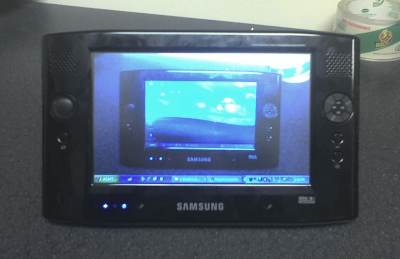
If you have no idea what a Samsung Q1 is, this is it:
That’s a 7" diagonal touch-sensitive screen, a 900MHz Intel Celeron M processor, 512MB of ram, a 30GB hard drive, and Windows XP Tablet Edition.
The really good:
Touch Sensitive Screen: having used our office Acer TravelMate Tablet PC, the touch screen is really nice. Tablet PCs use RF screens that work like graphics digitizer tablets, which can be aggravating as the mouse cursor won’t end up right underneath the tip of the pen. With a UMPC, you touch the screen and that’s where the cursor goes.
Small: PDA’s are pocket-sized, laptops are lap-sized, while the Q1 is “messenger-bag sized”. If I was still a student, I wouldn’t hesitate to toss this thing into my bag and haul it everywhere with me. It weighs less than a medium-sized textbook.
Windows XP: If you sit around saying, “Gee, I wish I had a portable computer smaller than a laptop but ran th same software as my desktop PC!”, UMPCs like the Q1 are probably just the ticket. The Q1 will run the same software your desktop PC will.
The not-so good:
Touch Sensitive Screen: I don’t think that this is necessarily a problem with the Q… the Tablet PC OS seems to be designed to be used with an RF mouse or pen in mind. When you touch the screen, the cursor is moved to that location instantly and registers as if you clicked. This makes clicking and dragging items a pain sometimes, since it’s hard to position the cursor exactly when it won’t move until you touch the screen to click.
Battery life: You only get about 2 hours of battery life.
Portrait mode: You can flip the screen into portrait mode, which is nice. It also makes the Q1 much easier to hold with one hand this way. However, Windows XP’s taskbar isn’t really made to look good when it is 480 pixels wide, and webpages may get squashed to a skinny column of text.
Width: Not the screen, but the whole Q1. The device itself is 10 inches wide, which means holding it with one hand in landscape orientation puts a lot of levered force on your wrist and becomes tiring
The bad:
Text entry: If you’re a touch-typist, you will sorely miss a built-in keyboard of some type. If you hunt and peck and are a huge fan of writing on your PDA, you might be fine. I found entering in text with the standard tablet PC tools to be very annoying. I’m sure this may change if I use the device for a long time, but having a hardware keyboard right there would present zero learning curve.
The Q1 features a program called DialKeys, which splits a QWERTY keyboard in half and attaches the keys in quarter-circles centered at the lower left and lower right corner, so your thumbs can press the keys. I found this to be awkward and intuitive at the same time, and tended not to use it. There are other ways of doing text entry - the venerable Fitaly is available for Tablet PCs, as are several other options.
So how does the screen measure up?
Enough stuff on the screen at once, minimal squinting, not quite enough height. The big shortcoming here is vertical space - dialog boxes may not fit on the screen vertically and you’re left trying to figure out how to see the bottom of the box, not to mention all the scrolling up and down. [ I’m not the only one who thinks this.] The extra 120 pixels of 800x600 would go a long way, as it’s the default recommended resolution for standard Windows XP and many web designers still make sites to be functional at 800 pixels across without scrolling.
Unlike the VGA Pocket PCs (and Palms), the Q1 doesn’t change the DPI from a standard PC display, so you can see quite a bit of information despite the shortcomings. A direct comparison would be the old 640x240 screens on Handheld PCs and the Q1 just blows them away. If you’re going to be working with spreadsheets and have a choice between a VGA Pocket PC and a Q1, you’d probably pick the Q1 hands down.
Bear in mind this is a first-revision device, and Microsoft is already planning the next big revision, and some of the shortcomings (like battery life) are things that all companies struggle with.
Would I buy one? No - I just don’t have the money and I’m usually either here at work or at home, not out on the go as a “Mobile Professional”. If I had the disposable income, I’d snap one up for couch-surfing.
Oh, and our software - eWallet, ListPro, and KeepTrack - looks pretty good on it!
 That’s right - eWallet 5.0 has been released! You may have heard us talking lately about eWallet 5.0 in the open beta, or maybe you even downloaded the beta version yourself, but now - the real deal is here!